Sound setting
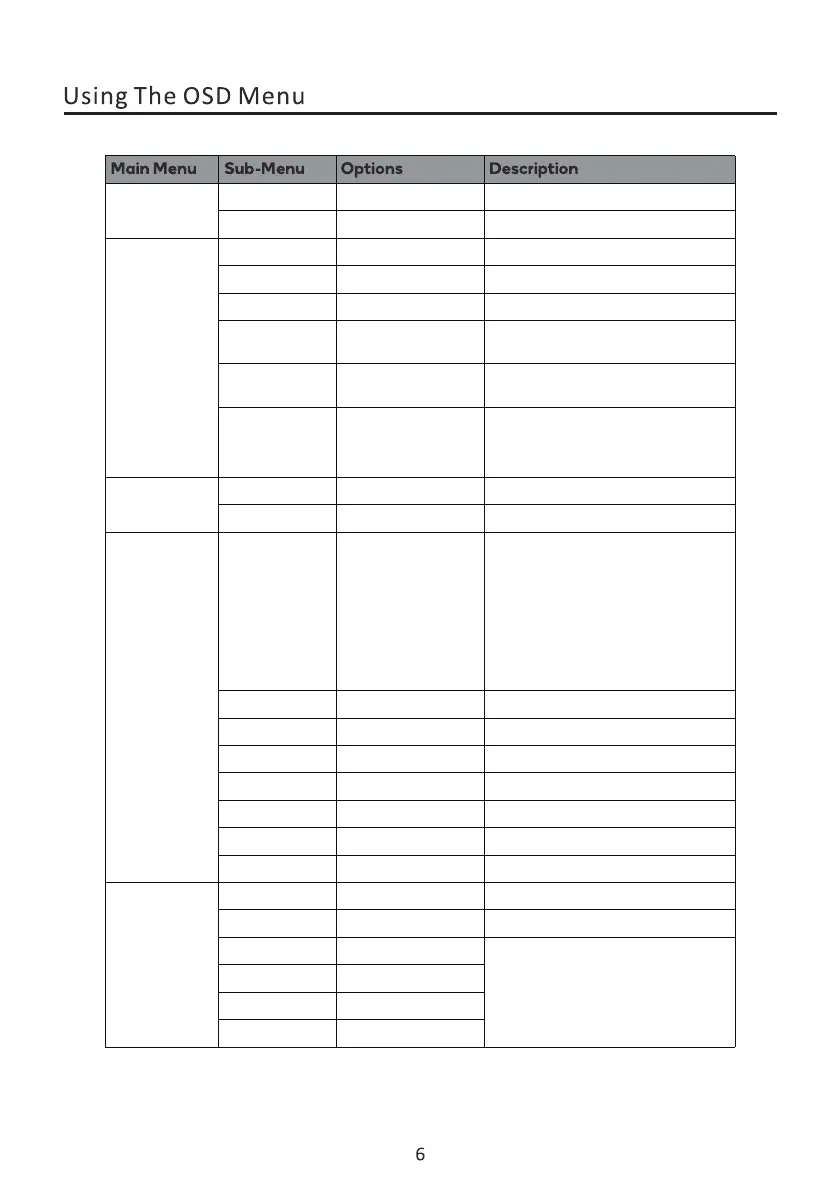
Gaming Mode
Adjust audio volume0-100
0-100
0-60
0-100
0-100
Off/On /
/
/
/
/
/
/
/
/
/
Off/On
Off/On
Off/On
Off/On
HDMI/VGA/DP Display the input select
Adjust the OSD transparence value
Adjust the horizontal position
Set OSD language
Adjust the vertical position
Set how long the OSD remains
Reset monitor configurations
Off/Fast/Extreme
Off/Icon1/Icon2/
Icon3/Icon4
Off/15:00/30:00/
45:00/60:00
Off/leftTop/
LeftBottom/RightTop/
RightBottom
Volume
Mute
lnput Source
Picture Adjust
OSD Setting
Auto
Input Select
Adaptive-Sync
Response Time
Language
H.Position
V.Position
Timeout
Transparency
DDC/CI
Reset N/A
Auto shutdown
0-100
0-100
/
/
/
It can only be adjusted under VGA
/
0-100
0-100
Auto Configuration
Auto Colour
H.Position
V.Position
Clock
Phase
CrossHair
Timer
RefreshRate
English
Spanish
French
/
Off/On
MPRT


 To Next Page