10
Location of controls
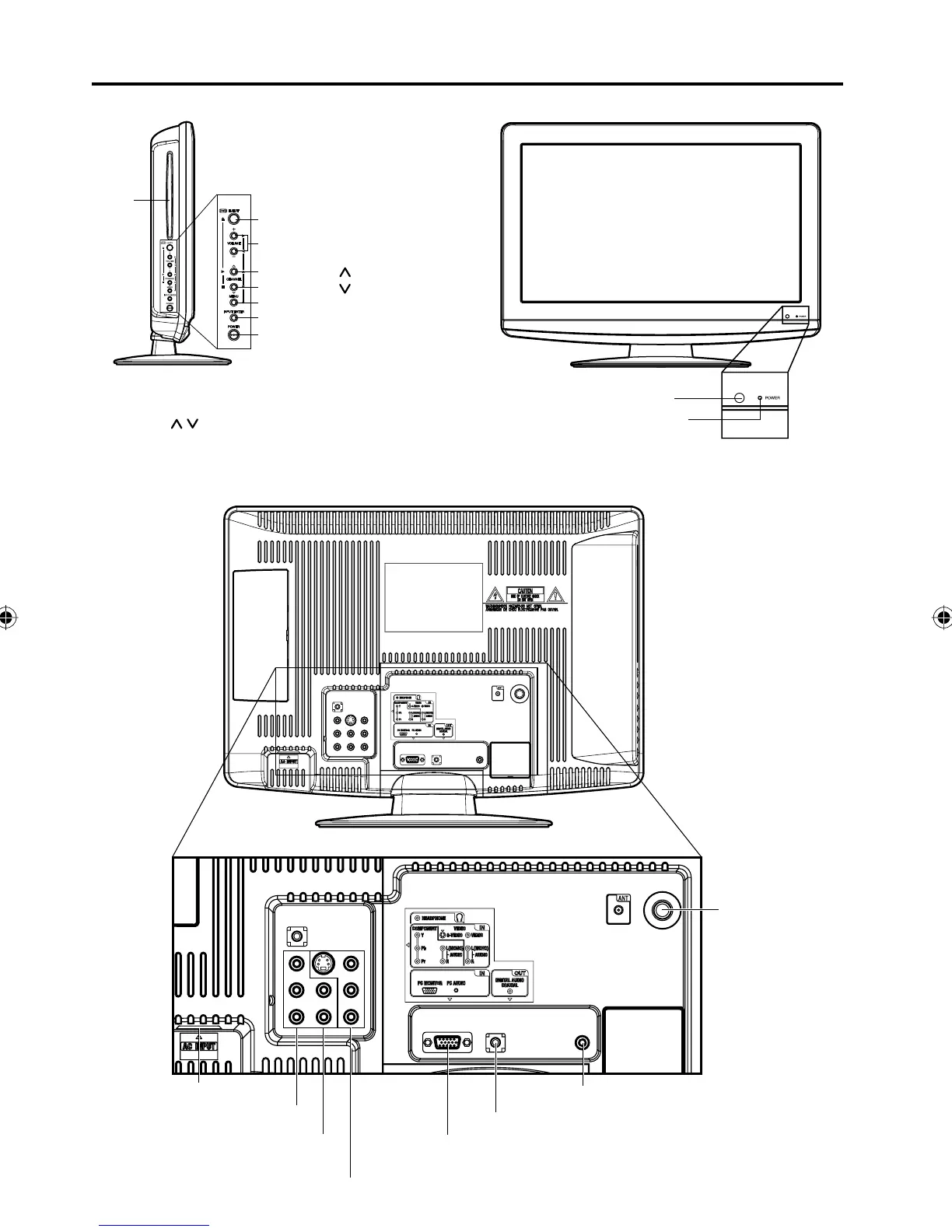
Front
To display the menu screen.
Press MENU button to display the menu screen.
CHANNEL
/ buttons, VOLUME +/– buttons and
INPUT/ENTER button can be used to select the
desired setting during the menu screen operations.
POWER button
INPUT/ENTER button
VOLUME +/– buttons
CHANNEL /1 (PLAY) button
MENU button
Remote sensor
POWER indicator
EJECT button
Left side
CHANNEL /3 (STOP) button
DISC
slot
Rear side
AC INPUT jack
HEADPHONE IN jack
LINE IN jacks (VIDEO/S-VIDEO/AUDIO (L/R))
PC MONITOR IN jack
RF (ANT) IN jack
COMPONENT IN jacks
(Y/Pb/Pr/AUDIO (L/R))
PC AUDIO IN jack
COAXIAL AUDIO IN jack
52C0121A_eng.indd 1052C0121A_eng.indd 10 12/26/08 11:27:01 AM12/26/08 11:27:01 AM


 To Next Page