EasyManua.ls Logo

Sansui SE-9 - Operating Procedures; SOUND MENU Presets; Using SOUND MENU for Playback; Storing Custom Equalizations

Sansui SE-9
18 pages
Print Icon
To Next Page IconTo Next Page
To Previous Page IconTo Previous Page
Loading...
ia
a
T
r——
EQUALIZER
——}
ON
SOURCE
esa
sess
Ses
@&
88
Sea
SquaueG
eoaoces
10
Operating
procedures
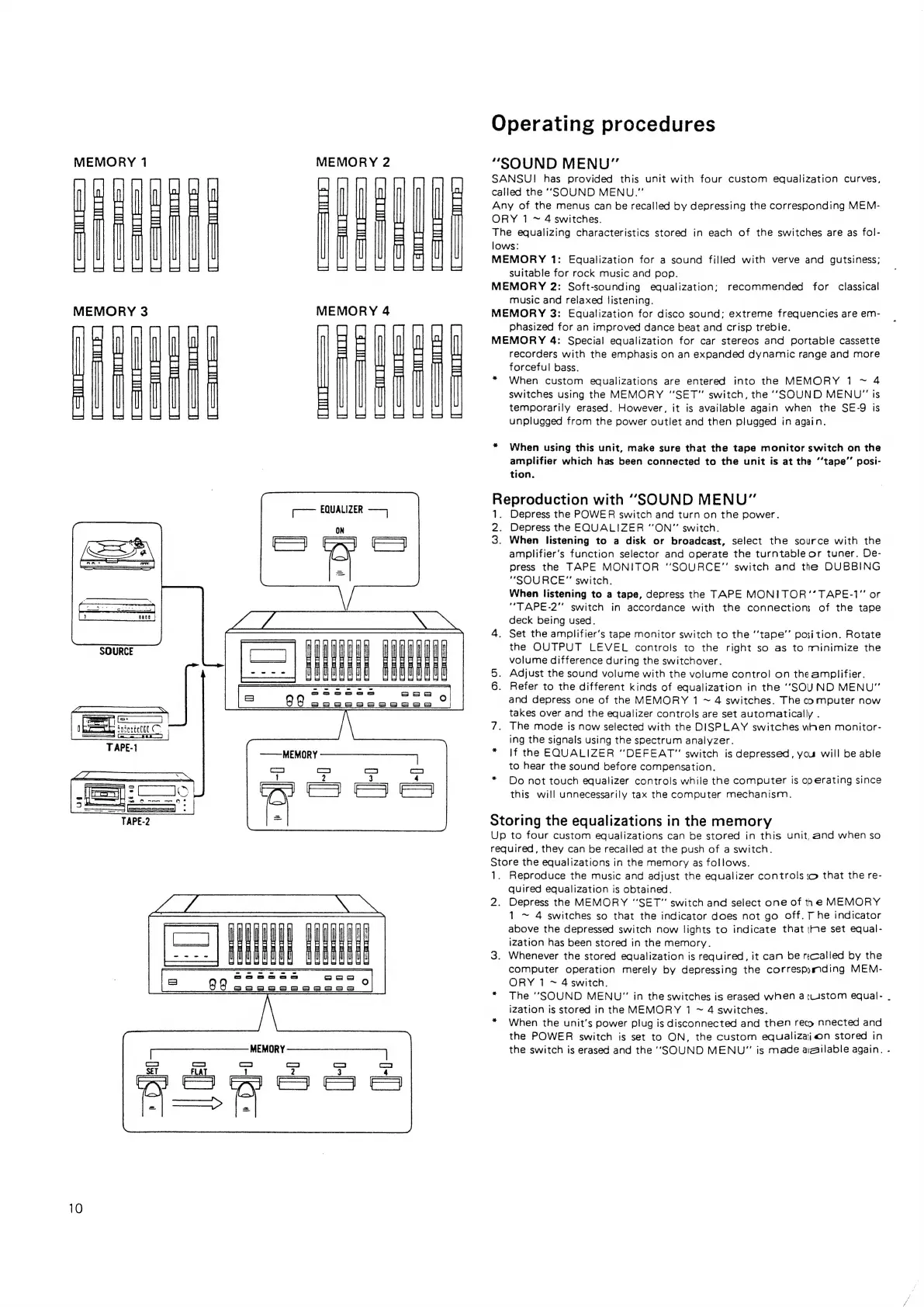
“SOUND
MENU”
SANSUI
has
provided
this
unit
with
four
custom
equalization
curves,
called
the
‘SOUND
MENU.”
Any
of
the
menus
can
be
recalled
by
depressing
the
corresponding
MEM-
ORY
1
~
4
switches.
The
equalizing
characteristics
stored
in
each
of
the
switches
are
as
fol-
lows:
MEMORY
1:
Equalization
for
a
sound
filled
with
verve
and
gutsiness;
suitable
for
rock
music
and
pop.
MEMORY
2:
Soft-sounding
equalization;
music
and
relaxed
listening.
MEMORY
3:
Equalization
for
disco
sound;
extreme
frequencies
are
em-
phasized
for
an
improved
dance
beat
and
crisp
treble.
MEMORY
4:
Special
equalization
for
car
stereos
and
portable
cassette
recorders
with
the
emphasis
on
an
expanded
dynamic
range
and
more
forceful
bass.
*
When
custom
equalizations
are
entered
into
the
MEMORY
1
~
4
switches
using
the
MEMORY
“SET”
switch,
the
‘SOUND
MENU"
is
temporarily
erased.
However,
it
is
available
again
when
the
SE-9
is
unplugged
from
the
power
outlet
and
then
plugged
in
again.
recommended
for
classical
*
When
using
this
unit,
make
sure
that
the
tape
monitor
switch
on
the
amplifier
which
has
been
connected
to
the
unit
is
at
the
‘‘tape’’
posi-
tion.
Peprocuen
oy
with
“SOUND
MENU”
Depress
the
POWER
switch
and
turn
on
the
power.
‘i
Depress
the
EQUALIZER
“ON”
switch.
3.
When
listening
to
a
disk
or
broadcast,
select
the
source
with
the
amplifier’s
function
selector
and
operate
the
turntable
or
tuner.
De-
press
the
TAPE
MONITOR
“SOURCE”
switch
and
the
DUBBING
“SOURCE”
switch.
When
listening
to
a
tape,
depress
the
TAPE
MONITOR
’’
TAPE-1”
or
‘"TAPE-2”
switch
in
accordance
with
the
connections
of
the
tape
deck
being
used.
4.
Set
the
amplifier’s
tape
monitor
switch
to
the
‘‘tape’’
position.
Rotate
the
OUTPUT
LEVEL
controls
to
the
right
so
as
to
minimize
the
volume
difference
during
the
switchover.
5.
Adjust
the
sound
volume
with
the
volume
control
on
the
amplifier.
6.
Refer
to
the
different
kinds
of
equalization
in
the
‘‘SOUND
MENU"
and
depress
one
of
the
MEMORY
1
~
4
switches.
The
computer
now
takes
over
and
the
equalizer
controls
are
set
automatically
.
7.
The
mode
is
now
selected
with
the
DISPLAY
switches
wnen
monitor-
ing
the
signals
using
the
spectrum
analyzer.
*
If
the
EQUALIZER
“DEFEAT”
switch
is
depressed,
you
will
be
able
to
hear
the
sound
before
compensation.
*
Do
not
touch
equalizer
controls
while
the
computer
is
operating
since
this
will
unnecessarily
tax
the
computer
mechanism.
Storing
the
equalizations
in
the
memory
Up
to
four
custom
equalizations
can
be
stored
in
this
unit,
and
when
so
required,
they
can
be
recalled
at
the
push
of
a
switch.
Store
the
equalizations
in
the
memory
as
follows.
1.
Reproduce
the
music
and
adjust
the
equalizer
controls
so
that
the
re-
quired
equalization
is
obtained.
2.
Depress
the
MEMORY
“SET”
switch
and
select
one
of
the
MEMORY
1
~
4
switches
so
that
the
indicator
does
not
go
off.
T
he
indicator
above
the
depressed
switch
now
lights
to
indicate
that
te
set
equal-
ization
has
been
stored
in
the
memory.
3.
Whenever
the
stored
equalization
is
required,
it
cam
be
recalled
by
the
computer
operation
merely
by
depressing
the
correspymding
MEM-
ORY
1
~
4
switch.
*
The
“SOUND
MENU"
in
the
switches
is
erased
when
atustom
equal-
.
iZation
is
stored
in
the
MEMORY
1
~
4
switches.
*
When
the
unit’s
power
plug
is
disconnected
and
then
reco
nnected
and
the
POWER
switch
is
set
to
ON,
the
custom
equalization
stored
in
the
switch
is
erased
and
the
‘SOUND
MENU”
is
made
ayaailable
again.
-

Related product manuals