EasyManua.ls Logo

Sansui SE-9 - Microphone and Sound Field Analysis; Microphone Battery Management; Measuring Sound Fields

Sansui SE-9
18 pages
Print Icon
To Next Page IconTo Next Page
To Previous Page IconTo Previous Page
Loading...
12
[——-
MonbE
ANALYZE
‘DISPLAY
LEFT
DISPLAY
FA
Loading
the
accessory
microphone
battery
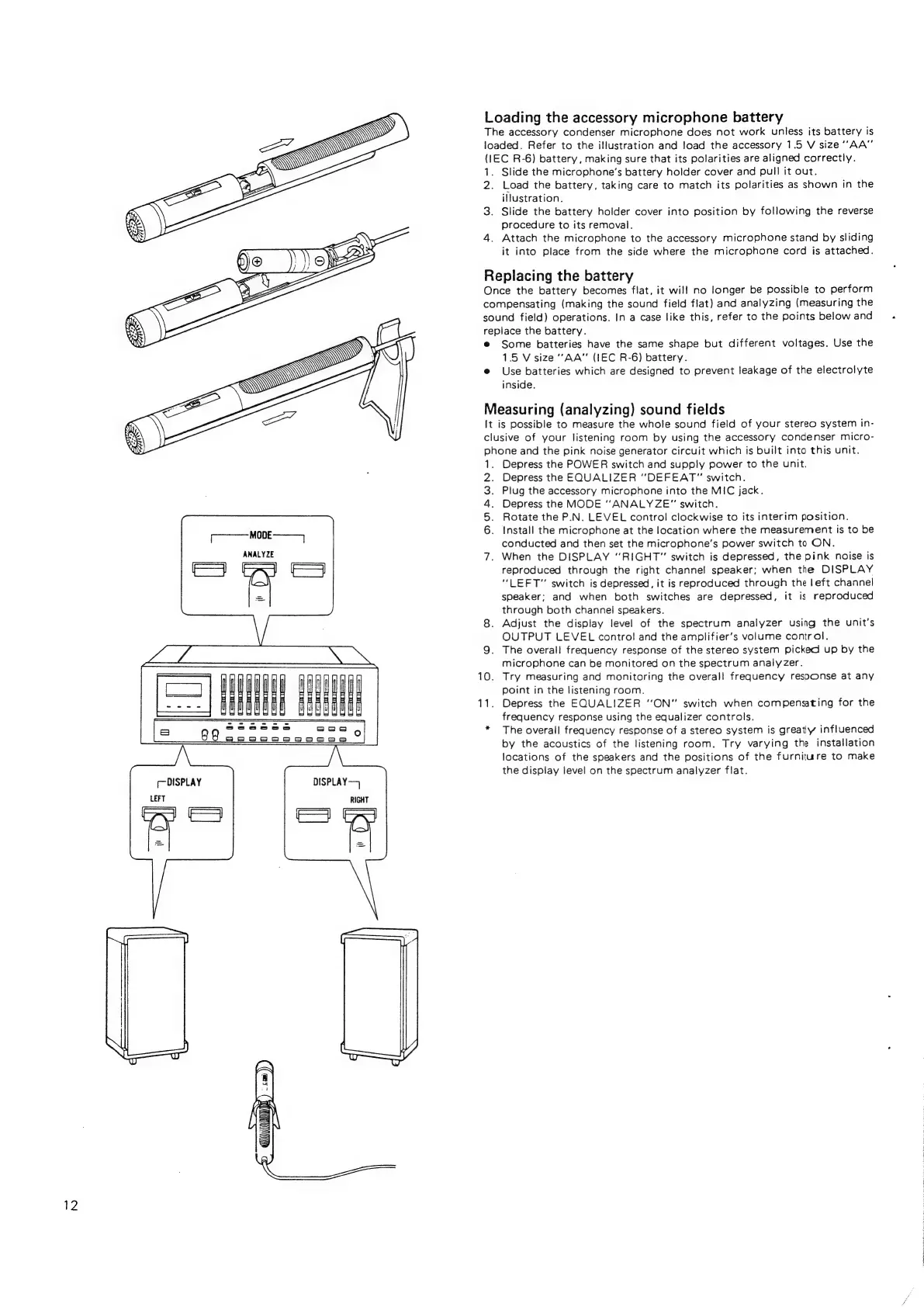
The
accessory
condenser
microphone
does
not
work
unless
its
battery
is
loaded.
Refer
to
the
illustration
and
load
the
accessory
1.5
V
size
’’AA”
(1EC
R-6)
battery,
making
sure
that
its
polarities
are
aligned
correctly.
1.
Slide
the
microphone’s
battery
holder
cover
and
pull
it
out.
2.
Load
the
battery,
taking
care
to
match
its
polarities
as
shown
in
the
illustration.
3.
Slide
the
battery
holder
cover
into
position
by
following
the
reverse
procedure
to
its
removal.
4.
Attach
the
microphone
to
the
accessory
microphone
stand
by
sliding
it
into
place
from
the
side
where
the
microphone
cord
is
attached.
Replacing
the
battery
Once
the
battery
becomes
flat,
it
will
no
longer
be
possible
to
perform
compensating
(making
the
sound
field
flat)
and
analyzing
(measuring
the
sound
field)
operations.
In
a
case
like
this,
refer
to
the
points
below
and
repiace
the
battery.
@
Some
batteries
have
the
same
shape
but
different
voltages.
Use
the
15
V
size
"AA"
(IEC
R-6)
battery.
e
Use
batteries
which
are
designed
to
prevent
leakage
of
the
electrolyte
inside.
Measuring
(analyzing)
sound
fields
It
is
possible
to
measure
the
whole
sound
field
of
your
stereo
system
in-
clusive
of
your
listening
room
by
using
the
accessory
condenser
micro-
phone
and
the
pink
noise
generator
circuit
which
is
built
into
this
unit.
Depress
the
POWER
switch
and
supply
power
to
the
unit.
Depress
the
EQUALIZER
‘'DEFEAT"”
switch.
Piug
the
accessory
microphone
into
the
MIC
jack.
Depress
the
MODE
“ANALYZE”
switch.
Rotate
the
P.N.
LEVEL
control
clockwise
to
its
interim
position.
Install
the
microphone
at
the
location
where
the
measurement
is
to
be
conducted
and
then
set
the
microphone’s
power
switch
to
ON.
When
the
DISPLAY
“RIGHT”
switch
is
depressed,
the
pink
noise
is
reproduced
through
the
right
channel
speaker;
when
the
DISPLAY
‘‘LEFT"
switch
is
depressed,
it
is
reproduced
through
the
left
channel
speaker;
and
when
both
switches
are
depressed,
it
is
reproduced
through
both
channel
speakers.
8.
Adjust
the
display
level
of
the
spectrum
analyzer
using
the
unit's
OUTPUT
LEVEL
control
and
the
amplifier’s
volume
control.
9.
The
overall
frequency
response
of
the
stereo
system
picked
up
by
the
microphone
can
be
monitored
on
the
spectrum
analyzer.
10.
Try
measuring
and
monitoring
the
overall
frequency
response
at
any
point
in
the
listening
room.
11.
Depress
the
EQUALIZER
‘‘ON”
switch
when
compensating
for
the
frequency
response
using
the
equalizer
controls.
*
The
overall
frequency
response
of
a
stereo
system
is
greatly
influenced
by
the
acoustics
of
the
listening
room.
Try
varying
the
installation
locations
of
the
speakers
and
the
positions
of
the
furniture
to
make
the
display
level
on
the
spectrum
analyzer
flat.
uth
cae
a
~N
BPN
ahh
ee
a
a
EN
ol
9
a
eM
ET

Related product manuals