EasyManua.ls Logo

Sansui SE-9 - Sound Field Compensation; Initial Setup and Microphone Placement; Compensation Process Execution; Storing and Listening to Flat Response

Sansui SE-9
18 pages
Print Icon
To Next Page IconTo Next Page
To Previous Page IconTo Previous Page
Loading...
14
fa
ee]
-———Mo0E——
COMPENSATE
Making
the
sound
field
flat
(compensating)
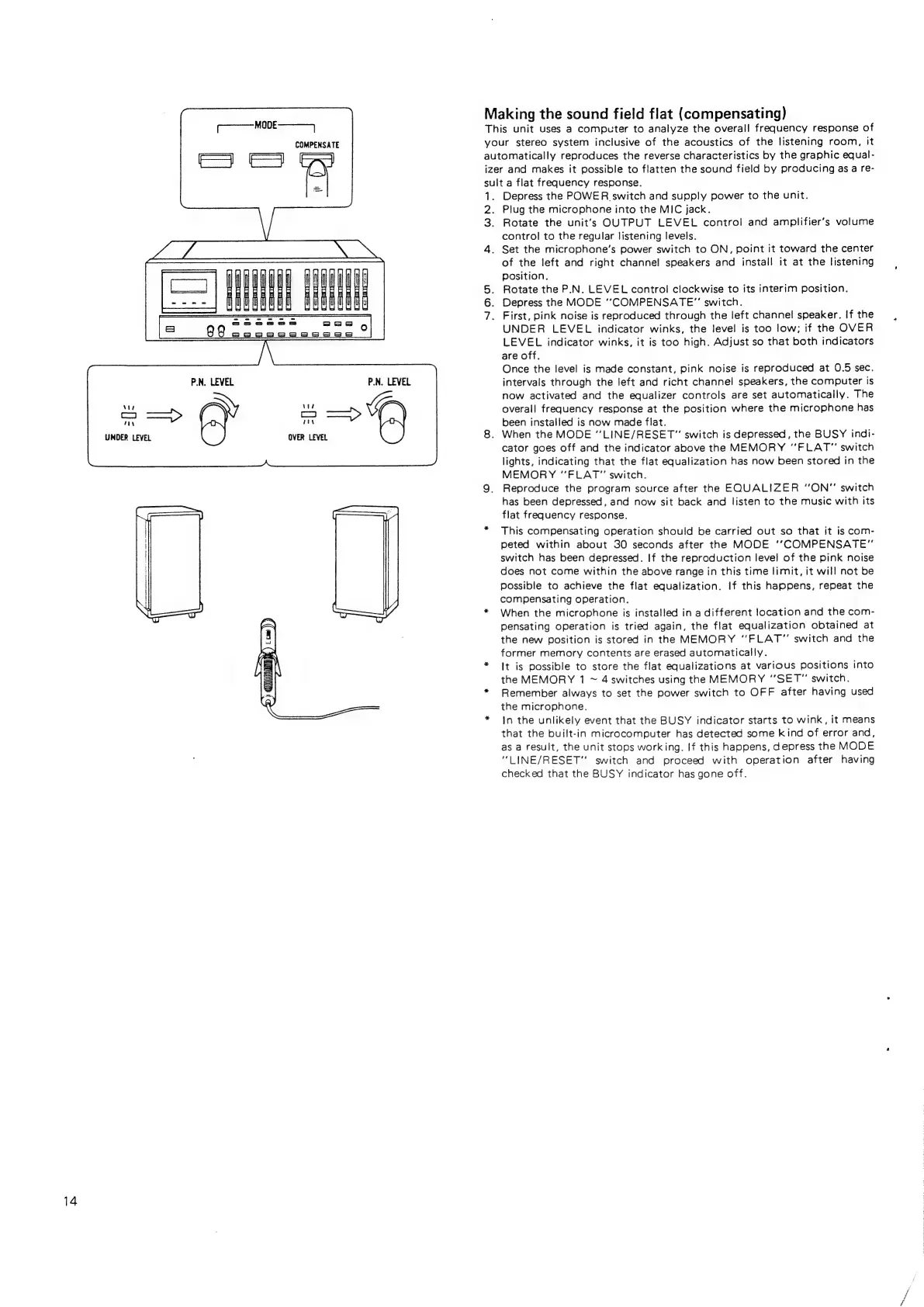
This
unit
uses
a
computer
to
analyze
the
overall
frequency
response
of
your
stereo
system
inclusive
of
the
acoustics
of
the
listening
room,
it
automatically
reproduces
the
reverse
characteristics
by
the
graphic
equal-
izer
and
makes
it
possible
to
flatten
the
sound
field
by
producing
as
a
re-
sult
a
flat
frequency
response.
1.
26
3.
4.
SO
O
Depress
the
POWER
switch
and
supply
power
to
the
unit.
Plug
the
microphone
into
the
MIC
jack.
Rotate
the
unit's
OUTPUT
LEVEL
control
and
amplifier’s
volume
control
to
the
regular
listening
levels.
Set
the
microphone’s
power
switch
to
ON,
point
it
toward
the
center
of
the
left
and
right
channel
speakers
and
install
it
at
the
listening
position.
Rotate
the
P.N.
LEVEL
control
clockwise
to
its
interim
position.
.
Depress
the
MODE
‘‘COMPENSATE”
switch.
.
First,
pink
noise
is
reproduced
through
the
left
channel
speaker.
If
the
UNDER
LEVEL
indicator
winks,
the
level
is
too
low;
if
the
OVER
LEVEL
indicator
winks,
it
is
too
high.
Adjust
so
that
both
indicators
are
off.
Once
the
level
is
made
constant,
pink
noise
is
reproduced
at
0.5
sec.
intervals
through
the
left
and
richt
channel
speakers,
the
computer
is
now
activated
and
the
equalizer
controls
are
set
automatically.
The
overall
frequency
response
at
the
position
where
the
microphone
has
been
installed
is
now
made
flat.
.
When
the
MODE
“LINE/RESET”
switch
is
depressed,
the
BUSY
indi-
cator
goes
off
and
the
indicator
above
the
MEMORY
“FLAT”
switch
lights,
indicating
that
the
flat
equalization
has
now
been
stored
in
the
MEMORY
“FLAT”
switch.
Reproduce
the
program
source
after
the
EQUALIZER
“ON”
switch
has
been
depressed,
and
now
sit
back
and
listen
to
the
music
with
its
flat
frequency
response.
This
compensating
operation
should
be
carried
out
so
that
it
is
com-
peted
within
about
30
seconds
after
the
MODE
‘’COMPENSATE”
switch
has
been
depressed.
If
the
reproduction
level
of
the
pink
noise
does
not
come
within
the
above
range
in
this
time
limit,
it
will
not
be
possible
to
achieve
the
flat
equalization.
If
this
happens,
repeat
the
compensating
operation.
When
the
microphone
is
installed
in
a
different
location
and
the
com-
pensating
operation
is
tried
again,
the
flat
equalization
obtained
at
the
new
position
is
stored
in
the
MEMORY
‘'FLAT”
switch
and
the
former
memory
contents
are
erased
automatically.
It
is
possible
to
store
the
flat
equalizations
at
various
positions
into
the
MEMORY
1
~
4
switches
using
the
MEMORY
“SET”
switch.
Remember
always
to
set
the
power
switch
to
OFF
after
having
used
the
microphone.
In
the
unlikely
event
that
the
BUSY
indicator
starts
to
wink,
it
means
that
the
built-in
microcomputer
has
detected
some
kind
of
error
and,
as
a
result,
the
unit
stops
working.
If
this
happens,
depress
the
MODE
“LINE/RESET”
switch
and
proceed
with
operation
after
having
checked
that
the
BUSY
indicator
has
gone
off.

Related product manuals