EasyManua.ls Logo

Sansui SE-9 - Recording and Dubbing Operations; Recording with EQ Compensation; Compensated Tape Dubbing; Uncompensated Tape Dubbing

Sansui SE-9
18 pages
Print Icon
To Next Page IconTo Next Page
To Previous Page IconTo Previous Page
Loading...
f—TAPE
MONITOR
SOURCE
[——EQUALIZER——
RECORDING
at
Weed
-——
EQUALIZER
RECORDING
(-——buBBINc-——,
1
p2
Sa3eagcttt
|
=a
i
TAPE-1
[——
TAPE
MONITOR—
TAPE-1
c<
EQUALIZER———
ON
[———
busBiINs——
1
Pe
See
(ho
dude
oaacge
(
a
[TAPE
MONITOR—
TAPE.-}
ae
SS
16
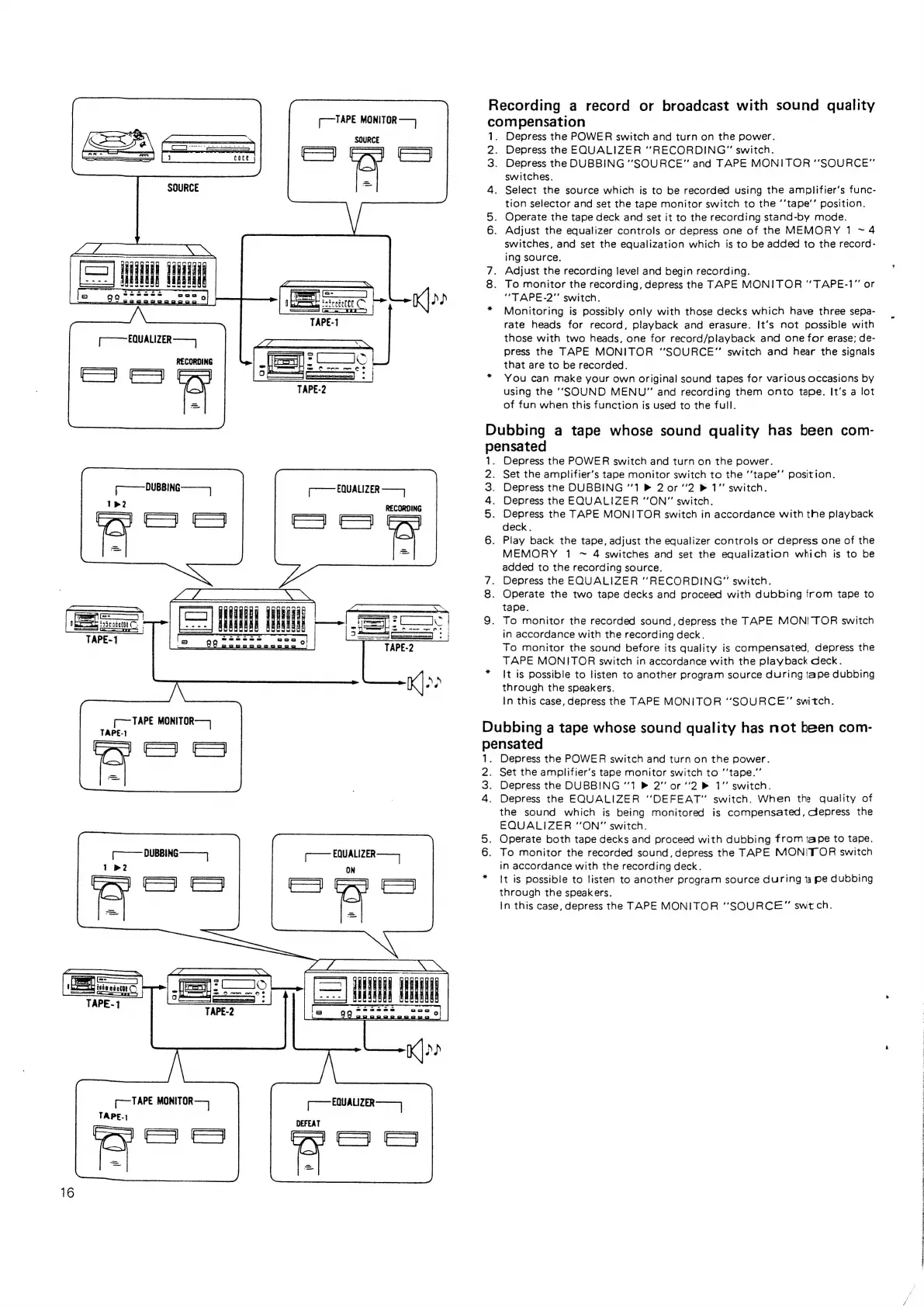
Recording
a
record
or
broadcast
with
sound
quality
compensation
1.
Depress
the
POWER
switch
and
turn
on
the
power.
2.
Depress
the
EQUALIZER
“RECORDING”
switch.
3.
Depress
the
DUBBING
‘‘SOURCE"
and
TAPE
MONITOR
‘‘SOURCE”
switches.
4.
Select
the
source
which
is
to
be
recorded
using
the
amplifier’s
func-
tion
selector
and
set
the
tape
monitor
switch
to
the
‘’tape’’
position.
5.
Operate
the
tape
deck
and
set
it
to
the
recording
stand-by
mode.
6.
Adjust
the
equalizer
controls
or
depress
one
of
the
MEMORY
1
~
4
switches,
and
set
the
equalization
which
is
to
be
added
to
the
record-
ing
source.
7.
Adjust
the
recording
level
and
begin
recording.
8.
To
monitor
the
recording,
depress
the
TAPE
MONITOR
“TAPE-1”
or
“TAPE-2"
switch.
*
Monitoring
is
possibly
only
with
those
decks
which
have
three
sepa-
rate
heads
for
record,
playback
and
erasure.
It’s
not
possible
with
those
with
two
heads,
one
for
record/playback
and
one
for
erase;
de-
press
the
TAPE
MONITOR
“SOURCE”
switch
and
hear
the
signals
that
are
to
be
recorded.
*
You
can
make
your
own
original
sound
tapes
for
various
occasions
by
using
the
‘‘SOUND
MENU”
and
recording
them
onto
tape.
It’s
a
lot
of
fun
when
this
function
is
used
to
the
full.
Dubbing
a
tape
whose
sound
quality
has
been
com-
pensated
1.
Depress
the
POWER
switch
and
turn
on
the
power.
2.
Set
the
amplifier’s
tape
monitor
switch
to
the
‘‘tape’’
position.
3.
Depress
the
DUBBING
“1
®
2
0r
2
®
1"
switch.
4.
Depress
the
EQUALIZER
‘’ON”
switch.
5.
Depress
the
TAPE
MONITOR
switch
in
accordance
with
the
playback
deck.
6.
Play
back
the
tape,
adjust
the
equalizer
controls
or
depress
one
of
the
MEMORY
1
~
4
switches
and
set
the
equalization
which
is
to
be
added
to
the
recording
source.
7.
Depress
the
EQUALIZER
“RECORDING”
switch.
8.
Operate
the
two
tape
decks
and
proceed
with
dubbing
from
tape
to
tape.
9.
To
monitor
the
recorded
sound,
depress
the
TAPE
MONITOR
switch
in
accordance
with
the
recording
deck.
To
monitor
the
sound
before
its
quality
is
compensated,
depress
the
TAPE
MONITOR
switch
in
accordance
with
the
playback
deck.
*
It
is
possible
to
listen
to
another
program
source
during
tape
dubbing
through
the
speakers.
In
this
case,
depress
the
TAPE
MONITOR
“‘SOURCE”
switch.
Dubbing
a
tape
whose
sound
quality
has
not
been
com-
pensated
Depress
the
POWER
switch
and
turn
on
the
power.
Set
the
amplifier’s
tape
monitor
switch
to
‘‘tape.”’
Depress
the
DUBBING
‘1
2’
or
‘'2
»
1°’
switch.
Depress
the
EQUALIZER
‘'DEFEAT”
switch.
When
the
quality
of
the
sound
which
is
being
monitored
is
compensated,
Clepress
the
EQUALIZER
“ON”
switch.
Operate
both
tape
decks
and
proceed
with
dubbing
from
tape
to
tape.
To
monitor
the
recorded
sound,
depress
the
TAPE
MONITOR
switch
in
accordance
with
the
recording
deck.
*
It
is
possible
to
listen
to
another
program
source
during
ta
pe
dubbing
through
the
speakers.
In
this
case,
depress
the
TAPE
MONITOR
“SOURCE”
switch.
St
ot
ee
Gyo)
Sea
a
Ra
i
ee
eh
ae
a
By
Be
a
et
Be
Og
oN
a!
Po
SE
ee
Ee
ee
ee
ee

Related product manuals