EasyManua.ls Logo

Sanus Systems VM2 - User Manual

Sanus Systems VM2
18 pages
Print Icon
To Next Page IconTo Next Page
Loading...
ESPAÑOL DEUTSCH FRANÇAIS ITALIANO PYCCKO
Spanish German French Italian Russian Japanese Mandarin
Sanus Systems 2221 Hwy 36 West, Saint Paul, MN 55113 7.05.05
Customer Service: (800) 359-5520 • (651) 484-7988 • fax (651) 636-0367
Customer Service Europe: 31 (0)20 5708938 • fax 31 (0)20 5708989
See complementary Sanus products at www.sanus.com
中文
ENGLISH
International Assembly Instructions for model VM2

Other manuals for Sanus Systems VM2

Question and Answer IconNeed help?

Do you have a question about the Sanus Systems VM2 and is the answer not in the manual?

Summary

VM2 Model Assembly Instructions

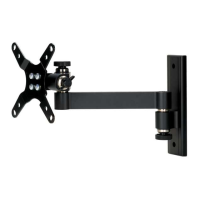
Attaching Monitor Mount to Television

Mount the TV to the monitor bracket using M4 bolts, ensuring correct orientation of the tapered hole.

Mounting Wall Plate Under Cabinet

Use Wall Plate as template, pre-drill, insert cabinet mounts, and attach plate with bolts.

Attaching Wall Plate to Wall

Locate stud, mark holes, pre-drill, and attach Wall Plate to the wall using lag bolts.

Connecting Monitor Mount to Wall Plate

Seat monitor mount onto wall plate bushing, add washer, cap, and knob for tension adjustment.

Sanus Systems VM2 Specifications

General IconGeneral
Mounting PatternUniversal
MaterialSteel
ColorBlack
Product TypeWall Mount
Adjustable TiltYes
VESA CompatibleYes

Related product manuals