EasyManua.ls Logo

Sanyo 28DN1 - Page 9

Sanyo 28DN1
40 pages
Print Icon
To Next Page IconTo Next Page
To Previous Page IconTo Previous Page
Loading...
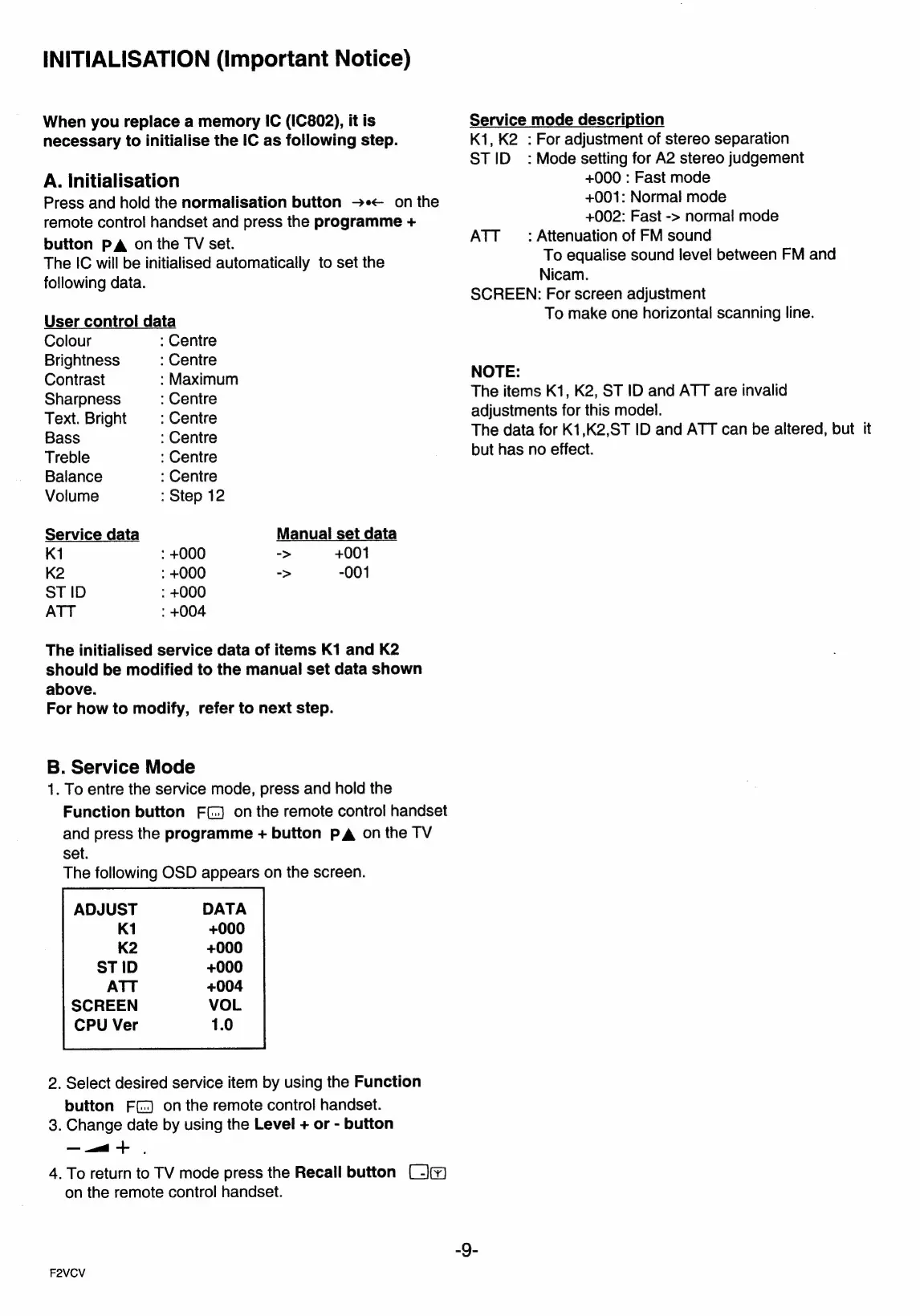
INITIALISATION
(important
Notice)
When
you
replace
a
memory
IC
(IC802),
it
is
necessary
to
initialise
the
IC
as
following
step.
A.
initialisation
Press
and
hold
the
normalisation
button
>+<
on
the
remote
control
handset
and
press
the
programme
+
button
PA
on
the
TV
set.
The
IC
will
be
initialised
automatically
to
set
the
following
data.
User
control
data
Colour
:
Centre
Brightness
:
Centre
Contrast
:
Maximum
Sharpness
:
Centre
Text.
Bright
:
Centre
Bass
:
Centre
Treble
:
Centre
Balance
:
Centre
Volume
:
Step
12
Service
data
Manual
set
data
K1
:
+000
->
+001
K2
:
+000
->
-001
ST
ID
:
+000
ATT
:
+004
The
initialised
service
data
of
items
K1
and
K2
should
be
modified
to
the
manual
set
data
shown
above.
For
how
to
modify,
refer
to
next
step.
B.
Service
Mode
1.
To
entre
the
service
mode,
press
and
hold
the
Function
button
F(.)
on
the
remote
control
handset
and
press
the
programme
+
button
PA
onthe
TV
set.
The
following
OSD
appears
on
the
screen.
ADJUST
CPU
Ver
2.
Select
desired
service
item
by
using
the
Function
button
FC.)
onthe
remote
control
handset.
3.
Change
date
by
using
the
Level
+
or
-
button
——a
+
4.
To
return
to
TV
mode
press
the
Recall
button
(-)¥)
on
the
remote
control
handset.
F2VCV
Service
mode
description
K1,
K2
:
For
adjustment
of
stereo
separation
STID_
:
Mode
setting
for
A2
stereo
judgement
+000
:
Fast
mode
+001:
Normal
mode
+002:
Fast
->
normal
mode
ATT
_
:
Attenuation
of
FM
sound
To
equalise
sound
level
between
FM
and
Nicam.
SCREEN:
For
screen
adjustment
To
make
one
horizontal
scanning
line.
NOTE:
The
items
K1,
K2,
ST
ID
and
ATT
are
invalid
adjustments
for
this
model.
The
data
for
K1,K2,ST
ID
and
ATT
can
be
altered,
but
it
but
has
no
effect.

Related product manuals