EasyManua.ls Logo

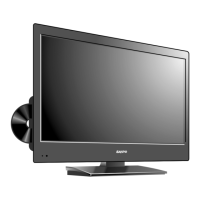
Sanyo DP26670 - User Manual

Sanyo DP26670
41 pages
Print Icon
To Next Page IconTo Next Page
Loading...
ESPAÑOL ENGLISH
© 2010 Sanyo Manufacturing Corporation
J54H0521B
Part No. / No. de parte / Nº de piece:
26-Z5AE
Owners Manual
Manual del usuario
Manuel d’instructions
Model No. / No. de Modelo / Nº de modèle
D
DP32670
P26670
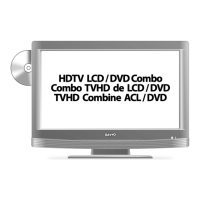
HDTV LCD / DVD Combo
Combo TVHD de LCD / DVD
TVHD Combine ACL / DVD
diagonal / diagonale 80cm
diagonal / diagonale 66cm
31.5
54H0521B_eng.indd 154H0521B_eng.indd 1 3/25/10 4:39:01 PM3/25/10 4:39:01 PM

Other manuals for Sanyo DP26670

Questions and Answers

  • D
    David PettySep 10, 2025
    What to do if playback doesn't start on Sanyo DP26670?
    • T
      Tina BallSep 10, 2025
      If playback doesn't start on your Sanyo TV DVD Combo, make sure a disc is inserted. If a disc is inserted, the disc may be dirty, so clean up the disc. Also, note that the unit cannot play CD-ROMs, etc.
  • K
    klineronaldAug 22, 2025
    What to do if the unit or remote operation key is not functioning on Sanyo DP26670?
    • J
      Jacob DixonAug 22, 2025
      If the unit or remote operation key isn't working on your Sanyo TV DVD Combo, turn off the unit and unplug the AC power cord for several minutes, then replug it.
  • B
    briancollinsAug 25, 2025
    Why is there poor sound or no sound on my Sanyo TV DVD Combo?
    • S
      Steven ParsonsAug 25, 2025
      If you're experiencing poor or no sound on your Sanyo TV DVD Combo, it could be due to several reasons. First, check if the station or cable TV is experiencing problems by tuning to another station. Also, verify the volume adjustments and muting settings. Finally, check for any potential sources of interference that might be affecting the sound quality.
  • L
    Lori MaldonadoAug 26, 2025
    Why is there poor picture or no picture on my Sanyo TV DVD Combo?
    • F
      Frances RobertsAug 27, 2025
      If you're seeing a poor picture or no picture on your Sanyo TV DVD Combo, try the following: * Tune to another station to rule out issues with the current broadcast or cable TV feed. * Check the antenna or cable TV connections and try reorienting the antenna. * Look for any sources of interference that might be affecting the picture. * Check the picture control adjustments to ensure they are properly configured.
  • K
    Kenneth EvansAug 27, 2025
    How to fix poor reception on some channels on Sanyo DP26670?
    • M
      Ms. Danielle WilliamsAug 27, 2025
      To address poor reception on certain channels with your Sanyo TV DVD Combo: * First, tune to another station to rule out issues with the broadcast. * If the station signal is weak, try reorienting the antenna for a stronger signal. * Also, check for any potential sources of interference that could be affecting reception.
  • C
    Christopher CoffeyAug 29, 2025
    How to fix poor color or no color on Sanyo TV DVD Combo?
    • D
      Daniel BaldwinAug 29, 2025
      If your Sanyo TV DVD Combo is displaying poor color or no color, here are some things to check: * Tune to another station to make sure the issue isn't with the broadcast itself. * Ensure that your channels are properly set into memory. * Check the picture control adjustments. * Inspect the antenna or cable TV connections and try reorienting the antenna. * Look for any sources of interference that might be affecting the color display.
  • J
    joyce37Sep 18, 2025
    Why angle cannot be changed on Sanyo TV DVD Combo?
    • A
      Alexandra JosephSep 18, 2025
      Angle cannot be changed on your Sanyo TV DVD Combo because multi-angles are not recorded on the DVD disc, or the function is prohibited with the unit or the disc.
  • R
    reneebridgesSep 12, 2025
    Why is there no sound on my Sanyo TV DVD Combo?
    • S
      Samantha FullerSep 12, 2025
      If there is no sound on your Sanyo TV DVD Combo, check that the input selector of the amplifier is set properly. Also, if the unit is in the Special playback mode, this could be the reason. Finally, select the correct Audio Output position on AV amplifier.
  • P
    Peter JimenezSep 8, 2025
    How to change display language on Sanyo DP26670?
    • Z
      ztuckerSep 8, 2025
      To change the display language on your Sanyo TV DVD Combo, select the proper language in the menu options.
  • B
    Brandon KennedySep 5, 2025
    How to fix no reception above channel 13 on Sanyo DP26670?
    • R
      Richard StevensSep 5, 2025
      If your Sanyo TV DVD Combo isn't receiving channels above 13, ensure the Signal Type option is in the appropriate mode. If you are using an antenna, check the UHF antenna connections.

Summary

Warranty and Safety Information

Warranty Details and Claim Process

Details the scope, duration, and claim procedure for the limited warranty.

Important Safety Instructions and Precautions

Provides critical safety guidelines for product operation, handling, and precautions.

Product Overview and Setup

Product Features and Controls

Highlights product features, disc information, and location of unit controls.

Stand Installation, Power, and Connections

Guides for stand installation, power source connection, and antenna/cable TV hookups.

Remote Control Operation and Initial Setup

Covers remote operation and initial system setup procedures.

System Operation and Settings

TV Operation, Menu Navigation, and Features

Guides through TV operation, menu navigation, and convenience features.

Channel Management, V-Chip, and Closed Captioning

Covers channel management, V-Chip settings, and closed captioning options.

DVD Playback Modes and Settings

Details DVD playback modes, special features, and video/audio settings.

External Connections and Troubleshooting

Connecting External Equipment

Instructions for connecting VCRs, DVD players, PCs, and audio systems.

Reception Disturbances and Problem Solving

Identifies reception issues and provides solutions for common problems.

Product Specifications

Technical Specifications Overview

Lists detailed technical specifications for the TV/DVD unit.

Sanyo DP26670 Specifications

General IconGeneral
BrandSanyo
ModelDP26670
CategoryTV DVD Combo
LanguageEnglish

Related product manuals