Thank you for purchasing CDF-201 (G) or CDF-201 (A) car compact disc player.
For proper operation and performance, read this instruction manual carefully.
CAUTION
\
The
Ex<ED!c
Series car stereo equipment is required to operate this player.
-
EX-1010(G)/101O(A)/11
IO(G)/1
1 IO(A)
-
n DIRECTIONS
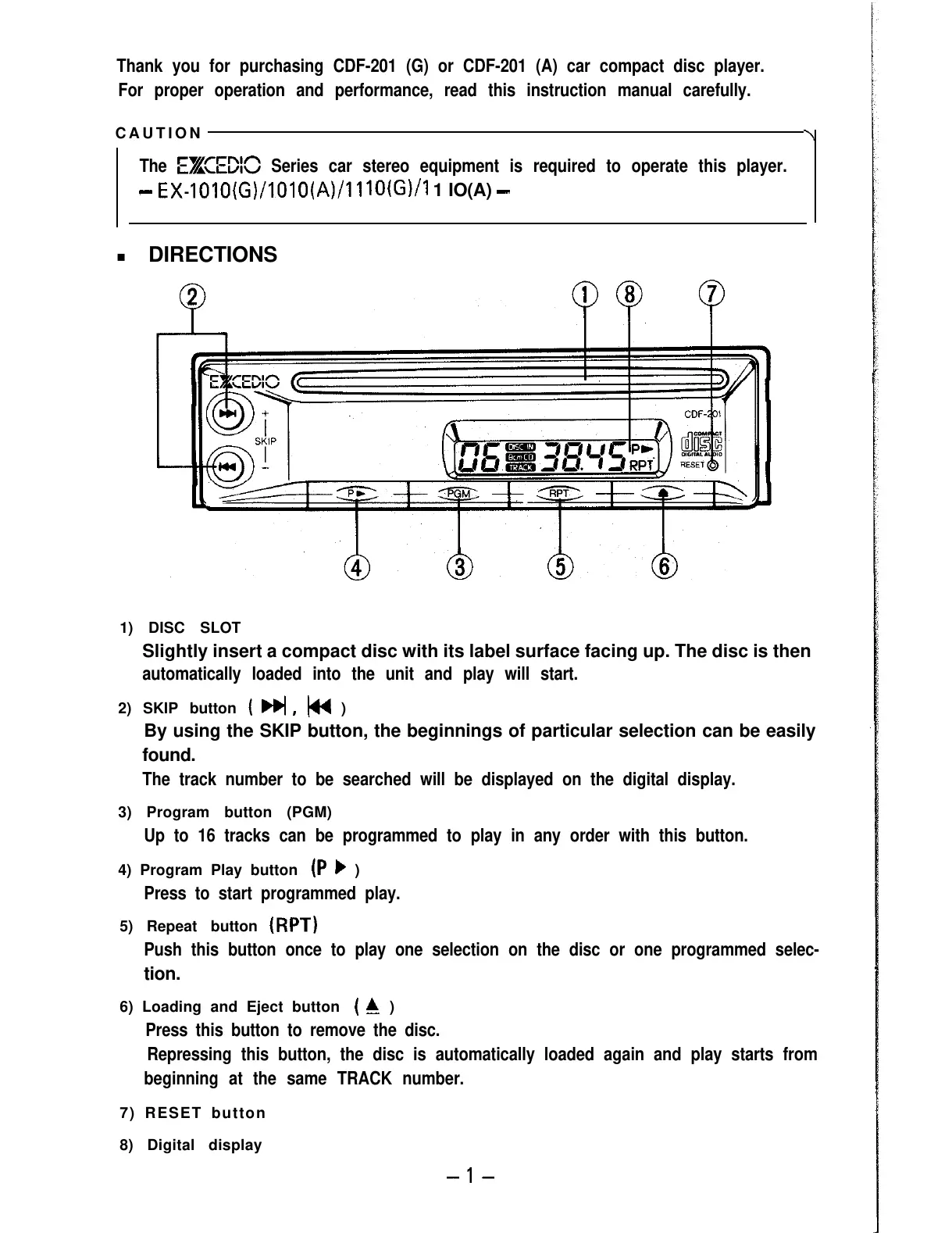
1) DISC SLOT
Slightly insert a compact disc with its label surface facing up. The disc is then
automatically loaded into the unit and play will start.
2) SKIP button
(
F#,
w
)
By using the SKIP button, the beginnings of particular selection can be easily
found.
The track number to be searched will be displayed on the digital display.
3) Program button (PGM)
Up to 16 tracks can be programmed to play in any order with this button.
4) Program Play button
(P
F
)
Press to start programmed play.
5) Repeat button
(RPT)
Push this button once to play one selection on the disc or one programmed selec-
tion.
6) Loading and Eject button
(
C
)
Press this button to remove the disc.
Repressing this button, the disc is automatically loaded again and play starts from
beginning at the same TRACK number.
7) RESET button
8) Digital display
-l-



 To Next Page