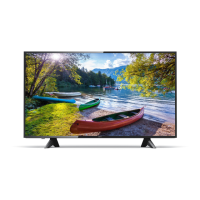
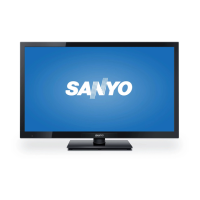
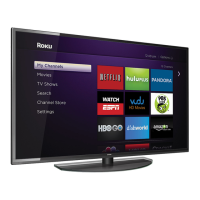
Sanyo FW43D47F LCD TV (LED Backlight)
The Sanyo FW43D47F is an LCD TV with LED backlighting, designed for home entertainment. This owner's manual provides comprehensive information on its features, setup, operation, and maintenance.
Function Description
The Sanyo FW43D47F serves as a central hub for various entertainment needs, offering a range of functionalities beyond basic television viewing.
Television Reception:
- DTV / Analog TV / CATV: The TV is capable of receiving digital (DTV), analog (TV), and cable (CATV) broadcast channels. It supports both standard and high-definition digital formats, as well as analog cable and satellite subscribers.
- Auto program: This feature automatically scans and memorizes available channels in your area, simplifying the initial setup process.
- Closed caption decoder: The TV includes a closed caption decoder, which displays text for closed caption-supported programs, enhancing accessibility for the hearing impaired or for viewing in noisy environments.
- MTS / SAP tuner: The TV is equipped with a Multi-channel Television Sound (MTS) and Secondary Audio Program (SAP) tuner, allowing for reception of multiple audio channels, including alternative languages or descriptive audio.
- Stereo sound function: Provides stereo audio output for an immersive listening experience.
Media Playback and Connectivity:
- HDMI input: The TV has multiple HDMI inputs, allowing connection to various high-definition devices such as Blu-ray players, game consoles, and set-top boxes. It supports HDMI-DVI conversion for connecting to PCs.
- Component video input (YPbPr): Provides high-quality analog video input for devices like DVD players or older game consoles.
- Composite video input (AV input): Offers standard analog video input for a wide range of devices.
- USB terminal: Allows for the playback of JPEG images and Motion JPEG videos directly from a USB memory stick.
- Digital audio output: Supports Dolby Digital audio output, enabling connection to external audio systems for enhanced sound quality.
- Headphone audio output: A 1/8 inch (3.5mm) stereo jack is available for private listening.
- PC input (VGA): Enables the TV to be used as a computer monitor, supporting various PC input resolutions.
- Fun-Link (HDMI CEC): This feature allows the TV to communicate with and control other HDMI CEC-compatible devices, simplifying operation with a single remote.
User Interface and Control:
- On-screen language: The TV supports multiple on-screen display languages, including English, Spanish, and French.
- Remote control: A comprehensive remote control is included for easy navigation and control of all TV functions.
- Sleep timer: Allows users to set a specific time after which the TV will automatically turn off, useful for falling asleep while watching TV.
- Child lock: This feature enables parents to block specific programs or channels, preventing unauthorized access.
- E-sticker: An electronic sticker can be displayed on the TV screen, showing information like the location (Retail/Home) setting.
Important Technical Specifications
The Sanyo FW43D47F boasts a 43-inch Full HD display and a range of audio and video capabilities.
Display:
- Model #: FW43D47F
- Picture Type: FHD (Full HD) (1920 x 1080 pixels 60Hz)
- Aspect ratio: 16:9
- Viewing angles: 178° (V) by 178° (H)
- Built-in digital / analog tuner: ATSC digital / NTSC (analog)
Audio:
- Sound: Mono, Stereo, Virtual Surround Sound
- Power output (RMS watts): 8W x 2
- Equalizer: Yes
- Digital audio output: Supporting Dolby Digital audio.
- Headphone audio output: 1/8 inch (3.5mm)
Video Playback (USB):
- Photo slide show: JPEG files only
- Video playback: Only Motion JPEG 320 x 240, 30 fps with file extension ".avi" will playback.
Channel Coverage:
- Terrestrial DTV (ATSC): VHF: 2-13, UHF: 14-69 (Each channel has e.g. 2.1~2.9, 3.1~3.9, etc)
- Terrestrial Analog (NTSC): VHF: 2-13, UHF: 14-69
- CATV (Analog NTSC): Z, 3, A-W, W+1~W+84, A-5~A-1, 5A
Connectivity:
- Component video input (YPbPr): 1 (Supporting video signals: 480i/p, 720p, 1080i/p @60Hz)
- Composite video input (shared Y green terminal with Component video): 1
- HDMI input: 3 (Supporting video signals: 480i/p, 720p, 1080i @60Hz, 1080p @24/30/60Hz. Supporting PC-input video signal up to FHD (1920 x 1080))
- Analog audio L/R input: 1 (L audio / R audio)
- PC input: HDMI and HDMI-DVI + Analog audio L/R
- USB: 1
- Tuning system: Channel frequency synthesized tuning system.
- Channel access: Direct access number keyboard, Programmable scan. Channel + (up) / - (down) and PREV. CH (Previous channel).
Power:
- Power requirements: 120V~ +/- 10%, 60Hz +/- 0.5%
- Operating temperature: 41 °F (5 °C) to 104 °F (40 °C)
Usage Features
The Sanyo FW43D47F is designed for user-friendly operation, from initial setup to daily viewing and advanced settings.
Initial Setup:
- Attaching the base: The manual provides clear instructions for securely attaching the TV base, ensuring stability.
- Installing remote control batteries: Simple steps are outlined for inserting batteries into the remote control.
- Initial setup menu: Guides users through the initial configuration, including language selection, location (Retail/Home) setting, and channel scanning.
- Antenna/Cable connection: Detailed diagrams and instructions are provided for connecting various antenna or cable/satellite set-top box configurations, including coaxial, component, and HDMI connections.
- Plugging in the AC power cord: Emphasizes safety precautions and proper connection to an AC outlet.
Basic Operation:
- Switching on/off and standby mode: Instructions for powering the TV on and off, and managing standby mode.
- Adjusting volume: Easy control of volume levels using the remote control.
- Switching channels: Methods for changing channels using number keys, CH +/- buttons, and the PREV. CH button.
- Watching channels from an external device: Guidance on selecting input sources (HDMI, Component, Composite) to view content from connected external devices.
- Changing picture and sound settings: Accessing and adjusting predefined picture and sound modes, as well as custom settings like backlight, contrast, brightness, color, tint, sharpness, equalizer, and virtual surround sound.
- Sleep timer: Setting the timer for automatic TV shutdown.
Advanced Features:
- Creating and displaying a list of favorite channels: Personalizing channel lists for quick access to preferred programs.
- Changing Pix Shape: Adjusting the aspect ratio of the screen (Normal, 4:3, 16:9, Movie expand, Zoom, Wide, Manual Zoom) for different content types and input signals (16:9 video, 4:3 video, PC input).
- TV screen information: Accessing detailed information about the current program, broadcast station, channel number, audio language, and other settings.
- Making more use with your TV menu: Navigating the main menu to access Picture, Sound, Setup, Features, Language, and USB settings.
- Setup menu:
- Autoprogram: Automatically scans and stores available channels.
- Channel list: Managing the list of scanned channels.
- Add channels: Manually adding channels.
- Antenna confirmation: Checking the digital signal strength of each channel.
- Features menu:
- Accessibility: Configuring accessibility options like Voice guide and Digital audio preferences.
- Caption settings: Adjusting closed caption display settings (Paint-on, Roll-up, Pop-on) and font styles.
- Child and ratings lock: Setting up parental controls with a PIN code to restrict access to certain programs or channels based on ratings.
- Fun-Link (HDMI CEC): Enabling and configuring HDMI CEC for integrated control with compatible devices.
- Device list: Viewing and selecting connected HDMI devices.
- Setting your location to home: Optimizing picture and sound settings for home viewing, which may affect ENERGY STAR® qualification.
- E-sticker: Displaying an electronic sticker on the screen, indicating the TV's location setting.
- USB media playback: Browsing and playing JPEG images and Motion JPEG videos from a USB memory stick, with options for slideshows and video playback controls.
- Upgrade your TV software: Instructions for checking current software version and upgrading the TV's firmware via USB.
Maintenance Features
Proper maintenance ensures the longevity and optimal performance of the Sanyo FW43D47F.
Cleaning:
- Screen and exterior surfaces: Use a soft, lint-free cloth to clean the screen and exterior surfaces. For stubborn dirt, a mild detergent solution can be used, but avoid harsh chemicals or abrasive cleaners.
- AC power cord: Disconnect the power cord before cleaning.
- Ventilation: Ensure proper ventilation around the TV to prevent overheating. Do not block ventilation openings.
Servicing:
- Troubleshooting tips: The manual includes a comprehensive FAQ section to address common issues such as no power, no picture, no sound, remote control problems, and connectivity issues.
- Contacting customer care: If problems persist, users are advised to contact Sanyo customer care for assistance.
- Remote control inspection: Regularly check the remote control for proper function and battery life. If the remote control is not working properly, it could be due to an infrared signal issue or battery depletion.
Safety Precautions:
- Child safety: Emphasizes the importance of proper TV placement to prevent tip-over accidents, especially with children around.
- Electrical safety: Warnings about the risk of electric shock and fire, advising against opening the TV cabinet or exposing it to moisture.
- Ventilation: Ensure adequate space around the TV for proper ventilation to prevent overheating.
- Power cord: Use the provided power cord and ensure it is not damaged or placed in a way that could cause a tripping hazard.
- Mounting: If wall-mounting, ensure it is done by qualified personnel and follows the manufacturer's recommendations.
Warranty Information:
- Limited warranty: The TV comes with a limited warranty covering one (1) year for parts and labor.
- What is covered/not covered: Details the conditions under which the warranty applies, including defects in materials and workmanship, and exclusions such as damage from misuse, accidents, or unauthorized repairs.
- Customer support: Provides contact information for Sanyo customer care for warranty claims and service.

 Need help?

 To Next Page
 General