NAS-20 Quick Installation Guide
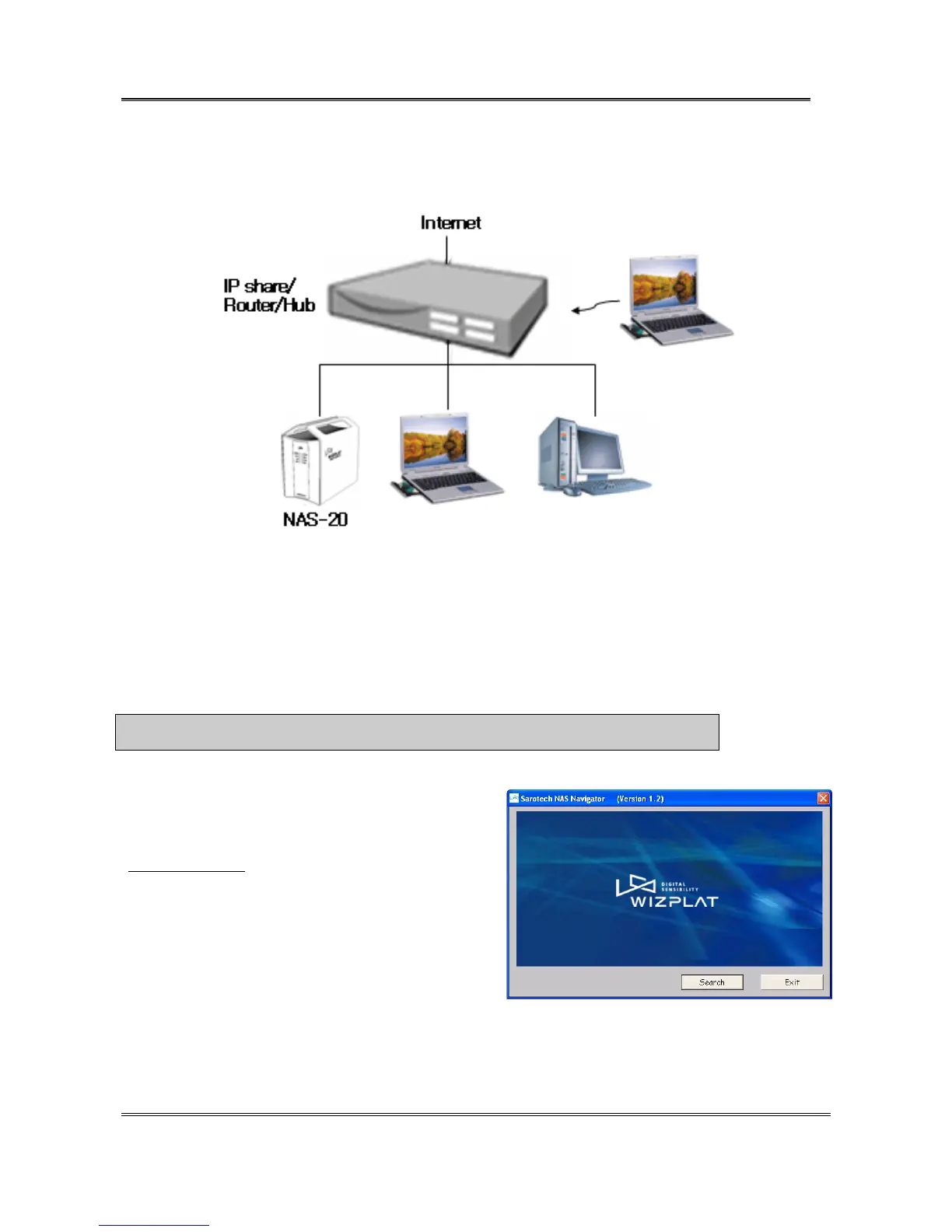
2. Network Connection via Internet sharing device / Router / Hub
Connect NAS-20 to Internet sharing device / Router / Hub using LAN cable.
3. System Installation
You can set up a RAID on Windows, MAC OS, and Linux.
1) Find the NAS by following these procedures.
a. When you turn on [POWER] switch at the back panel, [POWER] LED will light up.
b. When the boot process is completed, [READY] LED will turn on or blink. (It takes about 2 minutes.)
c. Run the Sarotech NAS Navigator by following these procedures. (It works only in the Windows OS.)
※ Notice : At the first time to use this program, you should [Unblock] in Windows Security Alert.
① Please execute
\Program\NAS_Navigator(ENG)_Setup_Rxxx.exe file in
provided CD.
You can download Navigator program at our web site.
(www.sarotech.com
)
After installation, Run [Start->All Programs->Sarotech NAS
Navigator-> Sarotech NAS Navigator] . Click [Search].
Sarotech Co., Ltd.
- 2 -


 To Next Page