NAS-20 Quick Installation Guide
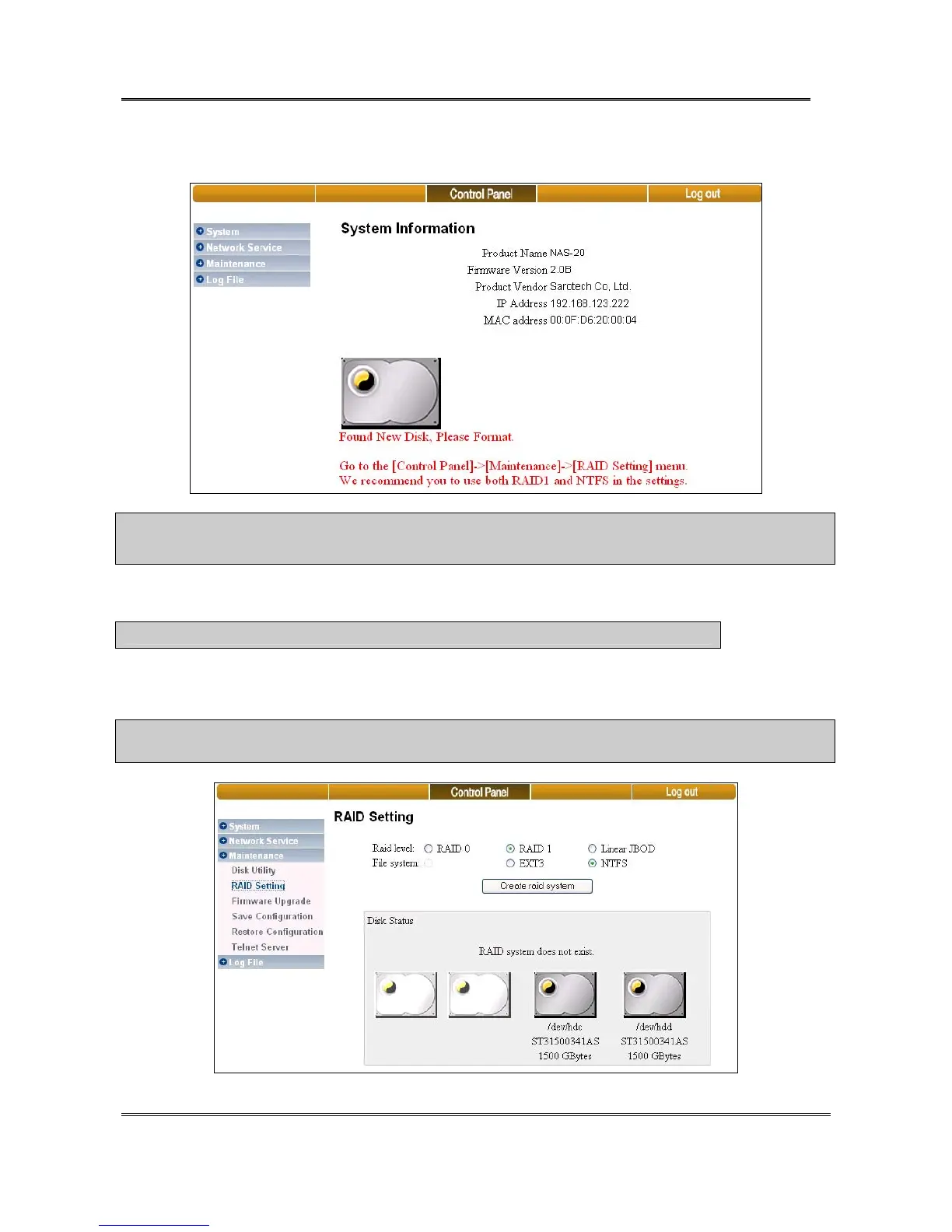
3) When you log-in successfully you will see the picture as below.
Notice :※ When the message “Found New Disk. Please Format.” does not come out it means that the HDD is not
recognized properly. Please check connected power cable and the data cable to HDD.
4) Create RAID System by following procedures.
※ Notice : Refer to FAQ [2. Single HDD, Single 2HDD installation] , if you don’t want to set RAID.
Go to [Control Panel->Maintenance->RAID Settings] menu. We recommend using RAID 1 as Raid Level and NTFS as File system.
The storage server only can build RAID on the two internal SATA hard disk drives.
※ Warning : For RAID–NTFS configuration, the HDD’s data cannot be read directly in windows PC because the partition of
HDD has RAID features.
Sarotech Co., Ltd.
- 4 -


 To Next Page