NAS-20 Quick Installation Guide
Now you can access NAS and install it.
2. Single HDD, Single 2HDD installation
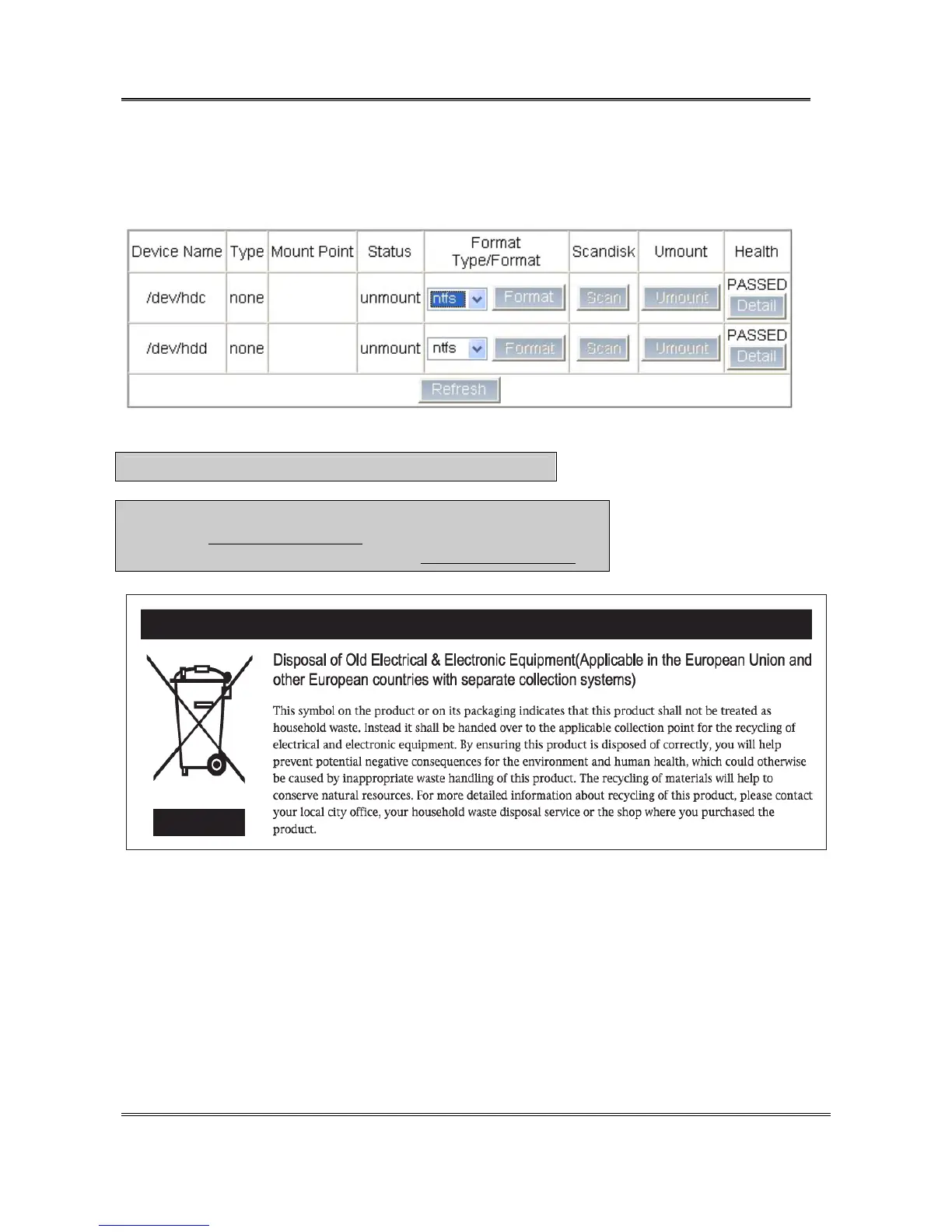
① Click [Control Panel]->[Maintenance]->[Disk Utility] menu.
② Select “ntfs” in [Format Type Format] and click [Format]. (The format time depends on HDD capacity.)
③ If HDD format is completed, NAS-20 will be automatically rebooted. When rebooted is completed
([READY] LED
is on)
, the login screen comes out.
Caution : ※ NEVER turn off the web-browser and PC while installing.
※ Notice
- Please visit (http://www.sarotech.com) support menu for FAQ & user manual.
- Possible to download user manual at web site (http://www.sarotech.com).
Rev 1.4(E)
Sarotech Co., Ltd.
- 8 -


 To Previous Page