
 Need help?
Do you have a question about the SATO KEIRYOKI SK-1110 and is the answer not in the manual?
The SK-1110 is not explosion-proof and must not be used in atmospheres with flammable gases.
Covers essential safety guidelines for using the SK-1110, including handling, environmental conditions, and care.
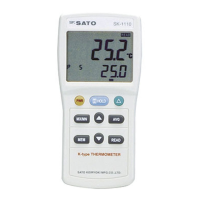
Introduction to the SK-1110 digital thermometer, its K type thermocouple probe, and measurement range.
Highlights features like large LCD, indication holding, OFFSET, MAX/MIN, AVG, memory, flip-up stand, and probe.
Details the main unit's front, rear, and upper views, including its display section and operational keys.
Explains the elements of the LCD display, including measurement readings, function labels, and indicators.
Step-by-step guide on how to install and replace the six AAA batteries, including caution for low battery.
Instructions on how to attach the protective vinyl cover to the unit for water resistance and grip.
Procedure to disable the automatic power-off function for continuous measurements.
Guide on connecting the Type 'K' thermocouple sensor probe to the main unit, ensuring correct alignment.
Explains how to use the HOLD key to freeze temperature readings for easier reading during rapid changes.
Details how to display the temperature difference relative to a reference point using the OFFSET key.
Instructions on using the MX/MN key to display the highest or lowest temperature measured.
Explains how to display the average temperature over a period using the AVG key.
Guide on storing up to 150 readings and displaying stored data using MEM and READ keys.
Procedure for clearing all stored memory data from the unit.
Lists common display errors, their causes, and recommended remedies.
Addresses common phenomena like power failure, abnormal indication, and unstable readings with possible causes.
Detailed technical specifications including measuring range, accuracy, resolution, power requirements, and dimensions.
Information on SK-K010 and SK-K020 standard probes, including their specifications and usage cautions.
 General
| Brand | SATO KEIRYOKI |
|---|---|
| Model | SK-1110 |
| Category | Thermometer |
| Language | English |

 To Next Page
