Need help?
Do you have a question about the SATO KEIRYOKI SK-1260 and is the answer not in the manual?
Unit meets IPX 4 splash-proof standard.
Manual or automatic data storage for printer output.
Set upper/lower limits with audible alarm alerts.
Supports thermistor and thermocouple (K) probes.
Explains functions of POWER, HOLD/REL, MAX/MIN, SET/CLEAR, TIME, REC/PRINT keys.
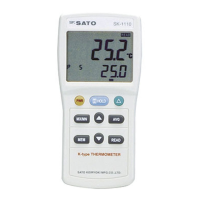
Describes the LCD panel and ports for sensor and printer.
Advises against clinical use, dropping, disassembly, or exposing to extreme conditions.
Warns against use in water, direct sunlight, near heat, or electrically noisy environments.
Instructions for sensor cord handling and battery removal for long-term storage.
Warns against leaving unit in hot cars or hot places to prevent failure.
Step-by-step guide for opening the battery lid and inserting AAA batteries.
Explains battery marks indicating power level and when replacement is needed.
Details how to properly insert the sensor probe into the main unit connector.
Explains connecting external devices like printers and AC adapters.
Outlines basic steps for powering on and performing temperature measurements.
Describes entering time setting and selecting manual or auto storage modes.
Explains connecting a printer and initiating data printing.
Step-by-step guide for connecting the probe, powering on, and taking readings.
How to freeze readings (HOLD) and view temperature fluctuations (REL).
How to display and record maximum and minimum temperatures.
Procedure to set temperature alarms and how they are indicated.
How to switch the temperature unit between Celsius and Fahrenheit.
Explains the automatic power-off feature and how to release it.
Navigating and setting parameters within the unit's modes.
Step-by-step guide to setting the current date and time.
How to configure the time interval for automatic data logging.
How to set management numbers for auto storage mode.
Procedure to manually record and store temperature data.
Procedure to automatically record temperature data at set intervals.
Steps to connect the thermometer to a dedicated printer.
How to initiate and perform the printing of stored data.
Lists error codes, their causes, and recommended remedies.
 General
| Brand | SATO KEIRYOKI |
|---|---|
| Model | SK-1260 |
| Category | Thermometer |
| Language | English |


 To Next Page