Step 1
Look for this icon. It means a
video assembly tip is available at
www.sauder.com/services/tips
å
Assemble your unit on a carpeted fl oor or on the empty
carton to avoid scratchin your unit or the fl oor.
å
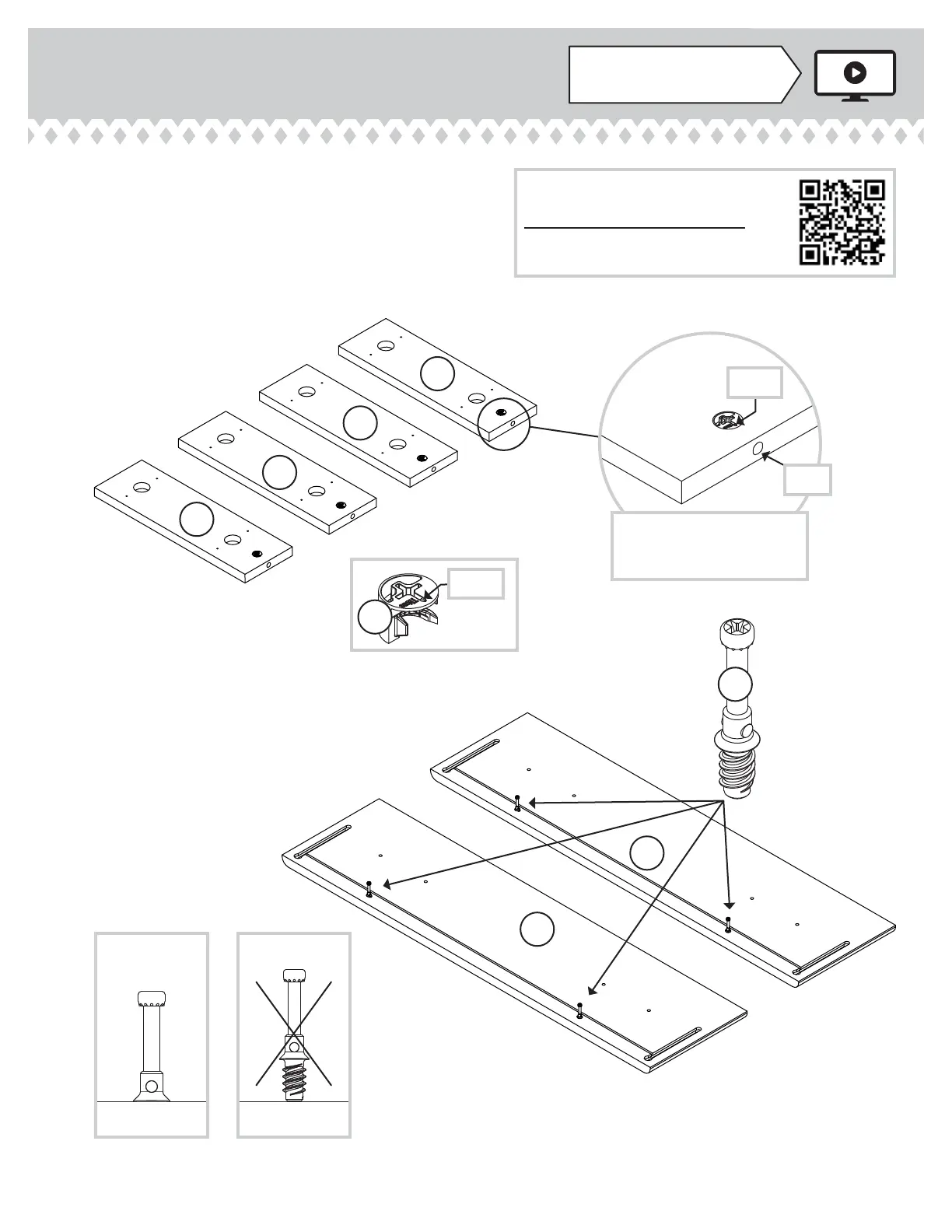
Push four HIDDEN CAMS (1F) into the DRAWER BRACES (G).
å
Turn four CAM SCREWS (8F) into the DRAWER FRONTS (E2).
8F
Arrow
Arrow
1F
The arrow in the HIDDEN
CAM must point toward the
hole in the ede of the board.
Hole
G
G
G
G
E2
E2
Scan this QR code or go to this address:
http://qr.sauder.com/?ID=1146
to watch a video on how to assemble your unit.
415546www.sauder.com/services
Pae 5


 To Next Page