EasyManua.ls Logo

Sauder East Canyon Series - User Manual

Sauder East Canyon Series
40 pages
Print Icon
To Next Page IconTo Next Page
Loading...
NOTE: THIS INSTRUCTION
BOOKLET CONTAINS IMPORTANT
SAFETY INFORMATION.
PLEASE READ AND KEEP FOR
FUTURE REFERENCE.
Enlish p 1-28
Français p 29-32
Español p 33-36
Lot # 387943 01/13/16
Purchased: __________________
Be sure to ive us a rin before
makin any returns. 1-800-523-3987
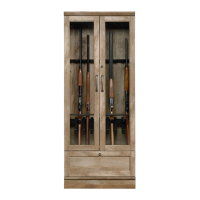
Gun Display Cabinet
East Canyon Collection | Model 419342
Need help? Visit Sauder.com to view video assembly tips or chat with a live rep.
Prefer the phone? Call 1-800-523-3987.
Share your journey!
sauder.com
WARNING
This cabinet provides limited
security for lon uns and is
not intended for handuns,
youth uns or other fi rearms.
Question and Answer IconNeed help?

Do you have a question about the Sauder East Canyon Series and is the answer not in the manual?

Summary

Gun Display Cabinet Overview

Critical Safety Warning

Provides a warning about the cabinet's limited security and intended use for long guns only.

Assembly Tools Required

General Safety and Usage Guidelines

Part Identification Guide

Hardware Identification Guide

Step 1: Initial Component Connection

Step 4: Cam and Dowel Insertion

Step 16: Attaching Door Hinges

Step 17: Mounting Cabinet Doors

Step 19: Door Adjustment Procedures

Step 22: Safe Gun Placement

Step 23: Wall Mounting and Stability

Step 24: Applying Final Labels

5-Year Limited Warranty Details

Customer Service and Product Registration

Sauder East Canyon Series Specifications

General IconGeneral
CategoryIndoor Furnishing
BrandSauder
MaterialEngineered Wood
Assembly RequiredYes
SeriesEast Canyon
ManufacturerSauder Woodworking
FinishMultiple finishes available

Related product manuals