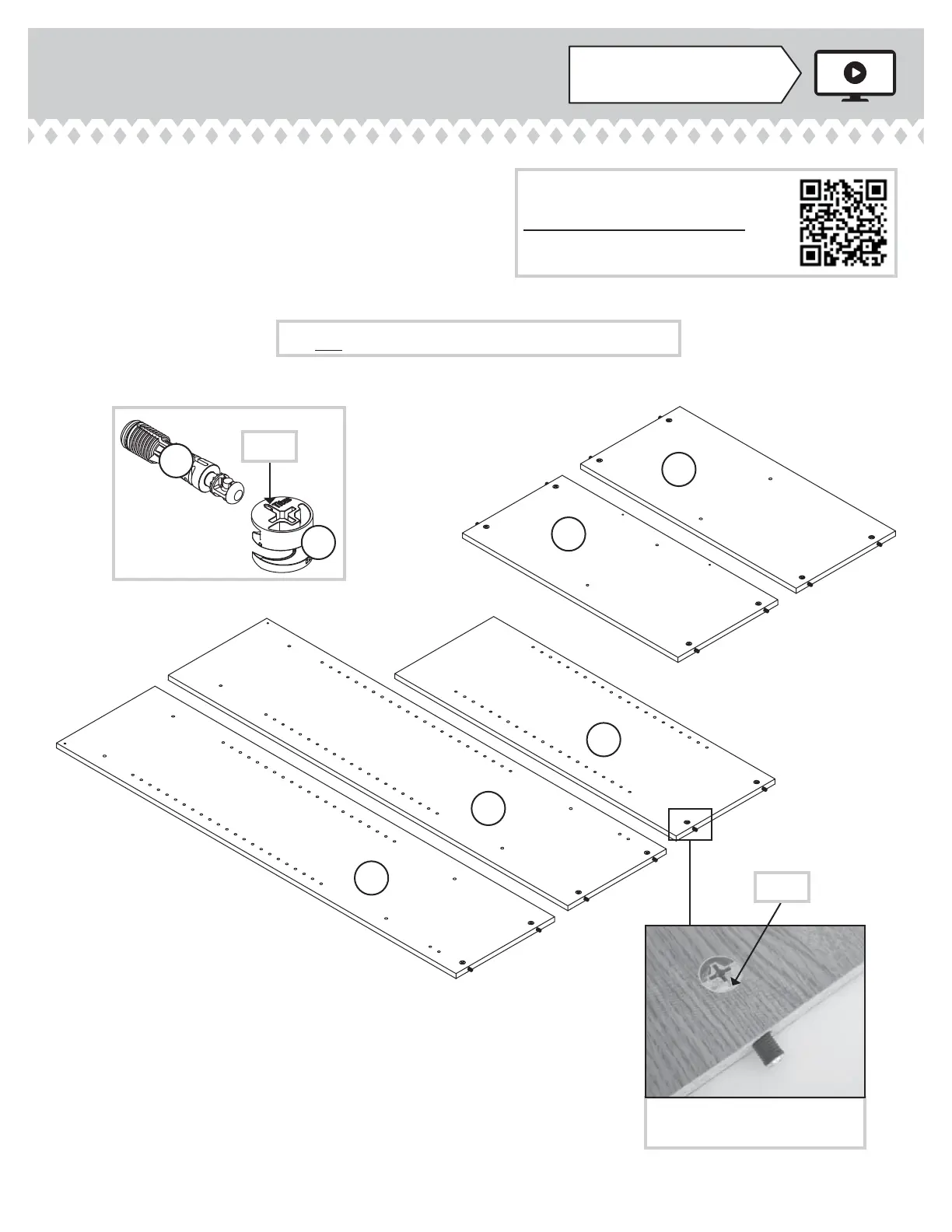
Step 1
Look for this icon. It means a
video assembly tip is available at
www.sauder.com/services/tips
å
Assemble your unit on a carpeted fl oor or on the empty
carton to avoid scratching your unit or the fl oor.
å
Push fourteen HIDDEN CAMS (O2) into the ENDS (A and B),
UPRIGHT (C), SHELF (E), and BOTTOM (F). Then, insert the
metal end of a CAM DOWEL (P2) into each HIDDEN CAM.
400742www.sauder.com/services
Page 5
Arrow
O2
P2
Insert the metal end of the CAM
DOWEL into the HIDDEN CAM.
Arrow
Do not tighten the HIDDEN CAMS in this step.
(14 used)
A
B
C
E
F
Scan this QR code or go to this address:
http://qr.sauder.com/?ID=1566
to watch a video on how to assemble your unit.





 To Next Page