Step
å
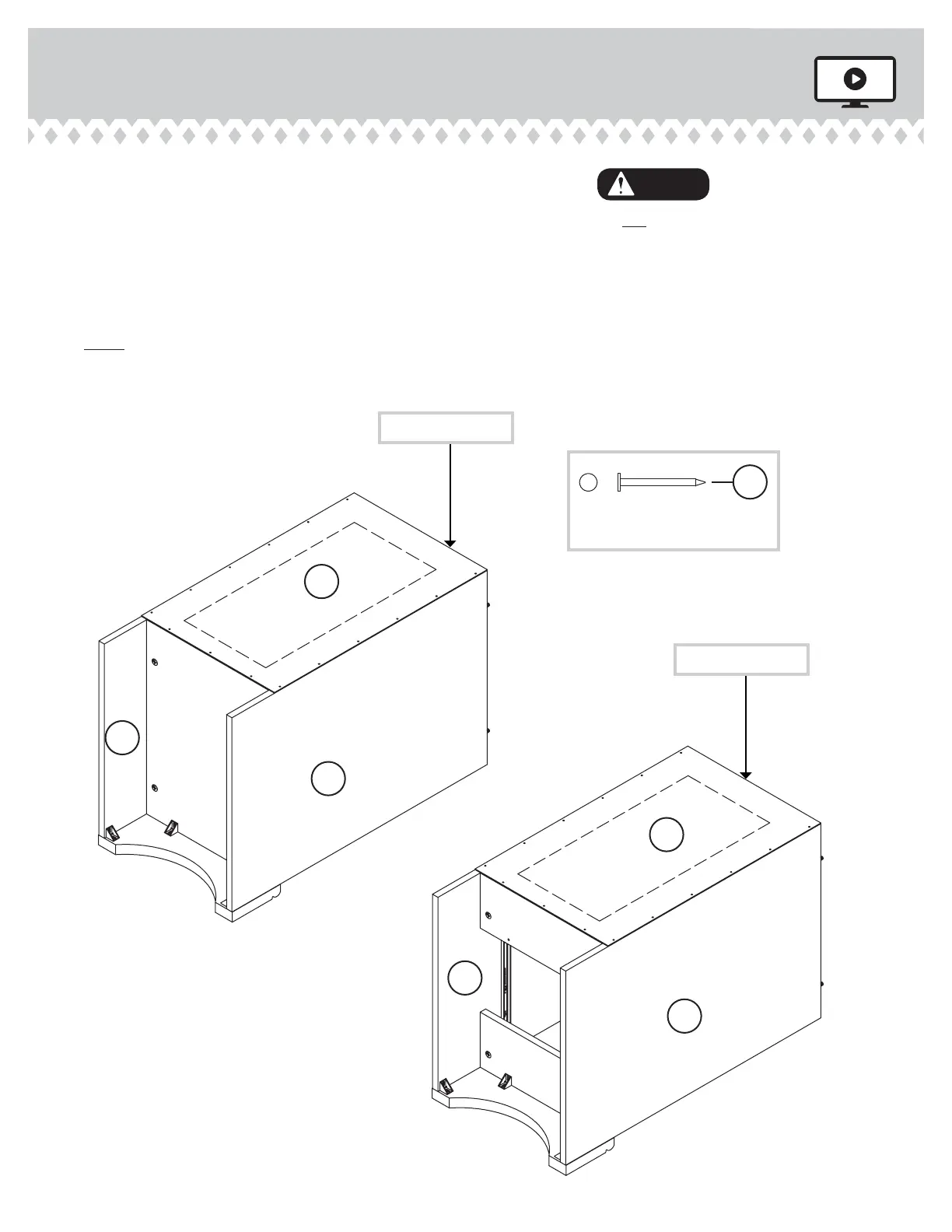
Carefully turn your unit over onto its front edes. Lay the
BACKS (K) over your unit.
å
Make equal marins alon all four edes of the
BACKS (K). Push on opposite corners of your unit if
needed to make it "square".
å
Fasten the BACKS (K) to your unit usin the NAILS.
å
NOTE: Perforations have been provided for access
throuh the BACK. Carefully cut out the rectanle in the
BACK for proper ventilation of your CPU.
Step 11
403793 www.sauder.com/servicesPae 16
Finished
surface
NAIL
(30 used in this step)
OOO
Finished
surface
K
K
A
B
C
D
Ede without holes
Ede without holes
Do not stand the unit upriht without the
BACK fastened. The unit may collapse.
Caution



 To Next Page