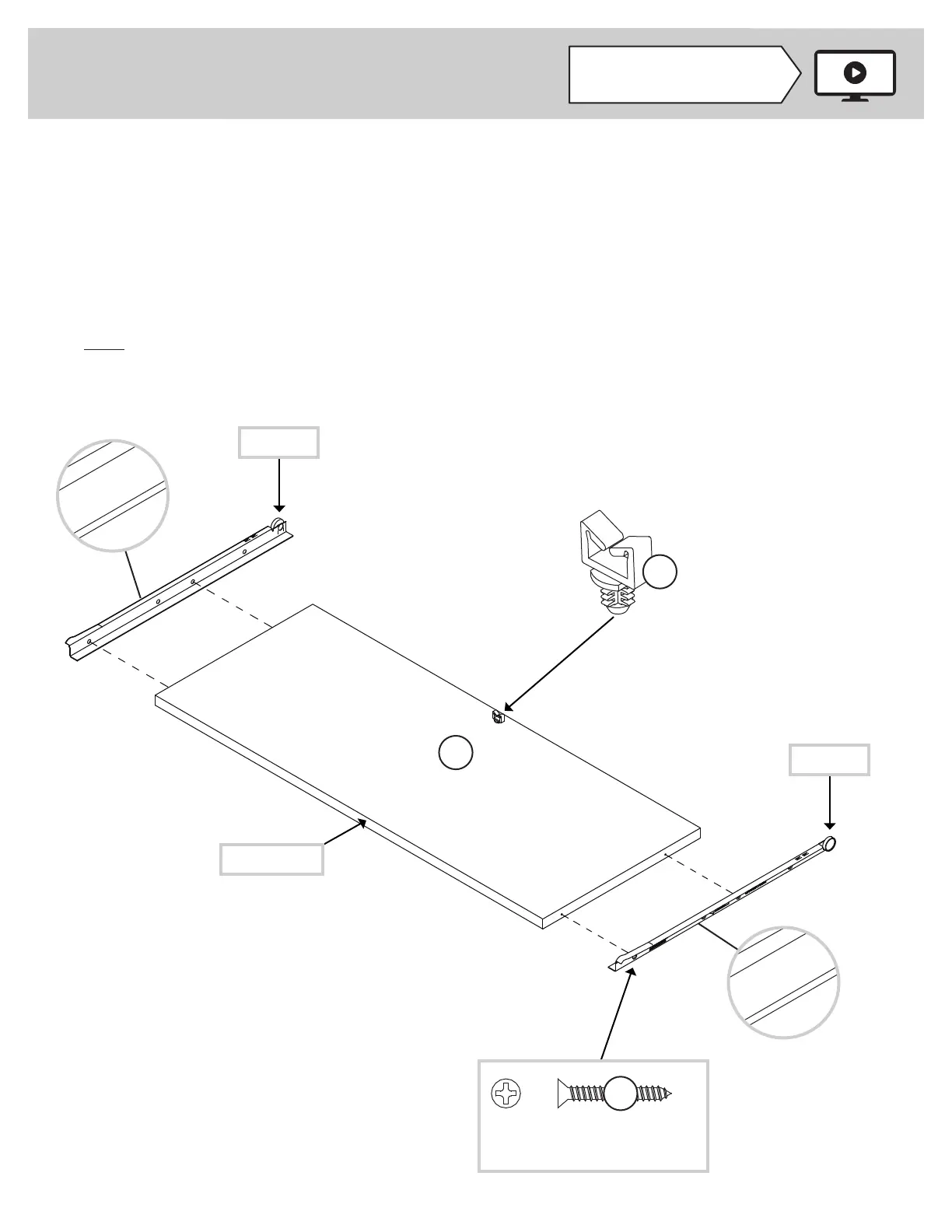
Step 1
Look for this icon. It means a
video assembly tip is available at
www.sauder.com/service/tips
å
Assemble your unit on a carpeted fl oor or on the empty carton
to avoid scratching your unit or the fl oor.
å
Fasten a DRAWER RIGHT (40AY) and a DRAWER LEFT (40AZ)
to the KEYBOARD SHELF (U). Use four BROWN 1" FLAT
HEAD SCREWS (18S).
å
Turn a CORD CLIP (4P) into the KEYBOARD SHELF (U).
å
NOTE: The CORD CLIP is used to hold your keyboard cord
against the TOP.
4P
Roller end
Roller end
U
Finished edge
BROWN 1" FLAT HEAD SCREW
(4 used in this step)
18S
Finished surface
40AZ
40AY
417586 www.sauder.com/servicePage 6



 To Next Page