Plantronics Savi User Guide 7
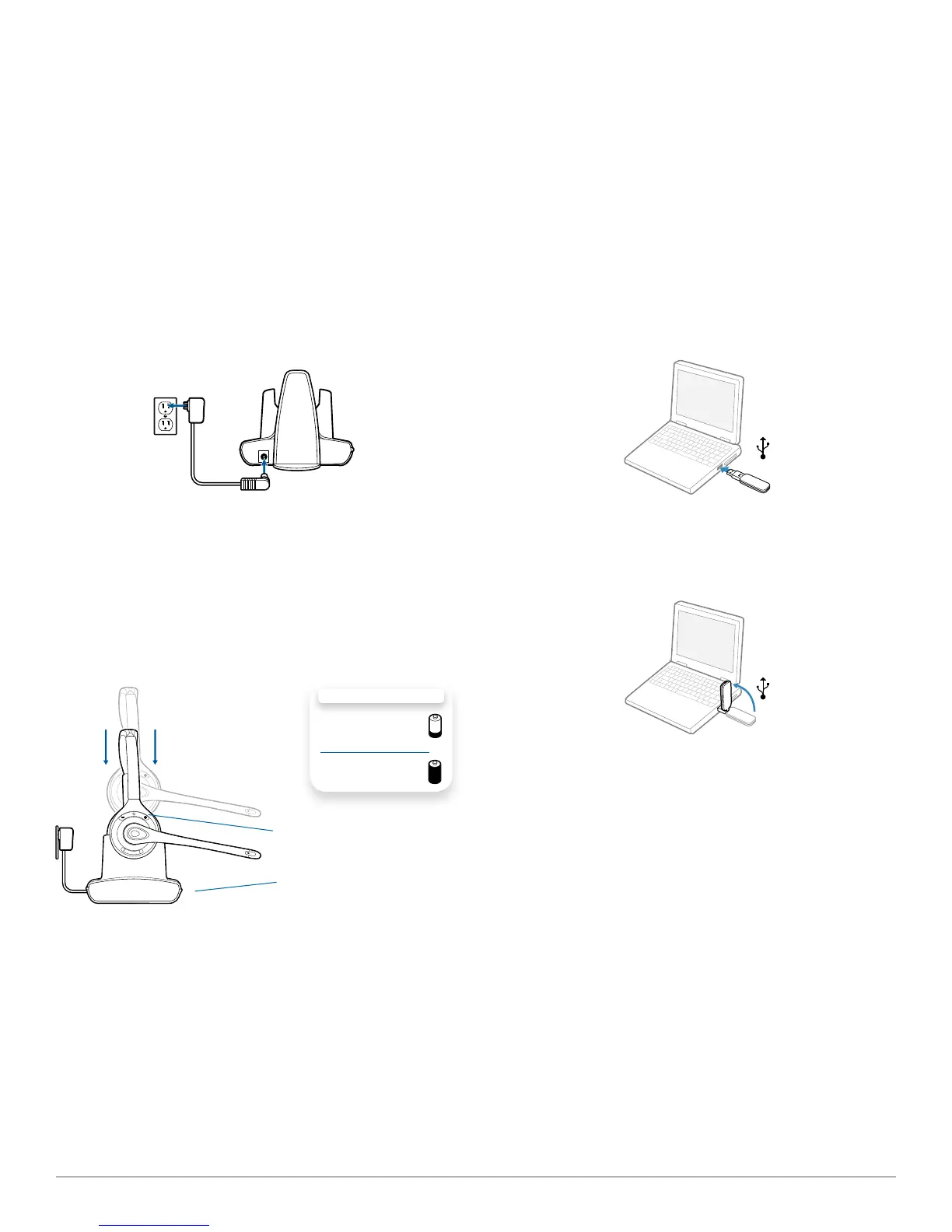
Connecting the power supply
1 Connect the base power supply into the power jack on
the charger base.
2 Connect the power supply to the outlet. The power
indicator light will be solid green.
Docking and charging the headset
1 Gently push the headset into the charging cradle. The
charging indicator light on the headset will flash green to
indicate that the headset battery is charging.
2 Charge for at least 20 minutes prior to first use. A full
charge takes 3 hours.
Charging Indicator Light
CHARGING TIME
20 min .....................
Minimum charge
before first use
3 hours ...................
Full charge
Power Indicator Light
Connecting the USB adapter to your PC
1 Insert the USB adapter into the USB Port on the PC. The
indicator light on the USB adapter will be solid red to indicate
the USB adapter is powered on and will turn solid green when
it finds the headset.
NOTE The headset may have to be charged before the USB
adapter can find it.
2 The USB adapter can be folded as shown.
IMPORTANT NOTE For best performance, it is
recommended that Windows is updated with Service Pack
levels listed below:
Microsoft Windows® XP Service Pack 3 (SP3) or later
Microsoft Windows Vista® Service Pack 1 (SP1) or later
Loading software
1 Load Plantronics software by visiting
plantronics.com/software and click on the download
button.
4 System setup



 To Next Page