SawStop 10” Professional Cabinet Saw 81
Adjusting Your Saw
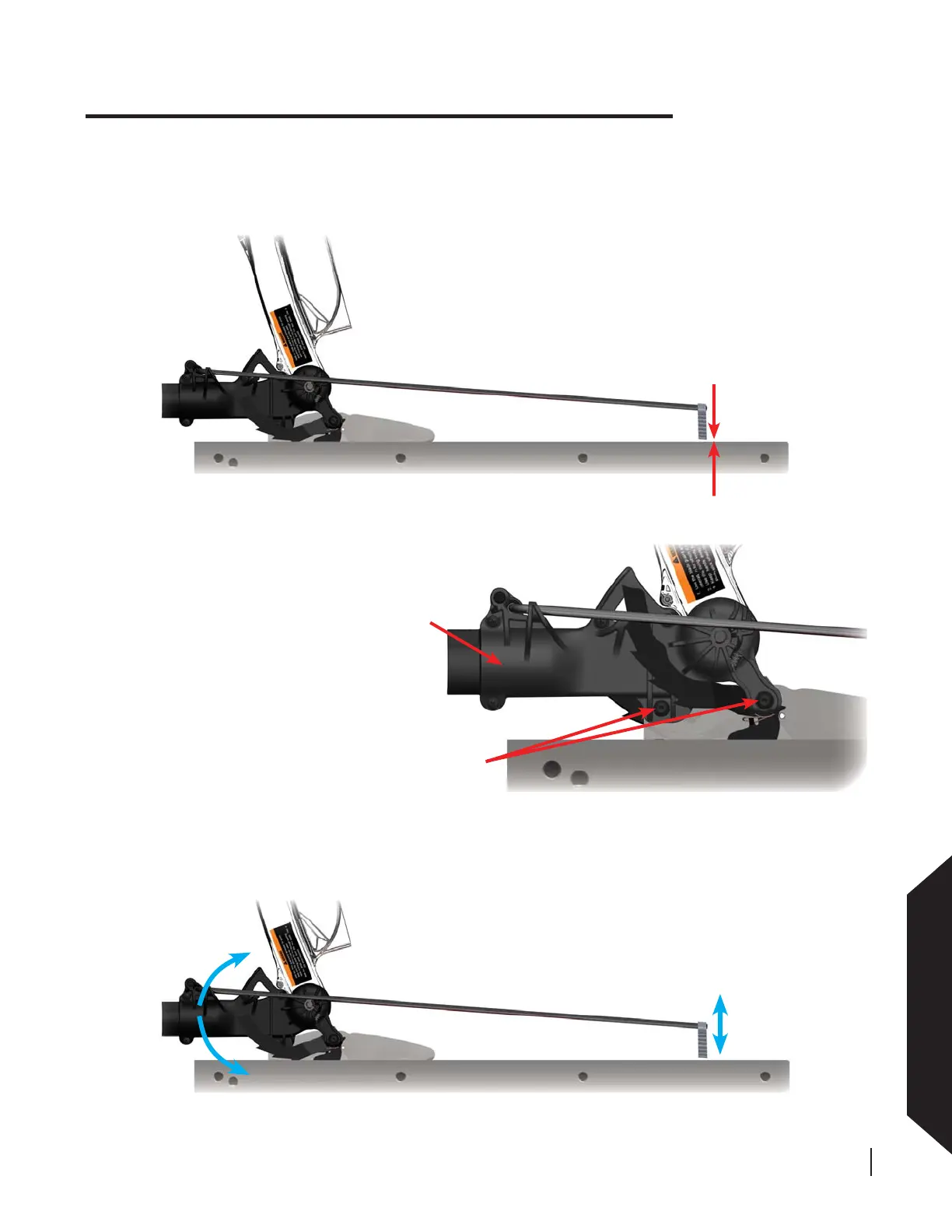
gap should be
7-10 mm
loosen these
two bolts
rotate back of dust port until the
wood stop is 7-10 mm above the table
Fig. 128
Fig. 129
Fig. 130
dust port
Making Adjustments to Your Saw
Rotate the blade guard dust port until the wood stop is 7-10 mm above the table. Once set, tighten the two bolts
on the blade guard dust port, but do not overtighten.
To adjust the height of the wood
stop, loosen the two bolts that
attach the blade guard dust port
to the spreader (see Fig. 129). To
better access the bolts, pivot the
left large anti-kickback pawl up and
guide it into the catch on the side of
the dust port as shown in Fig. 129.
Use a 4 mm hex key to loosen the
bolts.
With the tip of the blade fl ush with the table, measure the distance between the bottom of the wood stop and
the table. The bottom of the wood stop should be 7-10 mm above the table when the top of the blade is fl ush
with the table. If the wood stop is too far above the table or too low, you will need to adjust the height of the
wood stop.






 To Next Page