7
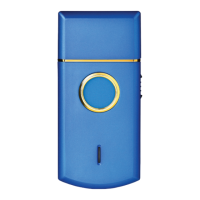
1 –Foil
2 – Head
3 – ON-OFF switch
4 – LED
5 –
Power supply cable connection (not
visible in the image)
6 – Forged blade
7 – Crunchy blade
8 – Feeder with USB connection
9 – Power supply/charge cable
10 – Brush
11 – Protective cap
CHARGING THE APPLIANCE
This appliance can be used on battery power or connected
directly to the mains power supply.
Do not recharge the appliance if the ambient
temperature is below 5°C or above 40°C.
Do not completely discharge the battery in case you wish to use
the appliance with the power supply cable inserted.
• To charge the appliance, use the supplied feeder (8) or cable (9) only,
connected to a USB socket.
• Insert the feeder (8) in the power socket.
• Check that the appliance is off and that the switch (3) is in position “0”.
• Connect the power supply cable (9) to the appliance (5) and to the
feeder (8). The red LED (4) will light up.
• When charging is completed, the LED (4) will turn green.
• Disconnect the appliance from the cable (9).
The appliance battery is supplied not charged. Before the rst
use, it is recommended to charge it completely.
Do not try to change the batteries yourself. Refer
to an authorised customer service centre.


 To Next Page