SMPA Setup Guide
December 2, 2022 Scala, Inc. Page | 56
Completing Player64 Configuration:
ENABLE Player64 services, AutoLogon Player Account, & ENABLE
UWF
To complete configuration, you must:
1. Run the ENABLE_Scala-Player64-SERVICES.CMD script.
2. Run the ENABLE_Display_Engine_PLAYER64_AutoLogon.CMD script.
3. OPTIONAL, (strongly encouraged!) Enable the Microsoft® Windows ™Unified Write Filter (UWF)
4. Restart the player.
Starting the Scala Player64 Network Transmission Client & Watchdog
services
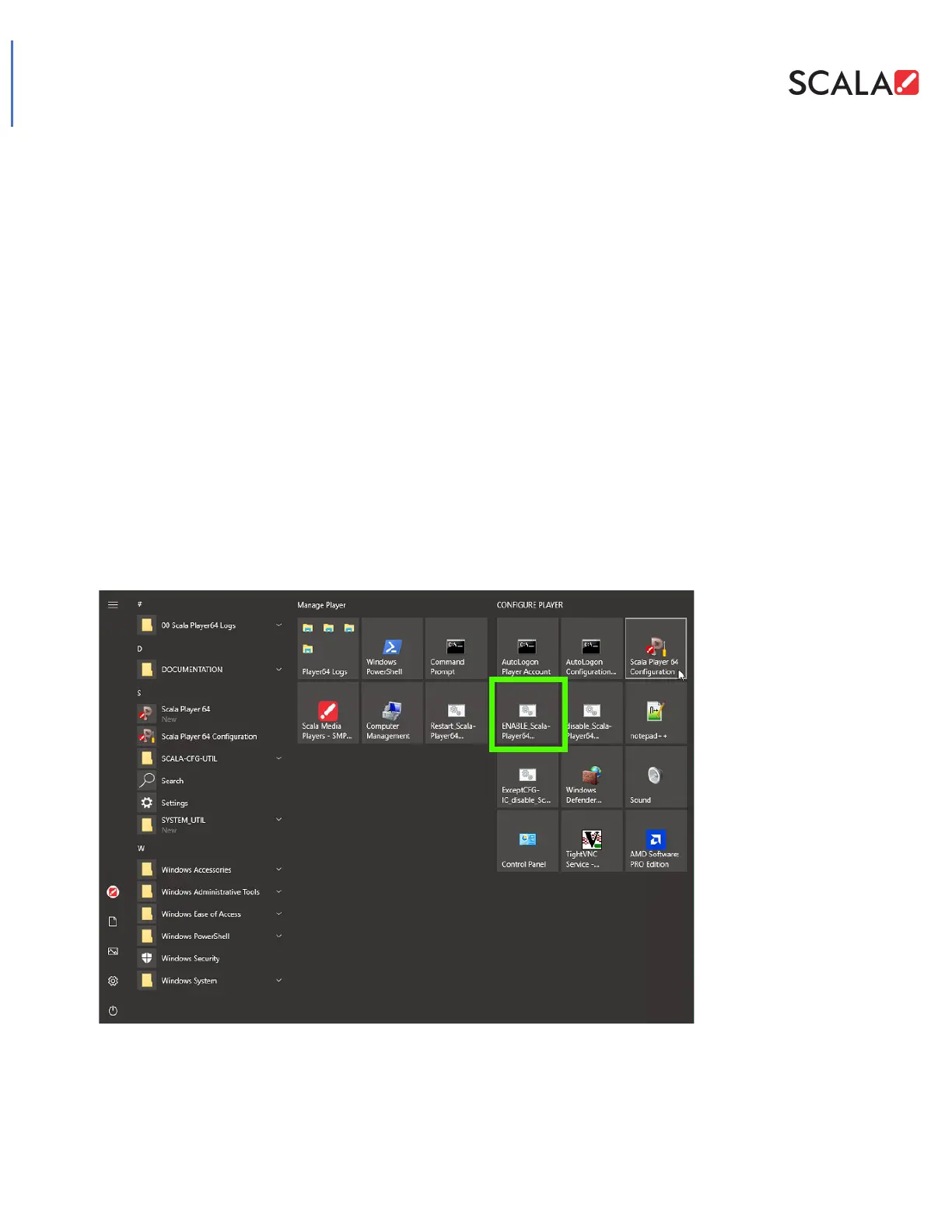
Menu links to the script to start enable+start the Player64 services
Menu link entries to the script which will enable & start the Player64’s Network Transmission Client & Watchdog
services so that the Scala Media Player can communicate with Scala Enterprise Content Manger server and
monitor the Player Display Engine so that the Media Player will reboot should media content cause the PDE to
“lock up.”
Navigate to the [Start] menu.
Launch the ENABLE_Scala-Player64-SERVICES script.
This script enables the automatic start of the Network Transmission Client & Watchdog services briefly after
the device’s Windows OS boots.



 To Next Page