5
B: Cave-software:
In contrast to the standard software, the cave software can not operate both light sources at the same time.
For this purpose, a faster change between spot and wide angle setting is possible by clicking. There is no key
lock on the cave software.
2. CONTROL LIGHTS
Depending on the mode, the control lights either show the battery status (after 3 seconds inactivity or key lock
mode) or the light intensity of the spot or wide angle (while adjusting).
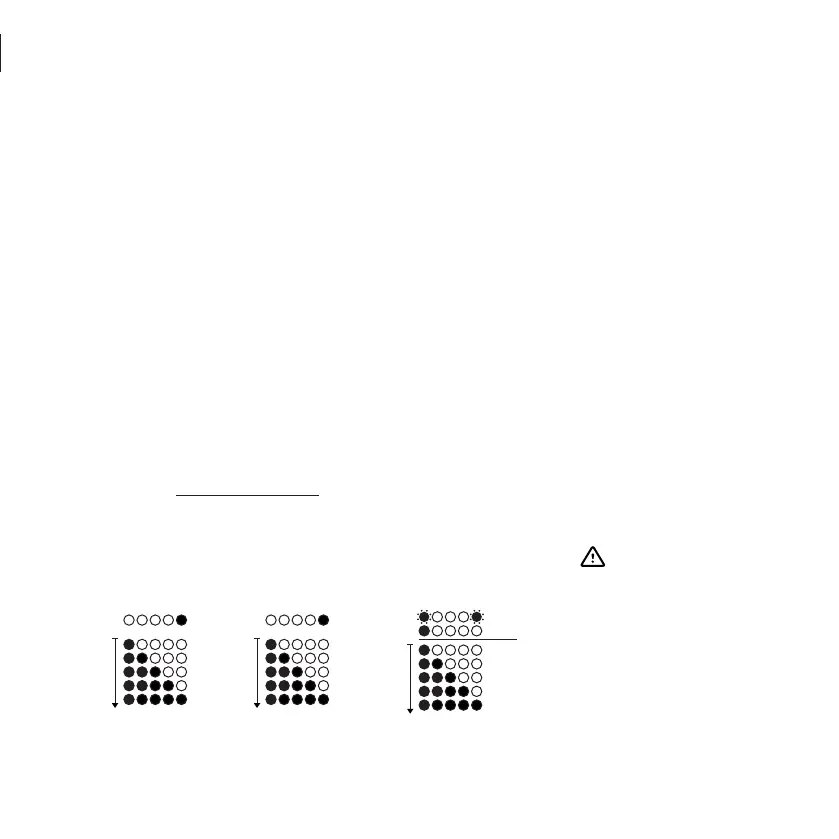
Spot The light intensity of the spotlight is displayed with red LED control lights.
Wide angle The light intensity of the wide angle is displayed with green LED control lights.
Battery status After 3 seconds or rather the lamp is in key lock mode, the current status is indicated by flas
hing. CAUTION: This will only provide a rough orientation and show how many percent of the
battery capacity still remain. The actual operation time until the lamp turns off depends on
the capacity of the battery (Wh) that is being used and on the light intensity that is regulated
while using the SCALEO infinity.
At full power of spot and wide angle the SCALEO infinity consumes 73 Watt.
C [Wh] Battery
P [W] SCALEO infinity
= t [h] (max. diving time)
Spot mode
Red LED display
0%
100%
O
Wide angle mode
Green LED display
> 25%
> 85%
Key lock mode
Flashing LED display
CAUTION!
The display of the battery
status decreases every 15
percent. If there is less than
one quarter of the battery
capacity available, the color
will change to red. Below 10
percent two LEDs will start
ashing fast and the emer-
gency lighting mode will be
activated.
0%
100%
O
< 10%
> 10%
Red
Green


 To Next Page
 Loading...