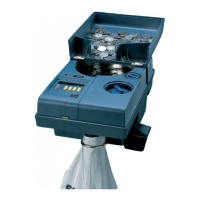
The SC 303/SC 313 are compact desktop, universal coin counting machines designed for ease of operation and high performance. They are capable of counting a wide range of coin diameters and thicknesses, offering both continuous and batch counting modes.
Function Description
The primary function of the SC 303/SC 313 is to accurately count coins. Coins are loaded into a coin tray, processed by the machine, and then exit through a designated coin outlet. A separate outlet is provided for rejected coins, specifically for those smaller than the selected coin size. The machines feature a six-digit digital display on the control panel, which shows the number of coins counted and the batch quantities. Two independently mounted knobs allow users to set the coin diameter and thickness, ensuring accurate counting for various coin types.
Important Technical Specifications
The SC 303/SC 313 models share many specifications, with some differences in dimensions, hopper volume, and weight.
- Part Numbers: SC 303: 012461-00x; SC 313: 012462-00x.
- Supply Voltage: 100-130/220-240 V AC.
- Frequency: 60/50 Hz.
- Current Consumption: 400 mA/200 mA.
- Max. Speed: Approximately 2,700 coins/minute.
- Coin Diameter Range: 14.0-34.0 mm (0.55-1.34").
- Coin Thickness Range: 1.0-3.4 mm (0.04-0.13").
- Display: 6 digits.
- Batch Range: 5-10,999.
- Hopper Volume: SC 303: Approximately 2.0 litres; SC 313: Approximately 3.0 litres.
- Dimensions (Width x Depth x Height):
- SC 303: 220 mm (8.66") x 370 mm (14.57") x 165 mm (6.50").
- SC 313: 260 mm (10.24") x 370 mm (14.57") x 315 mm (12.40").
- Weight: SC 303: 8.4 kg (18.52 lbs); SC 313: 11.6 kg (25.57 lbs).
- Noise Level (during operation): SC 303: 86 dB (A); SC 313: 84 dB (A).
- Operating Conditions: Temperature: 15-35 °C; Humidity: 30-80% R.H.
The machines comply with EN 60 950-1, EN 61000-6-1, EN 61000-6-3, Low Voltage Directive 2006/95/EC, EMC Directive 2004/108/EC, and FCC Part 15 (2008) for unintentional radiators (Class B equipment). They are also marked with the WEEE symbol, indicating compliance with the Waste Electrical and Electronic Equipment Directive 2002/96/EC for proper disposal and recycling within the EU.
Usage Features
The SC 303/SC 313 offer user-friendly features for efficient coin counting:
- Control Panel: The control panel includes keys for MOTOR ON/OFF, selecting batch stop or continuous counting (Q), resetting the display and transferring counted coins to memory (M), showing memory contents (ACC), showing bag/tube contents (B), and clearing the display (CE). Keys need to be pressed for a few seconds to activate their functions.
- Continuous Counting Mode: In this mode, the machine counts coins continuously, updating the display with the total. If no coins pass the detector for five seconds, the disc stops and reverses slightly before restarting. If no coins pass for 15 seconds, the disc stops automatically, indicating either no more coins or a blocked coin flow. This automatic stop function can be bypassed.
- Batch Counting Mode: The machine counts coins up to a predefined batch quantity and then stops. Seven fixed batch stop quantities are available: 20, 25, 40, 50, 100, 500, and 1,000. Additionally, a temporary batch stop quantity can be set between 5 and 10,999 coins.
- Setting Temporary Batch Stop: Users can set a temporary batch quantity by pressing and holding Q and using the M, ACC, B, and CE keys. This setting is not stored in memory and is lost when the machine is turned off or another batch stop is selected.
- Changing Fixed Batch Stop: The machines allow for programming fixed batch stop quantities. By pressing Q and switching on the machine, users can enter a programming mode to adjust the batch quantities associated with reference numbers 1-7. These settings are stored in memory even when the machine is switched off.
- Clearing a Blocked Coin Exit: In case of a coin blockage, users can set the coin diameter and thickness knobs to their maximum, open the right cover, and manually turn the disc to reject the coin.
- Safety Precautions: The manual emphasizes several safety warnings, including risks of electric shock, jamming, entanglement, impaired hearing, and tipping. Users are advised to wear ear protectors during operation and to disconnect power before servicing.
Maintenance Features
Regular maintenance is crucial for optimal performance and longevity of the SC 303/SC 313:
- Daily Cleaning: The machine should be cleaned daily to prevent dirt accumulation, which can lead to rejected coins. Only non-scratching cleaning materials should be used.
- Cleaning the Coin Track: The coin track requires regular cleaning to maintain high counting performance. This involves removing the right-hand cover, raising the outfeed belt, pulling a lever to remove the coin access block, cleaning the track with a stiff brush, and then reassembling the components.
- Changing Outfeed Belt: The outfeed belt should be changed after approximately one million coins have been counted. The procedure involves setting the coin diameter knob to minimum, removing the right-hand cover, raising the outfeed belt, lifting the feed mechanism, replacing the old belt with a new one, and then reassembling.
The manual also provides troubleshooting tips for common issues such as a blank display or the machine not starting, and situations where too few coins are in the bag during the first batch.

 Need help?
 General

 To Next Page