DSA5000 Quick Start Guide
In order to communicate withe DSA modules, the host com-
puter must be congured to be compable with the MPS.
The default DSA5000 IP address is:
191.30.yyy.xxx
Where yyy is the family code:
130 for DSA5000
Where xxx is the last three digits of the serial number of the
module.
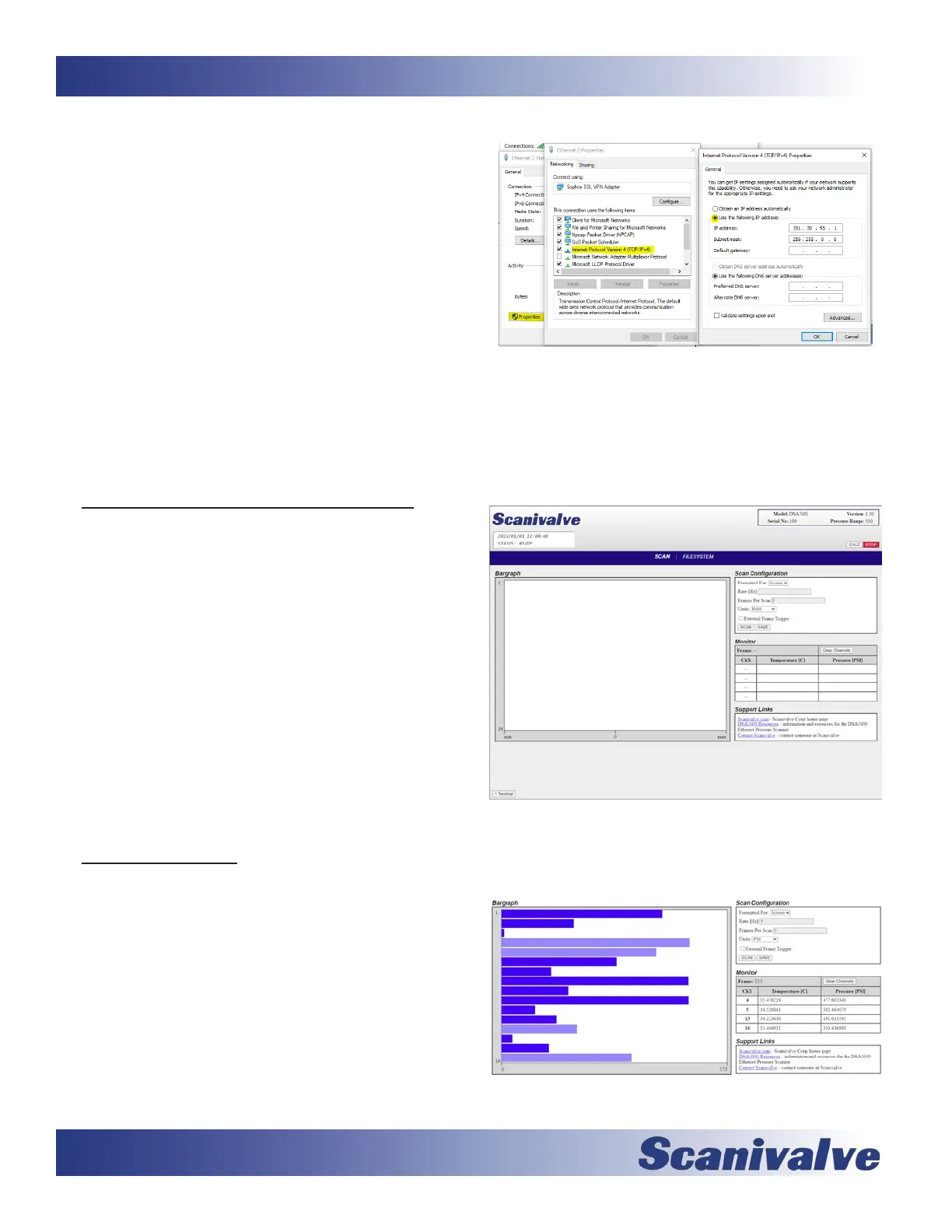
Congure the IP address of the host computer to be compat-
ible with this address. One example would be:
DSA5000: 191.30.130.234
Host Computer: 191.30.130.1
Subnet: 255.255.0.0
Please consult your computer or operang system for steps
on how to congure your computer’s IP address.
Step 5: Access the DSA’s Web Server
The DSA5000 has a single user web server which provides a
simple method for communicaon, conguraon and data
collecon from virtually any host computer.
The web server has been tested with several web browsers
to verify funconality and compability. Those that were
tested are (as of 10/2022) Mozilla Firefox, Google Chrome,
and Microso Edge.
To connect to the DSA5000’s web server, simply open one of
the supported browsers. In the address bar, enter:
xxx.xxx.xxx.xxx <ENTER>
(where xxx.xxx.xxx.xxx is the IP address of the DSA)
Once connected, the web server’s Scan page will be dis-
played.
Step 6: Scanning
There are mulple variables on this screen that the user may
modify to adjust scan conguraons. Congure a scan rate
(RATE) and select an Engineering Unit (UNITS). Default set-
ngs will be loaded. Then select a format (FORMATTED FOR).
The default selecon is to show scan data to the screen. The
user may also elect to scan to a .CSV, .TXT, or .DAT le.
Once congured, click the CALZ buon in the top right
corner and wait for 10 seconds. Click the SCAN buon to
start data collecon. If the format is set to “Screen”, data will
now be displayed in the bargraph area. For more opons or
detailed informaon on the web server, please see secon 3
in the DSA5000 User Manual.
Example: Setting Static IP address - Windows 10
DSA’s Web Server - Scan Page
DSA’s Web Server - Scanning


 To Previous Page
 Loading...
