THE APP
AVAILABLE IN THE APPLE APP STORE AND GOOGLE PLAY STORE
SYSTEM REQUIREMENTS ARE: iOS 10 or Android 5
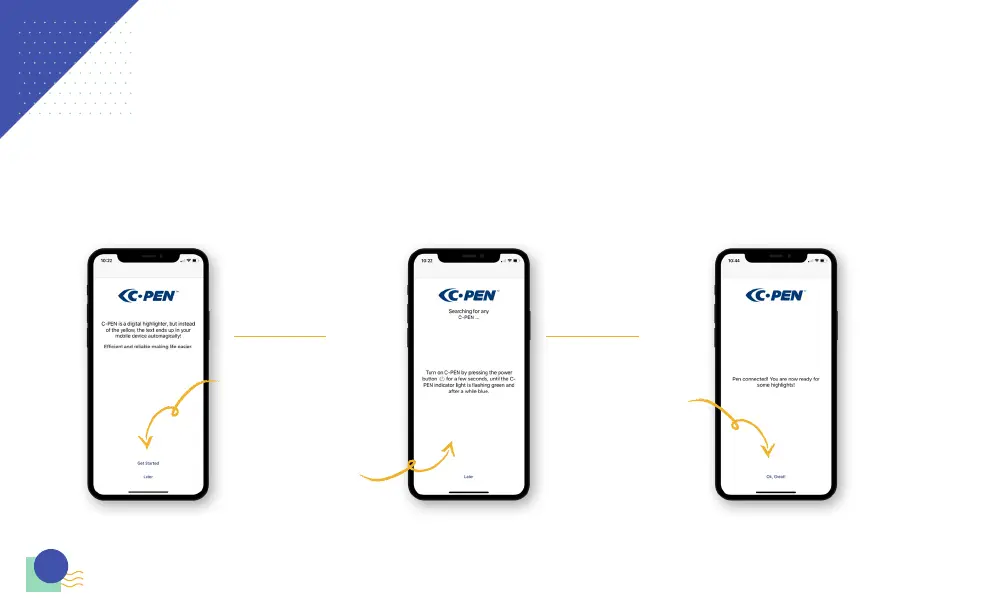
Once the Connect app has
downloaded to your device, open up
the app and select ‘Get started’.
The message “Turn on ” will appear,
(by pressing the power button for a
few seconds, until the indicator light
is flashing green and after a while
blue) this will pair the device and pen.
Once the pen has paired with the
App, the screen will change and the
message ‘Ok, Great!’ will appear. Click
onto the message and it will take you
to the work space where you can
scan away.
6



 To Next Page