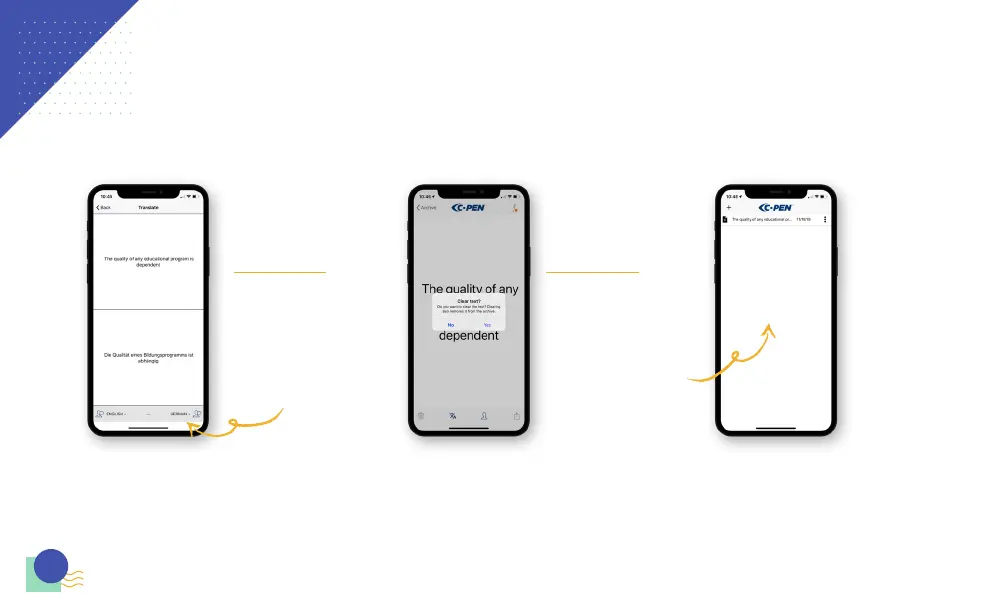
In order to translate the text, click
onto the translation icon. Select your
preferred language from the list in the
lower right corner of the app.
To hear the text aloud in your chosen
language, select the icon with the
speech bubble.
To change languages you can click each side and choose from the
following: Chinese, Danish, Dutch, English, French, Italian, Norwegian,
Russian, Spanish, and Swedish
While on the main screen, if you click
on the trash can you will be able
to clear the last text you scanned.
Clearing this text will also remove it
from the archive.
Clicking on Archive will take you to
everything you have scanned. To
access file options, you click on the
three dots. When choosing ‘share’ you
can upload your file to cloud drive or
share with a messenger app. Clicking
delete will erase the saved file.
8
THE APP - CONTINUED



 To Next Page