1
3
4
2
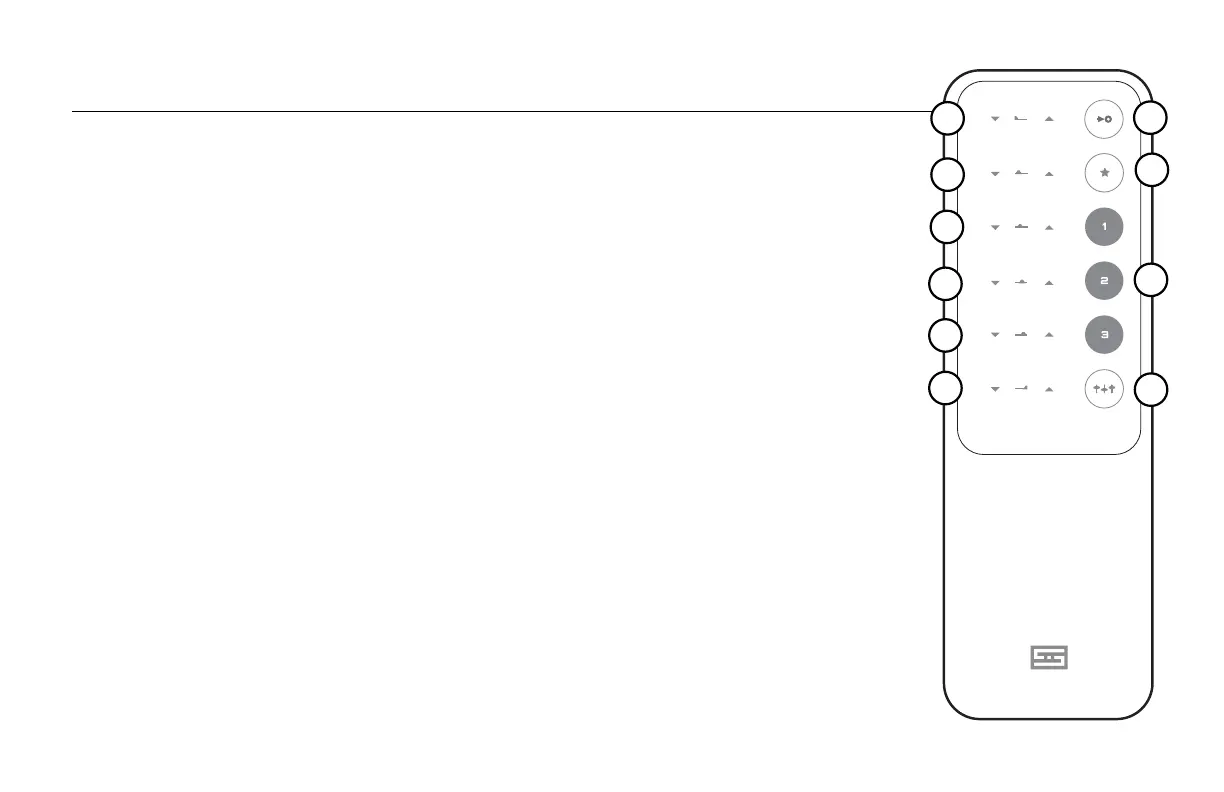
Yes, Loki Max comes with a remote control. With it, you can change EQ
settings, switch inputs, bypass the EQ, and save favorite EQ presets.
1-6 EQ bands. Press to increase or decrease the EQ settings. EQ bands
range from lows (1) to highs (6). Each band has 15 “clicks” up and down,
for a total of 31 positions, including center.
7 Input. Press to select the balanced or single-ended input.
8 Favorite. Press and hold for 5 seconds to dene a Preset (see below).
For example, if you want to change preset “3”, select that Preset, make the
changes you want, then press and hold the Favorite button for 5 seconds.
9 Presets. Press to change the EQ to one of three different Presets that you
have dened using the Favorite button above.
10 Process/Bypass. Press to bypass the EQ completely, or to switch in the
EQ if it is bypassed. When bypassed, the EQ isn’t just at--it’s completely
out of the circuit.
Changing the Battery
1. Flip the remote over to reveal a single hole on the back.
2. Push the remote open by inserting the end of an open paper clip into the hole in the back and
pushing rmly. It’s held together with magnets.
3. Replace the battery inside with one of the same type.
4. Reassemble the remote by rst inserting the clear LED in the front, then dropping the panel
down onto the matching magnets. Press down gently to pop the panel in place.
REMOTE CONTROL
5
7
8
6
9
10



 To Next Page