Schücode Commissioning instructions – Schüco DCS Touch Display
24
Dok-Nr.10000432116_01
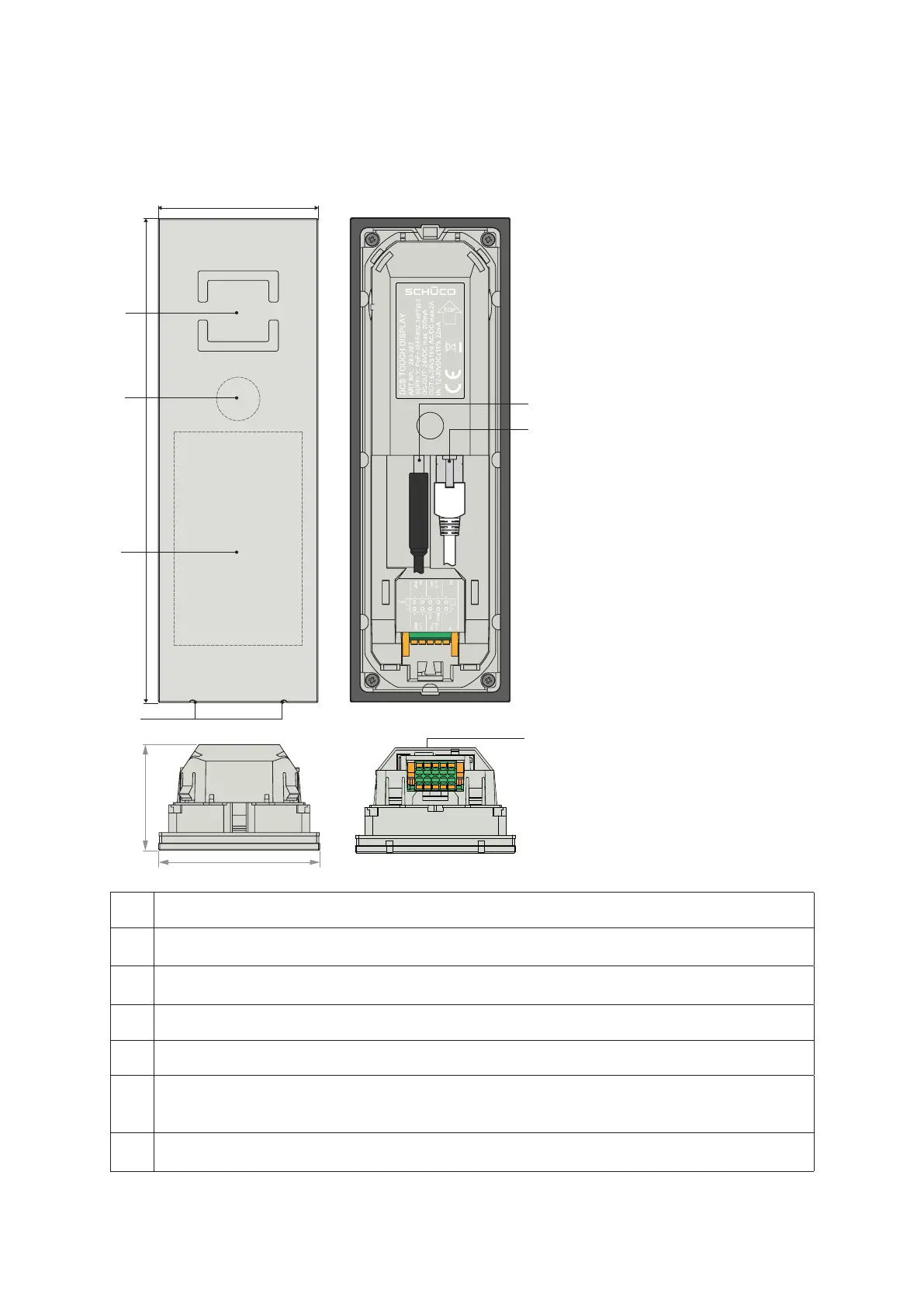
7.1. Overview of DCS Touch Display
A
B
C
D
E
F
G
70
A The loudspeaker openings are positioned such that the loudspeaker cannot be seen.
B
The high-resolution camera sits behind a tinted pane of glass, so that a person standing
directly in front of it cannot see that it is a camera.
C
The 4.3 inch colour Touch Display can automatically adjust its brightness
to suit the environment.
D The voice-optimised microphones are concealed.
E The two USB 2.0 ports turn the DCS Touch Display into a host for additional devices.
F
The RJ45 socket is used for the connection to the building‘s internal PoE+ switch or to the
IP secure connector, whereby the DCS Touch display is supplied with power in the form
of PoE+.
G
The inputs and outputs allow for additional devices to be directly connected to the
Schüco DCS Touch Display.


 To Next Page
 Loading...
