Schüco de
Commissioning instructions – Schüco DCS Touch Display 33
Dok-Nr.10000432116_01
8.2.1. Making a call
Tap the desired contact in order to make a call. Depending on how the counterpart intercom station
(e.g. SIP telephone, SIP app) was congured, the call is promptly accepted or ringing continues until
the call is accepted or automatically ended after a time-out of 45 seconds. In order to end a call
manually whilst calling a contact, you must tap the „Bell“ symbol in the bottom part of the screen.
INFORMATION
Calls
Calls are only possible once contacts have been created and the corresponding buttons have been
congured.
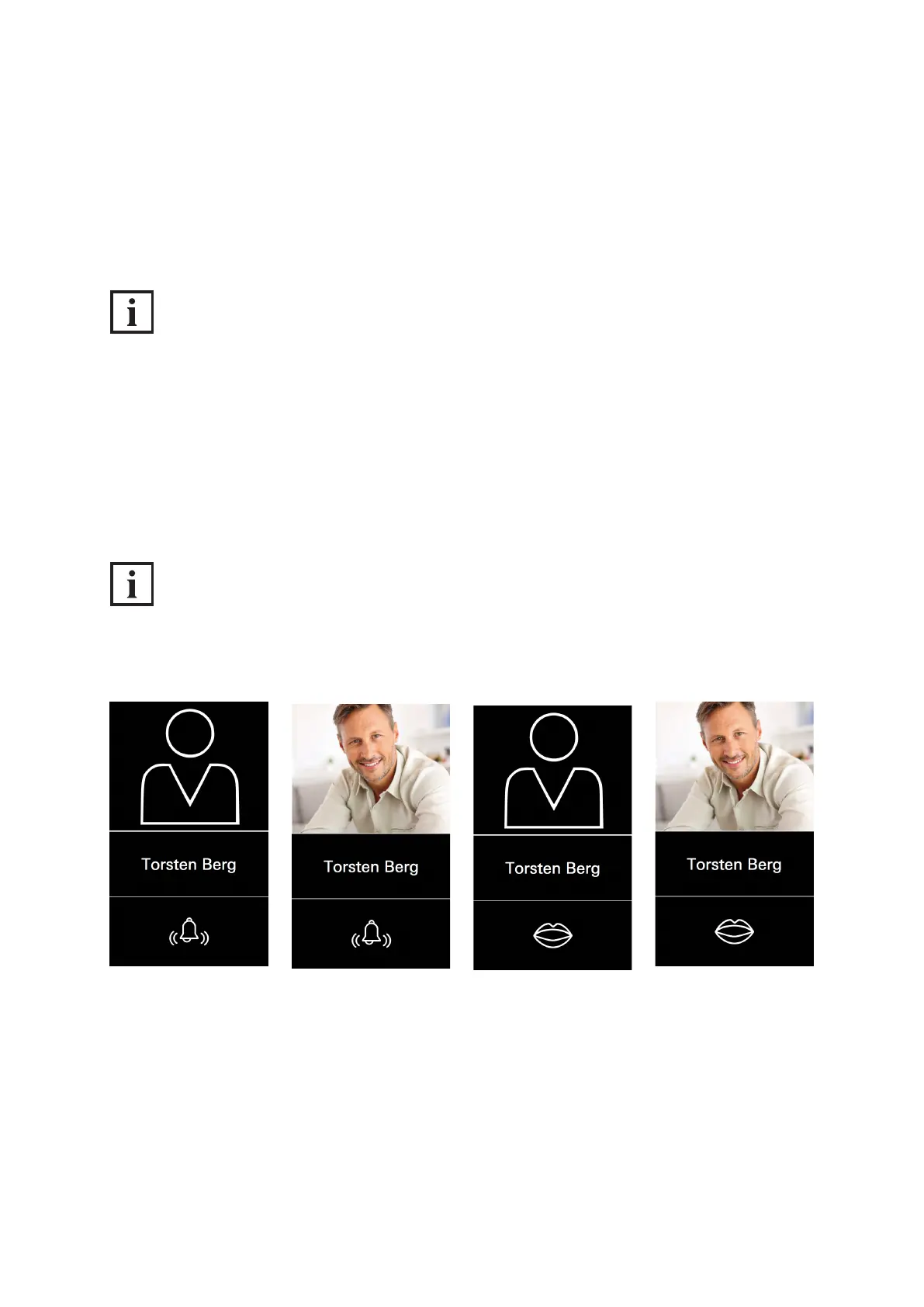
Corresponding to the two call statuses „Calling“ and „Talking“, there are two different views:
● Calling: The „Bell“ symbol in the bottom part of the screen makes clear that the counterpart intercom
station is ringing and that the call has not yet been accepted.
● Talking: The „Mouth“ symbol in the bottom part of the screen makes clear that the call has been
established and that dialogue can now begin.
INFORMATION
Prole picture
If no prole picture has been uploaded for the respective contact, the standard avatar is displayed.



 To Next Page