EasyManua.ls Logo

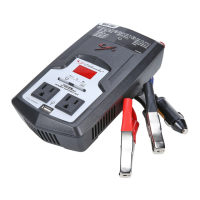
Schumacher Electric BATTERY EXTENDER BE01257 - User Manual

Schumacher Electric BATTERY EXTENDER BE01257
19 pages
Print Icon
To Next Page IconTo Next Page
Loading...
0099001708-01
PLEASE SAVE THIS OWNERS MANUAL AND READ BEFORE EACH USE.
This manual will explain how to use the converter safely and effectively. Please
read and follow these instructions and precautions carefully.
POR FAVOR CONSERVE ESTE MANUAL DEL USUARIO Y LEALO ANTES
DE CADA USO. En este manual le explica cómo utilizar el convertidor de manera
segura y conable. Por favor, lea y siga las siguientes instrucciones y precauciones.
MODEL / MODELO:
BE01257
Power Converter
Converts 12V DC Battery Power to AC Household Power
Convertidor de Energía
Convierte la energía 12V CD de baterías a energía doméstica de CA
OWNERS MANUAL / MANUAL DEL USUARIO

Questions and Answers

  • M
    Monica DuncanJul 28, 2025
    Why is the red LED lit on my Schumacher Electric Inverter?
    • P
      Patrick DuffyJul 28, 2025
      The red LED might be lit on your Schumacher Electric Inverter due to several reasons: the battery voltage could be below 10 volts, requiring you to recharge or replace the battery; the equipment being operated might be drawing too much power, in which case you should use a higher capacity converter or discontinue use with the current equipment; or the converter may be too hot, leading to a thermal shutdown, requiring you to allow the converter to cool, ensure adequate ventilation, and reduce the load to the rated continuous power output.
  • A
    Alison KnappAug 5, 2025
    What to do if my Schumacher Electric Inverter alarm sounds continuously?
    • A
      awilliamsAug 5, 2025
      If the alarm on your Schumacher Electric Inverter is sounding continuously, it could be due to a couple of reasons. First, the input voltage might be below 10.5 volts, meaning you should recharge or replace the battery. Second, there might be a poor or weak battery connection, so check the connection to the battery and ensure all connection points are clean.
  • L
    lisajohnsonAug 12, 2025
    How to fix low or no output voltage on a Schumacher Electric BATTERY EXTENDER BE01257 Inverter?
    • A
      Amy ParkerAug 12, 2025
      If you're experiencing low or no output voltage on your Schumacher Electric Inverter, it could be due to poor contact at the terminals. Try disconnecting and reconnecting the 12V connections. Also, ensure you are using a true RMS reading meter when testing the output voltage, as using an incorrect type of voltmeter can cause this issue.
  • S
    Sarah KirkAug 20, 2025
    What to do if my device doesn't operate properly when first connected to the Schumacher Electric Inverter?
    • E
      Elizabeth WoodAug 20, 2025
      If your device isn't operating correctly when first connected to the Schumacher Electric Inverter, the converter might not have the required capacity to operate the device. Try turning the converter switch OFF and then ON again to reset the converter.

Summary

Model and Overview

Model BE01257

Identifies the specific power converter model and its core function.

Important Usage Instructions

Advises users to save and read the manual for safe and effective converter use.

Important Safety Instructions

General Safety Precautions

Covers essential safety warnings, including electric shock, fire risks, and environmental conditions.

Operational Warnings

Details critical operational rules like not using with water, avoiding heat sources, and proper power connection.

Voltage and System Compatibility

Specifies connection requirements for 12V systems and warns against positive ground systems.

Shock and Electrocution Hazard

Highlights that the 120V AC output poses a shock or electrocution risk similar to household outlets.

Wattage and Overload Warning

Warns against using products exceeding the converter's wattage to prevent damage.

Personal Safety Precautions

Life Support and Pacemaker Warnings

Prohibits use with life support systems and advises pacemaker users to consult a physician.

Battery Handling Safety

Mandates protective gear when working with batteries and warns against sparks and flames.

California Proposition 65 Warning

Notifies users about chemicals known to cause cancer or reproductive harm.

Converter Location and Features

Optimal Converter Placement

Advises against placing the unit above batteries or in poorly ventilated areas.

Key Converter Features

Lists product features including ON/OFF switch, LED indicators, outlets, USB port, and protection systems.

Understanding Load Stages

Explains 'Start Up' surge load and 'Continuous Operation' load for devices.

Modified Sine Waveform Compatibility

Informs users that the converter uses a modified sine wave and recommends checking device compatibility.

Installation and Connection

Securing the Converter

Provides instructions for fastening the converter horizontally to a flat, secure surface.

Grounding the Converter

Details the process of grounding the converter chassis to prevent electrical shock.

Connecting Power Cables

Guides on connecting positive and negative battery cables to the converter and the power source.

Battery Connection Procedure

Outlines the correct method for connecting to a 12V battery, including safety and location specifics.

Connection Error Consequences

Warns that incorrect connections can lead to blown fuses and permanent converter damage.

Battery Bank Setup and Operation

Battery Bank Assembly Warnings

Provides safety instructions for assembling battery banks, including handling and ventilation.

Parallel Battery Connection

Instructs on connecting batteries in parallel, emphasizing not to connect in series due to high voltage risk.

Operating the Converter

Step-by-step guide on turning on the converter and checking the Green LED indicator.

Power Source and Protection

Automobile Battery Power Source

Discusses using a car battery, recommending keeping the engine running and recharging strategy.

TV and Audio Device Usage

Offers tips to minimize interference when operating audio or video devices.

USB Port Operation

Explains how to use the USB port for charging devices and warns about power draw when off.

LED Indicators and Shutdowns

Details Green LED for power, Red LED/alarm for low voltage, high voltage, or overload conditions.

Troubleshooting and Specifications

Converter Fuse Information

Explains the converter's fuse and how to replace it if blown.

Maintenance and Service

Provides guidelines for cleaning, maintenance, and servicing the converter.

Common Troubleshooting Guide

Lists common problems, their possible causes, and recommended solutions.

Product Specifications and Support

Technical Specifications

Lists detailed electrical and performance specifications for the power converter.

Replacement Parts

Identifies part numbers for replacement battery cables.

Customer Support and Repairs

Provides contact information for troubleshooting, repairs, and return authorization.

Limited Warranty Information

Warranty Coverage Details

Outlines the one-year limited warranty for material and workmanship defects.

Warranty Exclusions and Limitations

Specifies conditions that void the warranty and disclaims other implied warranties.

Schumacher Electric BATTERY EXTENDER BE01257 Specifications

General IconGeneral
ModelBE01257
Input Voltage12V DC
Output Voltage120V AC
Output WaveformModified Sine Wave
Battery Type12V

Related product manuals