Need help?
Do you have a question about the Schumacher Electric PID-760 and is the answer not in the manual?
Step-by-step guide on how to connect the power inverter to a 12-volt battery for operation.
Explanation of LED readouts and alarm codes for monitoring the inverter's status.
Solutions for issues when the inverter's alarm is activated, detailing display codes.
Troubleshooting steps for when the inverter fails to power on, including fuse and connection checks.
List of available accessories and replacement parts for the PID-760 power inverter.
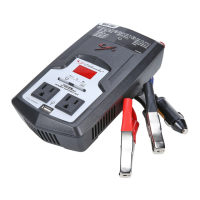
This document is the owner's manual for the Schumacher Power Inverter PID-760. This device is designed to convert DC battery power into AC household power, allowing users to operate various electronic devices and small appliances from a 12-volt battery source, such as a car or marine battery. The PID-760 comes with a clamp adapter and cables for easy connection to a battery.
The primary function of the Schumacher Power Inverter PID-760 is to provide AC power from a DC source. It is capable of supplying continuous power for devices drawing up to 760 watts. The inverter utilizes a modified sine wave output, which is suitable for a wide range of electronic devices, though users should verify compatibility with their specific equipment. The device is equipped to handle momentary power surges, which are often required by appliances with electric motors or compressors during startup.
The inverter features an LED display that provides real-time information about its operational status. This includes "VOLTAGE IN," which shows the voltage of the connected 12V battery or DC power source, "VOLTAGE OUT," indicating the AC voltage being supplied to the connected device, and "POWER OUT," which displays the wattage being drawn by the device.
In addition to its power conversion capabilities, the PID-760 incorporates several safety and diagnostic features. An audio alarm system, coupled with specific error codes on the LED display, alerts the user to potential issues such as low battery voltage, high battery voltage, overheating, continuous load exceeding the inverter's capacity, or short circuits/power surges. These alerts are crucial for protecting both the inverter and the connected devices, as well as ensuring user safety.
The PID-760 is designed for straightforward operation. Before use, it is essential to read and understand the safety instructions provided in the manual.
Connecting to a 12V Battery:
The inverter is designed to operate within an ideal air temperature range of 50° to 80°F. Proper ventilation is critical to prevent overheating, so users should ensure several inches of clearance around the inverter and avoid blocking its slots. It should also be kept dry and away from flammable fumes, gases, or clothing.
The manual provides examples of common devices and their estimated wattages, such as cell phones (10 watts), portable CDs (50 watts), laptop computers (90 watts), video games (100 watts), TVs (300 watts), power tools (375 watts), and small appliances (525 watts). This helps users estimate the load they will place on the inverter.
The PID-760 incorporates several features to aid in maintenance and troubleshooting, primarily through its LED display and audio alarm system.
Troubleshooting Alarms:
To stop an alarm, users can press the ON/OFF LED Selector button.
Power Source Management: The manual advises that an average automobile or marine battery can provide power for approximately 3 hours with the engine off. To maintain battery power, it is recommended to run the engine every 2 to 3 hours for about 10 minutes to recharge the battery. Although the PID-760 draws very low amperage when not in use, it should be unplugged to prevent battery drain over extended periods.
Fuse Replacement: If the inverter does not turn on, one possible cause is a blown fuse, often due to reverse polarity or an internal short circuit. Fuse replacement requires a qualified service technician to diagnose the issue and install appropriate replacement fuses.
The manual also includes a limited warranty, covering defects in material and workmanship for two years from the date of sale. For warranty service, customers are instructed to return the inverter with proof of purchase to the Schumacher Electric Corporation's Warranty Service Department. This ensures that any manufacturing defects are addressed, providing long-term reliability for the product.
 General
| Input Voltage | 12V DC |
|---|---|
| Output Voltage | 120V AC |
| Output Frequency | 60 Hz |
| Output Waveform | Modified Sine Wave |
| Outlets | 2 AC outlets |
| USB Ports | 1 |
| Protections | Overload, Overheat, Low Battery, Short Circuit |


 To Next Page