OPERATING INSTRUCTIONS AND SAFETY INSTRUCTIONS
SL10000
SL10000_BDA
GENERAL
Read the user guide and keep it in a safe place.
Congratulations and thank you for purchasing this Schwaiger Product. This user
manual is an integral part of this product. It contains important information on com-
missioning and handling.
This user manual is intended to assist you in using the product. Read through the
instructions for use carefully. Store this guide safely throughout the product’s entire
service life and pass it on to any subsequent users or owners. Check that the supplied
package is complete and ensure that none of the parts are defective or damaged.
Intended use
This product is designed exclusively for charging the battery of mobile devices via
USB connection. This includes, for example, smartphones or tablets. The internal,
permanently installed battery of the product can be charged via USB or the inte-
grated solar panel. In addition, the product has an LED lamp for illuminating the
immediate surroundings and a built-in compass.
The product is intended for private use only and is not suitable for commercial use.
Only use the product as described in this user manual. Any other use is considered
improper and may result in property damage.
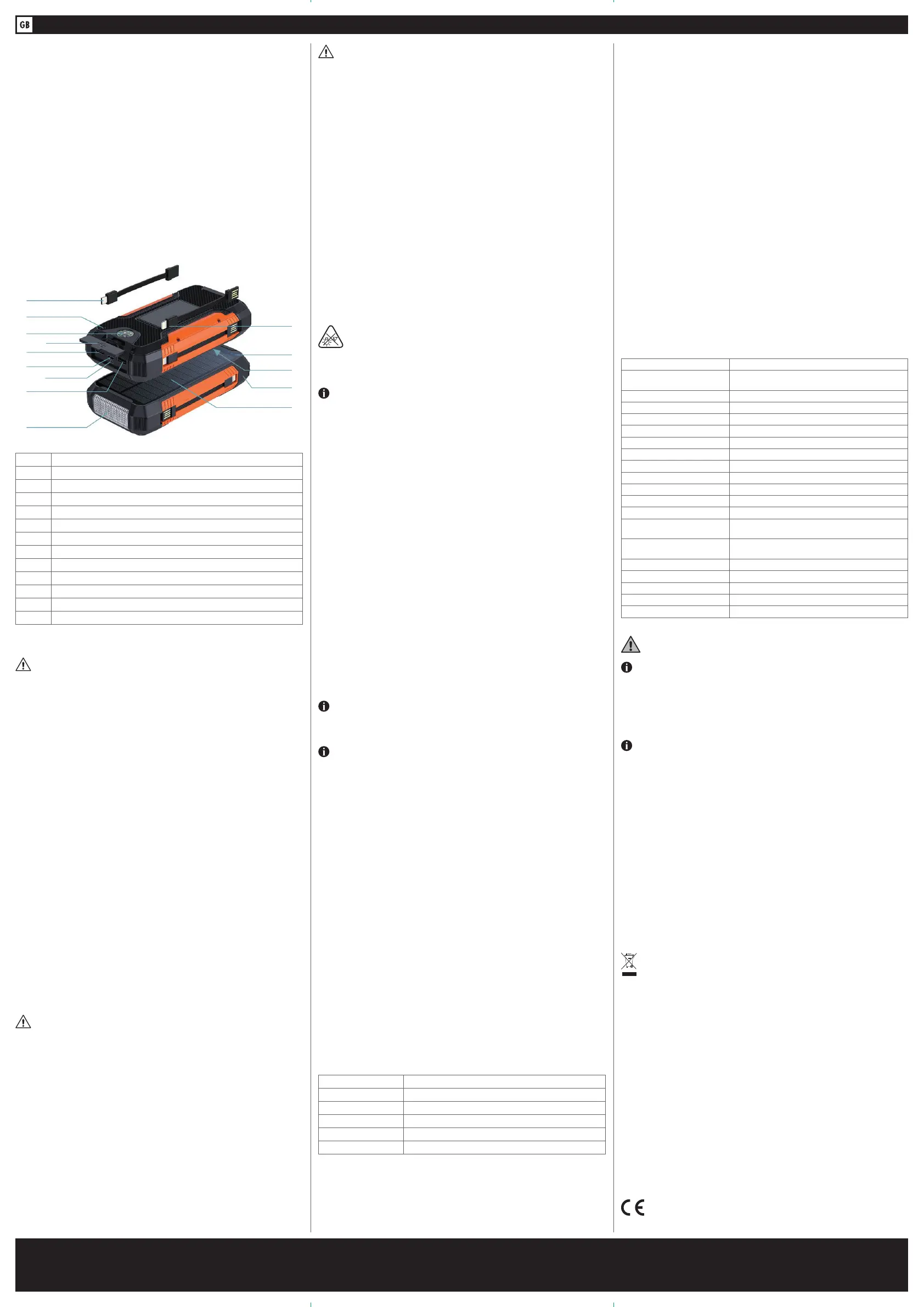
PRODUCT DETAILS
1 LED lamp
2 2x USB 2.0 A socket
3 1x Micro USB socket
4 1x USB Type C socket
5 Cover
6 Compass
7 Charge indicator
8 USB Type C charging cable
9 Apple
®
Lightning charging cable
10 Charge level indicator
11 Solar charge indicator
12 On/Off switch
13 Solar panel
GENERAL SAFETY AND WARNING INSTRUCTIONS
WARNING!
Risk of electric shock!
Faulty electrical installation or excessive mains voltage can lead to electric shock.
• If you use a USB charger, only connect it if the mains voltage of the socket match-
es the specification on the type plate.
• To charge the installed Li-ion battery, use only power supplies that comply with
the SELV standard according to IEC 61558-2-6 or IEC 61347-2-13 or ES1 / IEC
62368-1 according to IEC 62368-3.
• Do not operate the product if it has visible damage.
• Always check the product for damage before use. Damaged electrical equipment
as well as kinked power cords or bare wires increase the risk of electric shock.
• Do not open the housing but entrust the repair to specialists. Contact a specialist
workshop for this purpose. Liability and warranty claims are excluded in the event
of repairs carried out independently, improper connection or incorrect operation.
• Do not disassemble the product into its individual parts. Improper handling can
lead to electric shock and malfunction.
• Never immerse the product in water.
• Never touch the product with wet hands.
• Never pull the USB plug out of the charging socket by the USB charging cable, but
always hold the USB plug.
• Keep the product away from open flames and hot surfaces.
• Never operate the product in wet areas or in the rain.
• Do not expose the product to rain or extreme weather conditions e.g., sub-zero
temperatures, hail, extreme heat.
• Never place the product in such a way that it can fall into water.
• Charge the product indoors.
• Never reach for an electrical device if it has fallen into water.
• Make sure that no liquid gets into the product and, if necessary, dry the product
thoroughly before using it again.
• Ensure that children do not insert any objects into the product.
• When you are not using the product, cleaning it or if a malfunction occurs, always
switch off the product and disconnect the power plug.
• If there are large fluctuations in temperature or humidity, condensation may cause
moisture to form inside the product, which may cause an electrical short circuit.
After transporting the product, wait until it has reached ambient temperature
before putting it into operation.
WARNING!
Hazards for children and persons with reduced physical, sensory or mental
abilities (for example, partially disabled persons, elderly persons with re-
duced physical and mental abilities) or lack of experience and knowledge
(for example, older children).
• This product can be used by children aged from eight years and above and per-
sons with reduced physical, sensory, or mental capabilities or lack of experience
and knowledge if they have been given supervision or instruction concerning use
of the product in a safe way and understand the hazards involved. Children must
not play with the product. Cleaning and user maintenance must not be carried out
by children without supervision.
• Keep children younger than eight years away from the product and the connecting
cable.
• Do not leave the product unattended during operation.
• Do not allow children to play with the packaging film. Children can get caught in
it while playing and suffocate.
WARNING!
Fire hazard!
Improper handling of the product and battery may cause an explosion or fire.
• The battery is permanently installed in the case; it cannot be replaced. When the
battery has reached its end of life, the complete product must be disposed.
• Keep the product away from water, other liquids, open flames, and hot surfaces.
• Do not cover the product with objects or clothing.
• Do not place open fire sources, such as lighted candles, on or near the product.
• Keep a distance of at least 5 cm from easily flammable materials.
• Charge the battery of the device regularly, even if you do not use it for a longer
period of time (about every 3 months). Otherwise, the battery may become deep-
ly discharged and permanently unusable.
• Due to the battery technology used, no previous discharge of the battery is neces-
sary during the charging process, so it can be recharged regardless of the charge
status.
• Place the product on a surface that is not sensitive to heat during the charging
process. Slight heating during charging is normal.
• Leaking or damaged batteries can cause burns if they come into contact with the
skin. Therefore, use suitable protective gloves in this case.
• Liquids leaking from batteries are chemically very aggressive. Objects or surfaces
that come into contact with them can be severely damaged.
• Do not use the product in areas subject to explosion hazards. This includes, for
example, tank farms, fuel storage areas or areas where solvents are processed.
Also, do not use this product in areas with particle-polluted air (e.g., flour or wood
dust).
CAUTION!
Risk of injury!
The LED light of the product is bright and can damage the eyes when
viewed from an insufficient distance.
• Never investigate an illuminated LED lamp from a short distance.
• Never view an illuminated LED lamp with a magnifying glass or other optical
instruments.
IMPORTANT!
Risk of damage!
Improper handling of the product may result in damage to the product.
• Do not drop the product or expose it to strong vibrations.
• Place and operate the product on an easily accessible, level, dry, heat-resistant,
vibration-free, and sufficiently stable base to prevent the product from falling. Do
not place the product at the edge or on the edge of the base.
• Never place the product on or near hot surfaces (e.g., stove tops).
• Do not bring the product into contact with hot parts.
• Never expose the product to high temperature (heating, etc.) or weather (rain,
etc.).
• Never pour liquid into the product.
• Never immerse the product in water for cleaning and do not use a steam cleaner
for cleaning. The product may otherwise be damaged.
• Do not use the product if the plastic components of the product are cracked or
deformed. Replace damaged components only with suitable original spare parts.
OPERATION IN DETAIL
Checking product and supplied package
Risk of damage!
If you open the packaging carelessly with a sharp knife or other pointed objects, the
product can be damaged quickly. Be very careful when opening it.
1. Remove the product from the packaging.
2. Check if the delivery is complete.
3. Check whether the product or the individual parts show any damage. If this is the
case, do not use the product. Contact the hotline or e-mail address specified in
this instruction manual.
CHARGING THE PRODUCT
Fully charge the product before first use. It is recommended to charge the prod-
uct via USB cable first.
Charging via USB cable
NOTE!
Charging the product with an unsuitable USB charger may damage the product.
Only use USB chargers with a maximum output voltage of 5 V for charging.
1. Place the product on a dry, level surface to charge.
2. Remove the cover (5) from the product‘s connectors.
3. Take a standard Micro USB charging cable or a USB Type C charging cable and
unwind it completely.
4. Now, depending on the cable used, insert either the Micro USB plug into the Micro
USB socket (3) or the USB Type C plug into the USB Type C socket (4) of the
product.
5. Plug the USB connector into a USB power source (e.g., computer, USB charger).
During charging, the charge indicator (7) lights up red.
The charging time is approx. 10 hours.
When the product is fully charged, all four LEDs of the charge level indicator (10)
light up blue.
You can then use the product.
Charging via solar panel
1. Place the product outdoors.
2. Make sure that the product is not in the shade.
3. Allow the product to charge by direct sunlight on the solar panel (13).
During charging, the solar charge indicator (11) lights up green.
The charging time depends on the light intensity. If the sky is cloudy, the charging
time may be longer. Make sure that no USB cable is connected to the product during
this time.
Charge level indicator
The charge level indicator (10) consists of 4 LEDs that show the charge of the
battery. The more LEDs that light up blue, the higher the current battery level:
LEDs Battery level
oooo 0 %
●ooo 1 – 25 %
●●oo 26 – 50 %
●●●o 51 – 75 %
●●●● 76 – 100 %
Charging mobile devices
To charge external mobile devices, proceed as follows.
1. Remove the cover (5) from the connections of the product.
2. Depending on the connection of your external mobile device, take the USB Type
C charging cable (8) or the Apple
®
Lightning charging cable (9) from the
scope of delivery. If your mobile device has a Micro USB connection, please use
the corresponding charging cable of your device.
3. Now plug the USB 2.0 A connector of the USB Type C charging cable (8) or the
Apple
®
Lightning charging cable (9) into one of the two USB 2.0 A sockets
(2) of the product.
4. Insert the USB Type C plug or the Apple
®
Lightning plug of the respective cable
into the mobile device that you want to charge.
During charging, the charge indicator (7) lights up red and the charge level in-
dicator (10) lights up blue.
Remove the USB Type C charging cable (8) or the Apple
®
Lightning charging
cable (9) and stow it back on the product once your device is charged.
Activating the LED lamp
In addition to the power bank function, the product also has a built-in compass (6)
and an integrated LED lamp (1).
• To switch on the light of the LED lamp, press and hold the On/Off switch (12)
for approx. 2 seconds.
• To switch off the light, press and hold the On/Off switch (12) again for approx.
2 seconds.
When the light is on, press the On/Off switch (12) and the LED lamp (1) starts
flashing. If you press the On/Off switch (12) again, the LED lamp (1) starts flash-
ing SOS.
TECHNICAL DATA
Item number SL10000
Connections 1x USB Type C socket, 1x Micro USB socket,
2x USB 2.0 A socket
Power supply 5.0 V DC
Input current 2.0 A (USB Type C), 2.0 A (Micro USB)
Output current 3.0 A (USB 2.0 A)
Output power 15.0 W (max.)
Type of battery Lithium-ion polymer
Battery capacity 10,000 mAh
Charging time approx. 10 h
Light source type LED
Light source type power 0,1 W
Luminous flux 50 lm
Solar panel 1.5 W (monocrystalline silicon)
Protection systems Temperature control, overvoltage-, overcharge-,
overcurrent- and short circuit protection
Protection class IPx3 (Protection against splashing water
oblique up to 60°)
Ambient temperature 0°C - +40°C
Product material ABS
Dimensions (W x H x D) 166 x 84 x 32 mm
Weight 311 g
Colour black / orange
MAINTENANCE & CLEANING
IMPORTANT!
Short circuit hazard!
Water or other liquids entering the housing can cause a short circuit.
• Never immerse the product in water or other liquids.
• Make sure that no water or other liquids get into the housing.
IMPORTANT!
Risk of damage!
Improper handling of the product may result in damage to the product.
• Do not use aggressive cleaning agents, brushes with metal or nylon bristles, or
sharp or metallic cleaning objects such as knives, hard spatulas, and the like.
These can damage the surfaces.
1. Before cleaning, switch off the product and remove the USB cable.
2. Clean the product with a soft, dry cloth.
3. If the product is stubbornly dirty, use a slightly damp cloth and a little mild deter-
gent if necessary.
4. Allow all parts to dry completely afterwards.
Storage
All parts must be completely dry before storage
• Always store the product in a dry place.
• Store the product out of reach of children, securely closed and at a storage tem-
perature between 5 °C and 20 °C (room temperature).
Disposal
Do not dispose of batteries or electric and electronic devices in the normal-
household waste. The consumer is legally obliged to return electrical and
electronic devices, and batteries that are at the end of their useful life to
the point of sale or public collection points that have been set up for this
purpose. Legislation in the country of use stipulate the specific requirements
regarding disposal. The symbol on the product, user guide or the packaging
in-dicates this legal requirement.
Disclaimer
Schwaiger GmbH does not accept any liability or warranty for damages that are
sustained due to improper installation or mounting, improper use of the product or
non-compliance with the safety instructions.
Manufacturer‘s information
Dear Customer, please contact our Technical Support if you need technical advice and
your retailer is unable to help you.
Warranty
The warranty period starts when the product is purchased. The purchase receipt,
such as a till receipt, invoice or delivery slip, serves as proof of this date. Keep these
documents in a safe place. Our warranty is based on our warranty conditions valid
at the time of purchase.
Office Hours
(Technical Support in German)
Monday to Friday: 8:00 a.m. - 5:00 p.m.
Schwaiger GmbH | Würzburger Straße 17 | 90579 Langenzenn | Direct line: +49 (0) 9101 702-299 | www.schwaiger.de | info@schwaiger.de
Office Hours: Monday to Friday: 8:00 a.m. - 5:00 p.m.
All technical data and illustrations are subject to errors, deviations & modifications.


 To Next Page
 Loading...