EasyManua.ls Logo

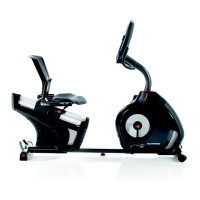
Schwinn Journey 2.0 Recumbent Bike - User Manual

Schwinn Journey 2.0 Recumbent Bike
44 pages
Print Icon
To Next Page IconTo Next Page
Loading...
ASSEMBLY MANUAL / OWNER’S MANUAL
Manual en Español Latino Americano:
http://www.schwinnfitness.com
270 /
230 /
430 /
470 /
2.5

Questions and Answers

  • C
    Carlos AguirreAug 17, 2025
    How to fix a Schwinn Exercise Bike that won't turn on?
    • M
      michaelhendersonAug 17, 2025
      If your Schwinn Exercise Bike is not turning on, has no display, or only a partial display, first ensure the unit is plugged into a functioning wall outlet. Check that the connection is secure and undamaged, and replace the adapter or connection if needed. Inspect the cable for any damage, replacing it if any wires are crimped or cut. Make sure the cable is connected securely and oriented properly. Look for any visual damage to the console display, and replace the console if it's cracked or damaged. If the console only has a partial display and all connections are fine, replace the console. If these steps don't work, contact Customer Care.
  • R
    Rachel HancockAug 20, 2025
    How to fix a Schwinn Exercise Bike that rocks?
    • Y
      Yolanda WebbAug 20, 2025
      To fix a Schwinn Exercise Bike that rocks or doesn't sit level, adjust the levelers until the machine is level. If the surface is extremely uneven, move the machine to a more level area.
  • C
    Catherine MichaelAug 22, 2025
    Why does the seat assembly on my Schwinn Exercise Bike shift or squeak?
    • L
      Lisa YoungAug 23, 2025
      If the seat assembly on your Schwinn Exercise Bike shifts or squeaks during use, check the hardware that attaches the seat assembly and fully tighten it.
  • A
    Angela JohnsonAug 26, 2025
    What to do if my Schwinn Journey 2.0 Recumbent Bike Exercise Bike console displays 'E2' error code?
    • M
      Maria NelsonAug 26, 2025
      If your Schwinn Exercise Bike console displays an 'E2' error code, ensure all wires in the cable are intact. Replace the cable if any wires are cut or crimped. Also, check that the cable is securely connected and properly oriented, making sure the small latch on the connector lines up and snaps into place. If the problem persists after these checks, contact Customer Care.
  • C
    Chad WalkerAug 28, 2025
    Why does my Schwinn Journey 2.0 Recumbent Bike console shut off while in use?
    • A
      Amy StuartAug 28, 2025
      If your Schwinn Exercise Bike console shuts off during use, ensure the unit is plugged into a functioning wall outlet and that the connection is secure and undamaged. Replace the adapter or connection if necessary. Check the cable for any cuts or crimps and replace it if damaged. Also, make sure the cable is securely connected and properly oriented. Try unplugging the unit for 3 minutes and then reconnecting it. Verify that the magnet is in place on the pulley and that the speed sensor is aligned with the magnet and connected to the data cable. Realign or replace the sensor if damaged.
  • L
    Laura RussellAug 30, 2025
    Why is my Schwinn Journey 2.0 Recumbent Bike showing 'Please Pedal' and no speed?
    • W
      Willie LewisAug 31, 2025
      If you're not getting a speed or RPM reading and the Schwinn Exercise Bike console displays 'Please Pedal', check that all wires in the cable are intact and replace the cable if any are cut or crimped. Ensure the cable is securely connected and properly oriented. Verify the magnet is in place on the pulley and the speed sensor is aligned with the magnet and connected to the data cable. Realign or replace the sensor if necessary.
  • M
    Madeline ReedSep 2, 2025
    What to do if the fan on my Schwinn Exercise Bike won't turn on or off?
    • E
      ehunterSep 3, 2025
      If the fan on your Schwinn Exercise Bike won't turn on or off, check that all wires in the cable are intact and replace the cable if any are cut or crimped. Make sure the cable is securely connected and properly oriented. Try unplugging the unit from the electrical outlet for 3 minutes, then reconnect it.
  • S
    stephen52Sep 5, 2025
    Why is the contact HR not displayed on my Schwinn Journey 2.0 Recumbent Bike Exercise Bike?
    • K
      kurt90Sep 5, 2025
      If the contact heart rate (HR) is not displayed on your Schwinn Exercise Bike, ensure the cable is securely connected to the console. Check that the cables from the handlebars and the cable to the console are secure and undamaged. Make sure your hands are centered on the HR sensors and kept still with equal pressure applied to each side. Using a conductive electrode cream may improve contact. If these steps don't work, the static handlebar should be replaced.
  • A
    adamyuSep 8, 2025
    What to do if the fan on my Schwinn Journey 2.0 Recumbent Bike Exercise Bike won't turn on?
    • J
      Joanna NguyenSep 8, 2025
      If the fan on your Schwinn Exercise Bike won't turn on but the console operates, unplug the unit from the electrical outlet for 5 minutes. Remove any material from the fan. If necessary, detach the console to help with removal. Replace the console if you are unable to remove the blockage.
  • T
    Tracy HarrisonSep 12, 2025
    Why is the telemetric HR not displayed on my Schwinn Journey 2.0 Recumbent Bike?
    • B
      brettjohnsonSep 12, 2025
      If the telemetric heart rate is not displayed on your Schwinn Exercise Bike, ensure the strap is 'POLAR®' compatible and uncoded. Make sure the strap is directly against the skin and the contact area is wet. Try moving the unit away from sources of interference like TVs or microwaves. If eliminating interference doesn't work, replace the strap. If the heart rate still doesn't function, replace the console.

Summary

Important Safety Instructions

Safety Warnings and Identification

Specifications and Setup

Specifications Overview

Details on machine dimensions, weight limits, and power requirements for the exercise bike.

Pre-Assembly Guidance

Guidance on selecting an assembly area and basic assembly tips for the exercise bike.

Parts Identification

Hardware and Tools

Assembly Instructions

Attach Stabilizers

Step-by-step guide for attaching the front and rear stabilizers to the main frame of the exercise bike.

Install Seat Frame and Pads

Connecting the seat frame assembly to the seat rail and attaching seat pads.

Attach Frame Cover and Seat Handle

Instructions for attaching the protective cover and the seat adjustment handle to the bike.

Connect Console and Pedals

Connecting console cables, mast, and attaching the pedals to the bike's crank arms.

Install Water Bottle Holder and AC Adapter

Procedure for mounting the water bottle holder and connecting the power adapter.

Final Inspection

A final check of the assembled machine to ensure all components are secure and properly installed.

Getting Started

Moving the Bike

Guidelines for safely moving the exercise bike, including lifting and positioning instructions.

Leveling the Bike

Instructions on how to adjust the bike's levelers to ensure stability and proper operation.

General Safety Precautions

Console and Features

Feature Identification

Diagram and list identifying key components and features of the Schwinn exercise bike.

Console Operation

Explanation of the console's display, buttons, and keypad functions for controlling workouts.

Display Data Explained

Description of the data shown on the console display, including Speed, Time, Distance, Level, RPM, Heart Rate, and Calories.

Heart Rate Monitoring

Using Heart Rate Sensors

Instructions on how to use the contact heart rate sensors and factors affecting signal detection.

Heart Rate Zone Guidance

A graph illustrating target heart rates for fat burning based on age.

Operating the Exercise Bike

Exercise and Adjustment Basics

Guidance on attire, exercise frequency, seat/pedal adjustments, and power modes.

Console Setup and User Profiles

Steps for initial setup, managing user profiles, and editing user data.

Workout Programs and Goals

How to select and execute various workout programs, including goal-oriented and fitness tests.

Workout Management

Pausing, Stopping, and Cool Down

Procedures for pausing, continuing, stopping a workout, and understanding the cool-down period.

Viewing Workout Statistics

Accessing and reviewing workout history, achievements, and personal records.

Online Connectivity

Console Setup Mode

Configuring Console Settings

Steps to set date, time, units, machine type, and sound settings.

Maintenance and Parts

Routine Maintenance Tasks

Daily, weekly, and monthly cleaning and inspection tasks for the exercise machine.

Maintenance Parts Identification

Diagram illustrating the various parts of the machine used for maintenance and repair.

Troubleshooting Guide

Display and HR Issues

Solutions for problems with the display, power, and heart rate sensor readings.

Operational and Mechanical Faults

Resolving issues with sensors, speed, fan, unit stability, and component noises.

Warranty Information

Warranty Coverage and Claims

Details on what is covered, warranty terms, and how to obtain service for defects.

Limitations and Legal Aspects

Information on what is not covered, limitations of remedies, and state law considerations.

Schwinn Journey 2.0 Recumbent Bike Specifications

General IconGeneral
BrandSchwinn
ModelJourney 2.0 Recumbent Bike
CategoryExercise Bike
LanguageEnglish

Related product manuals