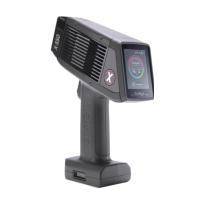
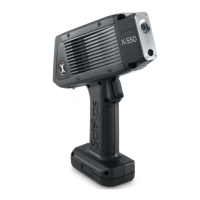
The SciAps X-550 and X-505 are handheld XRF (X-ray fluorescence) analyzers designed for elemental analysis. These devices are used to quickly and accurately identify the elemental composition of various materials, making them suitable for applications such as alloy identification, material verification, and quality control in industries like manufacturing, scrap metal recycling, and mining.
Function Description:
The core function of the SciAps X-550 and X-505 is to perform non-destructive elemental analysis using X-ray fluorescence technology. When a sample is placed in front of the analyzer's window and a test is initiated, the device emits X-rays that interact with the sample's atoms. This interaction causes the atoms to emit secondary X-rays (fluorescence) with characteristic energies unique to each element. The analyzer detects these fluorescent X-rays and processes the data to determine the elemental composition and concentration of the sample. The results are displayed in real-time on the device's screen, often providing a grade match score against a library of known alloy specifications.
Important Technical Specifications:
While specific technical specifications like X-ray tube power, detector type, and element detection range are not explicitly detailed in the provided QuickStart Guide, the manual highlights several operational aspects that imply certain technical capabilities:
- X-ray Radiation: The device produces X-ray radiation during operation, necessitating safety precautions.
- Real-time Analysis: Tests report findings in real-time, indicating fast data acquisition and processing capabilities.
- Calibration: The unit requires calibration, typically using a known standard (e.g., a 316 coupon), which is a standard practice for maintaining accuracy in XRF instruments. Calibration takes approximately 15 seconds.
- Data Storage: The X-550 uses an embedded SD card to store test results, allowing for a large volume of data to be saved.
- Connectivity: The SD card can be accessed by connecting the analyzer to a computer using a micro-USB cable, facilitating data transfer.
- Battery Operated: The device is battery-operated, with the battery integrated into the handle, suggesting portability and field use.
Usage Features:
The SciAps X-550 and X-505 are designed for user-friendly operation, featuring a touchscreen interface and intuitive workflow:
- Powering On/Off: The unit is turned on by pressing and holding the on/off button located on the top of the device for 2 seconds. To power off, users tap "Power off" on the screen after holding the button.
- Login System: The device features a login system with a factory-set administrator name ("admin") and passcode ("12345"), which can be changed by the administrator for security.
- Application Selection: After logging in, users can select from various installed applications (e.g., "Alloy," "Aluminum") depending on the type of analysis required.
- Calibration Process: If calibration is needed (e.g., first use of the day), the unit automatically prompts the user. The process involves placing a 316 coupon on the nose of the unit and tapping "CALIBRATE."
- Sample Analysis: To take a test, users align the sample with the analysis window and either tap "START" on the screen or squeeze and release the trigger on the handle.
- Real-time Results Display: During a test, results are updated in real-time, showing elemental concentrations and confidence levels.
- Grade Matching: Upon completion, the device displays the best alloy grade match, along with a grade match score (100 being a perfect match).
- Detailed Specifications: Users can tap on the "Specification" column to expand it and view the acceptable range for each detected element within the matched grade. Elements within specification are highlighted in green.
- Compare Results to Different Grades: The "Compare" icon allows users to view other potential grade matches and their scores. Tapping "Other..." reveals additional grades with lower scores. Users can tap on a listed grade to understand why it wasn't the best match (e.g., elements out of specification).
- Information about the Test: The "i" icon provides access to specific test information, including date and time, spectrum data, and other user-created details.
- Exporting Tests: From the Home Screen, users can tap "Results" to view a list of all tests. Options include filtering by date, individually selecting tests via a checkbox, and exporting data.
- Export Formats: Data can be exported in various formats, including PDF and EXCEL.
- Export Location: Users can change the export file name and location (default is
/storage/sdcard0/export/) and choose to overwrite existing files.
Maintenance Features:
The QuickStart Guide primarily focuses on operational aspects, but it implicitly touches on maintenance through:
- Calibration: Regular calibration is a key maintenance procedure to ensure the accuracy and reliability of the instrument.
- Data Management: The ability to export and manage test data stored on the SD card is crucial for record-keeping and analysis, which can be considered a form of data maintenance.
Safety Features:
A significant portion of the manual is dedicated to radiation safety, emphasizing that "Radiation Safety is up to you."
- X-Ray Warning: A prominent warning screen appears upon login, stating, "This device produces X-Ray radiation. Do not point at living things! X-Rays can cause serious harm to people and animals!" Users must tap "OK" to acknowledge this.
- X-Ray Emission: X-rays are only emitted when the X-550 is energized and actively testing, through the window in the nosecone. No X-rays are emitted when not actively testing.
- Invisible X-Rays: The manual explicitly states that X-rays are invisible to the human eye.
- Best Practices for Safe Operation:
- The trigger finger should be the body part closest to the analyzer window.
- Run tests with the XRF pointed away from other people.
- Pay attention to where the beam is pointed.
- Do not hold samples in your hand during testing.
- Maintain control of the analyzer at all times.
- Limit operation to trained personnel.
In summary, the SciAps X-550 and X-505 are robust, portable handheld XRF analyzers designed for efficient and accurate elemental analysis across various industrial applications, with a strong emphasis on user safety and ease of data management.

 Need help?
 General

 To Next Page