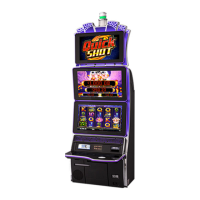
The TwinStar™ Slant (AH-1S227) is a gaming machine designed for casino environments, offering a blend of robust technical specifications, user-friendly operational features, and straightforward maintenance procedures. This document serves as an operator's instruction manual, detailing everything from installation to component replacement and routine tasks.
Function Description
The TwinStar™ Slant (AH-1S227) is an electronic gaming machine (EGM) that provides an interactive gaming experience. It is designed to be a standalone unit or part of a larger bank of machines, offering various game titles and features depending on the software version, jurisdiction, and specific machine configuration. The machine incorporates multiple display screens, a button deck, and bill acceptance/dispensing mechanisms to facilitate gameplay and transactions. Its primary function is to entertain players while adhering to strict regulatory and operational standards.
Important Technical Specifications
The TwinStar™ Slant cabinet is available in two configurations: with a topper and without a topper, each with slightly different electrical and physical specifications.
Electrical Specifications (120 VAC):
- Line Voltage: 120 VAC (also supports 240 VAC, with current values adjusted accordingly).
- Surge State Current: 1.5 Amps (with topper), 1.1 Amps (without topper).
- Operating State Current: 1.6 Amps (with topper), 1.4 Amps (without topper).
- Fuse Limited Rated Current: 6.3 Amps (for both configurations).
- Heat Generated (BTU/HR): 622 (with topper), 545 (without topper).
Physical Specifications:
- Weight (Un-crated including Flammable Weight): 164.66 kg (363 lbs) with topper, 153.77 kg (339 lbs) without topper.
- Flammable Weight: 29.71 kg (65.5 lbs) with topper, 27.22 kg (60 lbs) without topper.
- Dimensions (Width): 71.36 cm (28.09-in.) for both configurations.
- Dimensions (Depth): 73.32 cm (28.9-in.) for both configurations.
- Height (with topper): 218.44 cm (86.0 in.) overall, with the main cabinet being 201.93 cm (79.5 in.) and the upper monitor at 162.30 cm (63.9 in.). The topper itself adds 30.98 cm (12.2 in.) to the height, with a depth of 24.89 cm (9.8 in.).
- Height (without topper): 177.80 cm (70.0 in.) overall.
Operating Environment (Recommended):
- Temperature Range: 4-40 Degrees Celsius (39.2-104 Degrees Fahrenheit).
- Humidity (Maximum): 90%.
Internal Components:
- CPU: The machine utilizes a CPU-4.2.2.X (264020-E8870) which includes various display port video interfaces (Primary, Secondary, iDeck, Topper), Ethernet ports, USB ports, and VGA secondary output. It also features flash media sockets located behind a door.
- Power Backplane Board (PCA249016-0-0): This board manages power distribution to various components, including the MPU, monitors, coin mechanisms, and other peripherals. It features numerous connectors for different power lines and includes surge jumpers.
- Signal Backplane Board (PCA235204-0-0): This board handles signal routing for various inputs and outputs, including door switches, attendant switches, counters, tower lights, coin/hopper I/O, deck buttons, bill acceptor, card reader, and printer. It also includes a battery for memory retention.
- Lighting Control Unit (LCU) Board (PCA245961-0-0): The LCU board controls the machine's lighting, including super candle tower lights, cabinet side lights, Pro Topper lights, coin tray lights, and the Bally logo light. It features DIP switches for manually setting light colors and provides diagnostic light patterns to indicate various operational states or errors.
Usage Features
The TwinStar™ Slant is designed for ease of use by both players and operators.
- Modular Design: Components like the MPU, monitors, and various boards are designed for relatively straightforward removal and installation, facilitating maintenance and upgrades.
- Door Access: The machine features multiple access points, including the middle door, upper door, lower door, deck door, and a security panel, each secured with specific locks and mechanisms. Instructions are provided for safe opening and closing, emphasizing the use of handles and proper support for heavy doors.
- Lock and Cam Specification: A detailed table outlines the specific cam part numbers required for various locks, including the middle door, lower door (DROP), bill acceptor cash box, flash media module, and MPU housing. This ensures proper security and compliance.
- Operational Tasks: The manual covers routine operational tasks such as attendant pays and canceling credits (triggered by audit key switch), collecting bills from the machine (involving access to the bill acceptor cash box), and refilling printer paper (requiring access to the upper door and paper tray).
- Software Configuration: While specific software setup is detailed in a separate guide, the manual highlights the importance of configuring the machine's software after installation, including setting up the operating system.
- Environmental Protection: The product bears a WEEE recycling mark, indicating its compliance with European Commission Directive 2012/19/EU and promoting environmentally sound disposal and recycling practices.
Maintenance Features
Maintenance is a key aspect of the TwinStar™ Slant's design, with several features aimed at simplifying service and ensuring longevity.
- Unpacking and Inspection: The manual provides a detailed checklist for unpacking and inspecting the machine upon arrival, including verifying serial numbers, checking for shipping damage, and ensuring all internal connections are secure.
- Safety Precautions: Emphasized throughout the manual are critical safety measures, such as preventing electric shock (always remove power), preventing ESD, proper handling of heavy doors (enlist aid), and securing all equipment.
- Component Removal and Installation: Step-by-step instructions are provided for removing and installing key components:
- Upper Door/Monitor: Involves disconnecting cables, removing ground cables, and unfastening hinge screws. Caution is given regarding the weight of the door.
- MPU: Instructions detail how to unfasten the thumbscrew, pull the cover plate, and lift the MPU by its handle.
- Lock Management: Operators are advised to purchase spare machine locks in advance to avoid delays during installation or replacement.
- Cable Management: Instructions stress the importance of routing power and network cables carefully to prevent pinching, abrasion, or damage, especially during installation and when closing doors.
- Diagnostic Indicators: The LCU board features diagnostic light patterns (Table 11) and an LED indicator light (Table 12) that help identify various error conditions, such as disconnected devices, firmware errors, hardware issues, or loose connections. This allows for quick troubleshooting.
- Spare Parts Information: Chapter 4 provides a list of common spare parts, including the Universal Power Supply, iDeck™ Assembly, IMPU Assembly, Power Backplane Board, and Signal Backplane Board, along with recommended quantities for different numbers of machines (1-25, 26-99, 100+). This aids in inventory management and ensures timely repairs.
- Documentation Access: Revocation Bulletins, Service Manuals, and other documents are available online via a login portal, providing comprehensive support and information for operators. Contact information for regional technical support is also provided.

 Need help?
 General

 To Next Page