Page 8
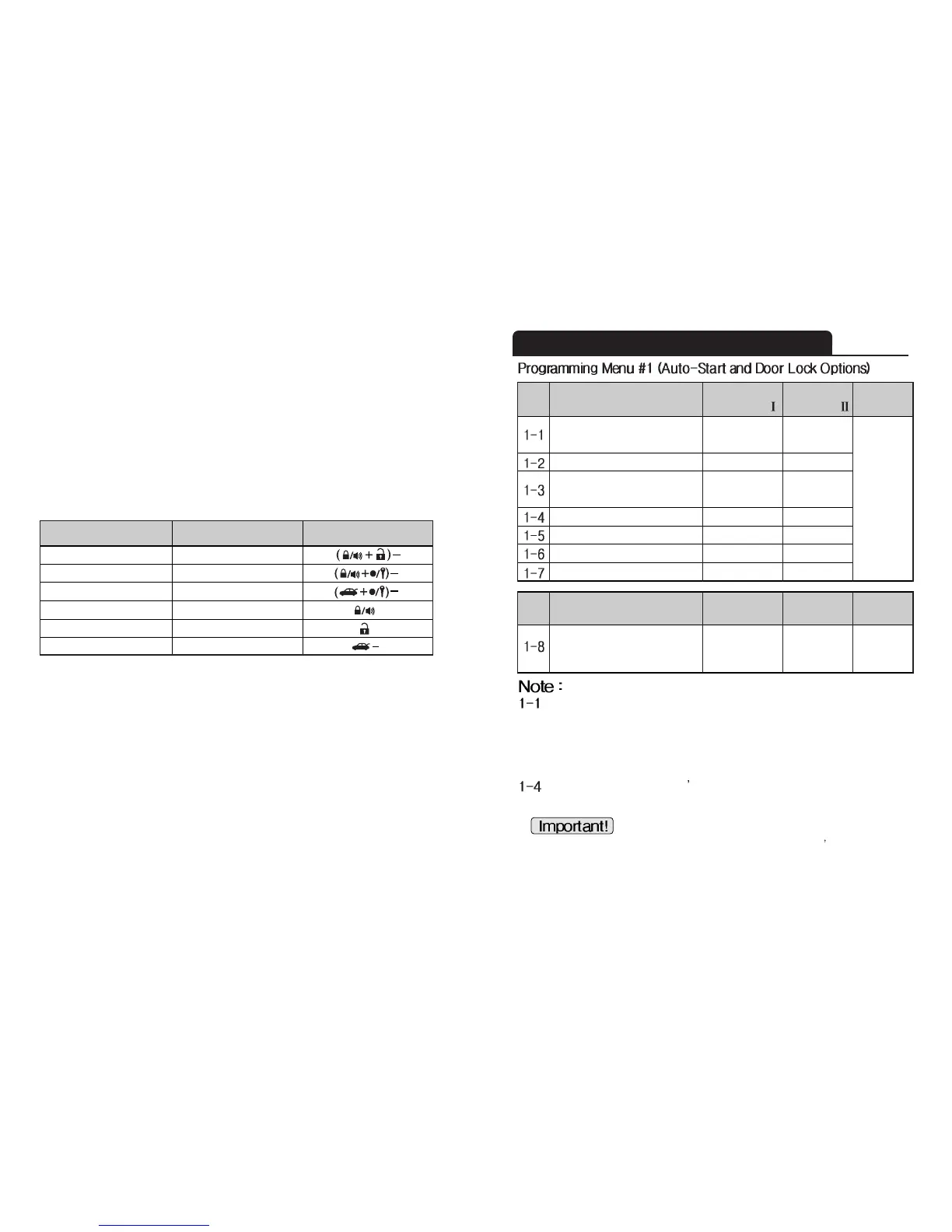
Remote-Pager Programming Menu Options
Some vehicles such as Mercedes-Benz and the Lexus ES300 require you to
unlock the car to disarm the factory alarm before remote starting the vehicle.
Activating this feature will unlock the vehicle for a brief second in order to
disarm the factory alarm before auto-starting the vehicle remotely then
lock after starting.
This feature unlocks the driver s side door lock with the first unlock pulse.
A second unlock pulse is need to unlock the rest of the car doors.
Page 9
In order for this feature to operate, the installer must use the
2
nd
Unlock Wire (Lt. Blue wire of Connector 4). Isolate the driver s door
actuator from the rest of the other doors. Call us for technical support if you
are not sure about this.
Feature
20 sec
Diesel Preheating Time
3~99 sec
Option
Programmer
(CM3 -Series)
OFF ON
Programming
Method
Feature
Unlock Before, Lock After Starting,
Lock after remote start
Door Lock / Unlock Pulse Duration
Min. Crank Time for the
Alternator Sensing
Driver’s Priority Unlock
Double Pulse Unlock
Dome Light Factory Rearm
Turbo
OFF
0.8 sec
0.8 sec
ON
2.5 sec
1.0 sec
Remote
controller
OFF
OFF
OFF
OFF
ON
ON
ON
ON
Factory Default
Setting - Button
Optional
Setting - Button
Programming
Method
3. Wait a few seconds, and the parking lights will flash the number of times
corresponding to the option number you are about to modify. If the number of times
the lights flash does not correspond with the option you want to change, wait a few
seconds and the siren/horn will sound, signaling that you have exited programming
mode. After the siren/horn sounds, you can retry the process from the beginning.
4. Immediately after the parking lights stop flashing from step 3, press:
a. The (lock) button for the factory default setting. The parking lights will flash once.
b. The (unlock) button for the optional setting. The parking lights will flash twice.
You will need to perform these steps for each option you would like to change.
Programming 4 Button Remote
ICON
(I+II)-
(I+IV)-
(IV)
( I )
( II )
( III )
Programming Menu 1
Programming Menu 2
Option Selection
Factory Setting
Optional Setting
Default Setting Selection









 To Next Page