Need help?
Do you have a question about the Scotsman CM3 and is the answer not in the manual?
Begin removal by detaching the front panel, harvesting any ice, and shutting off the unit.
Procedure for removing the evaporator cover to access internal components.
Instruction to pull the cube deflector out from under the evaporators.
Locate and push the bottom of the cascading shield back to release from tabs on eye holders.
Lift the shield off eye-holder tabs, then pull forward and down, out from under the evaporators.
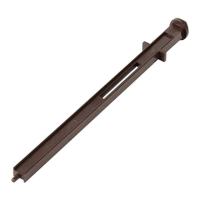
Unbundle photo-eye wires to create slack for easier removal of the sensors.
Pull the eye-holders from the left and right walls by engaging the tabs.
Release the module from the holder and gently clean lenses with a soft cloth and diluted scale remover.
Snap the module back into the holder and ensure the wire is clipped as shown.
Insert holders into the freezing compartment wall and attach the cascading shield onto its holder.
 General
| Type | Modular |
|---|---|
| Condenser Type | Air-cooled |
| Electrical | 115V, 60Hz, 1.5A |
| Refrigerant | R404A |
| Power Supply | 115V |


 To Next Page