EasyManua.ls Logo

Scotts TC70020S - User Manual

Scotts TC70020S
30 pages
Print Icon
To Next Page IconTo Next Page
Loading...
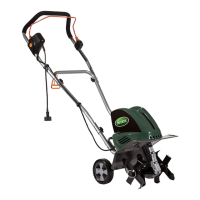
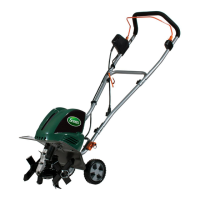
OWNERS MANUAL
CORDLESS 20 VOLT CULTIVATOR LITHIUM-ION BATTERY PACK
Copyright. All Rights Reserved.
Model TC70020S
Your cordless tiller has been engineered and manufactured to our high standard for dependability, ease of operation,
and operator safety. Properly cared for, it will give you years of rugged, trouble-free performance.
WARNING: To reduce the risk of injury, the user must read and understand the owners manual before
using this product.
Thank you for your purchase.
DO NOT RETURN THIS PRODUCT TO THE STORE. OPERATING,
ASSEMBLY, PARTS, SERVICE QUESTIONS? GO TO
SCOTTS.AMERICANLAWNMOWER.COM OR CALL 1-800-618-7474
BETWEEN 8:00 AM5:00 PM EST FOR ASSISTANCE.
SAVE THIS MANUAL FOR FUTURE REFERENCE
CA Compliant
Charger Included
(Model No.
CHL82000)
3189723
BATTERY MUST BE
CHARGED BEFORE FIRST
USE. TWO TO THREE INITIAL
CHARGING/ DISCHARGING
CYCLES MAY BE REQUIRED
TO ACHIEVE MAXIMUM RUN
TIME/CAPACITY.


Questions and Answers

  • P
    pjonesJul 29, 2025
    What to do if my Scotts TC70020S Tiller does not run?
    • A
      Amanda MolinaJul 30, 2025
      If your Scotts Tiller doesn't run, several factors could be at play. First, ensure the battery is fully inserted and making proper contact. Next, verify that the lock-off button is completely depressed before engaging the trigger. Also, double-check that the battery is correctly installed and adequately charged according to the charging requirements.
  • A
    Anthony BatesAug 5, 2025
    Why will my Scotts TC70020S battery not charge?
    • N
      Nichole HarrisonAug 5, 2025
      If your Scotts Tiller battery isn't charging, check these potential causes: 1. Make sure the battery is fully inserted into the charger until the red LED appears. 2. Confirm that the charger is plugged into a working outlet. 3. The surrounding air temperature might be too hot or too cold. Move the charger and tool to an environment with a temperature between 39°F (4°C) and 104°F (+40°C).
  • A
    Allison ParsonsAug 10, 2025
    How to fix abnormal noises in my Scotts TC70020S?
    • L
      lewisrebeccaAug 11, 2025
      If your Scotts Tiller is making abnormal noises, here's what you should do: First, switch off the tiller and wait for the tines to come to a complete stop. Then, check for and remove any jammed objects. Also, inspect all bolts, nuts, and other components to ensure they are tightened. If the noises persist after these steps, arrange for a repair.
  • S
    Stephanie ReidAug 17, 2025
    What to do if my Scotts Tiller has poor results?
    • B
      Billy CruzAug 17, 2025
      If your Scotts Tiller is producing poor results, consider these possibilities: The working depth might be too small, so adjust the working depth accordingly. Also, inspect the tines for wear and replace damaged or worn tines.
  • M
    montestiffanyAug 22, 2025
    Why is my Scotts Tiller vibrating abnormally?
    • K
      Kurt MccarthyAug 22, 2025
      Abnormal vibrations in your Scotts Tiller can stem from a couple of issues: Either the tines are damaged or worn, in which case you should replace them, or the working depth is too large, requiring an adjustment.

Summary

Important Safety Warnings

General Safety Precautions

Essential safety guidelines for operation, environment, personal protection, and maintenance.

Product Features and Specifications

Technical Specifications

Details of working width, depth, run time, weight, and voltage.

Assembly and Unpacking

Unpacking and Parts Verification

Instructions for unpacking the tiller and verifying all parts are present.

Handle Assembly Procedure

Steps for connecting the upper and lower handle sections securely.

Assembly Steps

Connecting Tilling Head and Handle

Steps to securely connect the tilling head to the lower handle.

Auxiliary Handle Attachment

Instructions for attaching the auxiliary handle to the tiller.

Battery Installation and Removal

Procedures for safely installing and removing the battery pack.

Operating Instructions

Tilling Patterns and Clearing Obstructions

Guidance on tilling patterns and how to clear lodged foreign objects.

Battery Charging and Care

Battery Charging Procedures

Instructions for safely charging the lithium-ion battery pack.

Battery Status Indicators

Explanation of LED lights for battery capacity and charging status.

Battery Disposal and Recycling

Guidelines for proper disposal and recycling of lithium-ion batteries.

Maintenance and Tine Replacement

Routine Maintenance and Cleaning

Procedures for cleaning and maintaining the tiller for optimal performance.

Tine Removal and Installation

Step-by-step guide for removing and installing tines.

Storage and Troubleshooting

Storage Recommendations

Guidance on storing the tiller/cultivator properly during off-seasons.

Common Problems and Solutions

Troubleshooting guide for common issues like unit not running or charging problems.

Replacement Parts Information

Details on ordering replacement parts, including model and item numbers.

Warranty Information

Limited Warranty Terms

Details of the 3-year limited warranty and coverage exclusions.

Warranty Limitations and Claims

Additional limitations on warranty and procedures for making a claim.

Scotts TC70020S Specifications

General IconGeneral
Engine Displacement208 cc
Tilling Width20 inches
Number of Tines4
Forward Rotating TinesYes
Reverse Rotating TinesYes
Tilling Depth8 inches
Warranty2 years limited

Related product manuals