10
SETTING THE TIME
A ash every 2 seconds indicates a time disruption following a power cut.
This ash is reversed (light goes out briey every 2 seconds) when the LED
is on during the heating cycle.
The time can only be set to certain hours: 12:00, 17:00 or 20:00.
1- Select frost protection mode.
2- Select programme P1 if it is 12:00, or programme P2 if it is 17:00, or Pro-
gramme P3 if it is 20:00.
3- Briey disconnect the appliance from the mains supply.
4- Select the desired program and set the setpoint temperature.
Tip : the oset of the time setting osets all of the programme times (for
example, setting the time to 13:00 instead of 12:00 delays the programme
times by 1 hour).
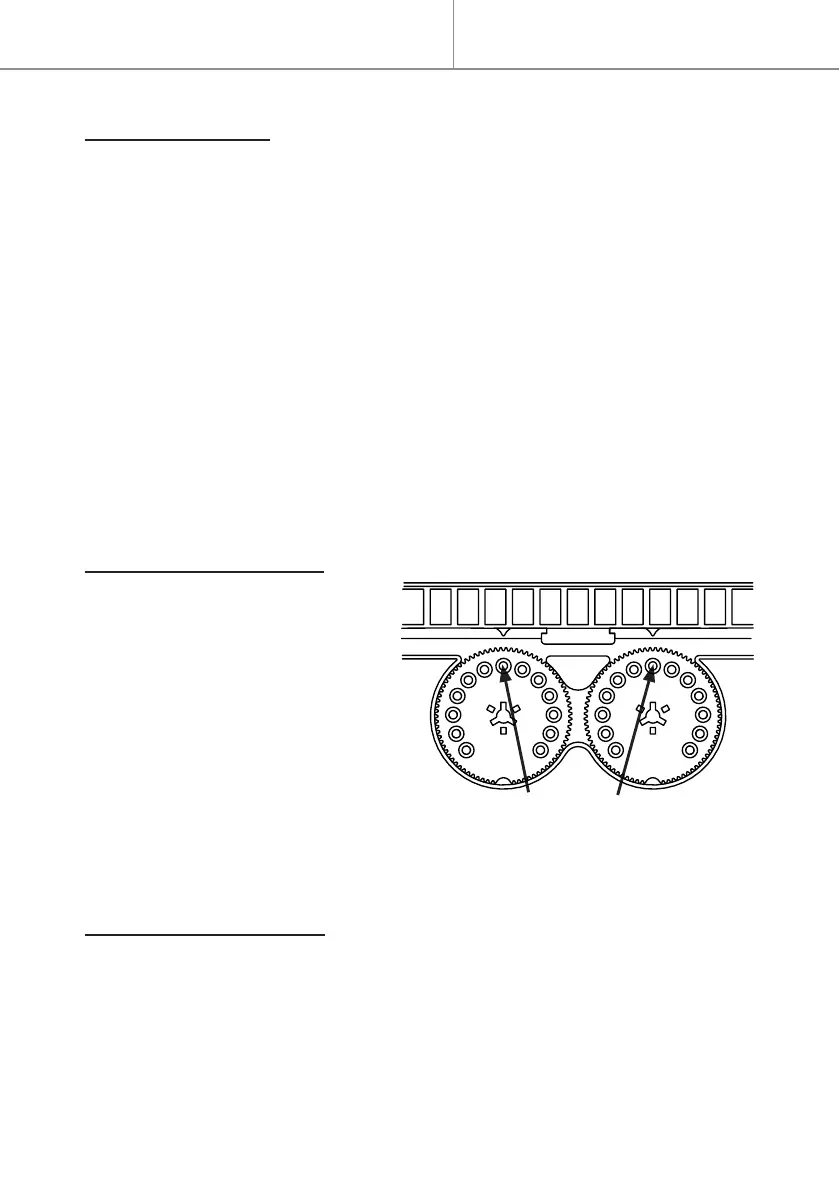
LOCKING THE BUTTONS
- The position of the button
can be locked by screwing a
small screw (12 mm long) into
the hole opposite the position
marker.
- The rotation of the button can
be limited by screwing one or
two small screws (12 mm long)
into one or two dierent holes
(apart from the hole opposite
the position marker that locks the button).
PRECAUTIONS FOR USE
- There is no point setting the temperature to the maximum as the room tem-
perature will not reach that level.
- Wait several hours for the room temperature to stabilise before adjusting
the temperature setting.
- Switch the appliance o when you air the room.
Hole for locking the button
Quick start


 To Next Page