11
Trouble shooting
Trouble shooting
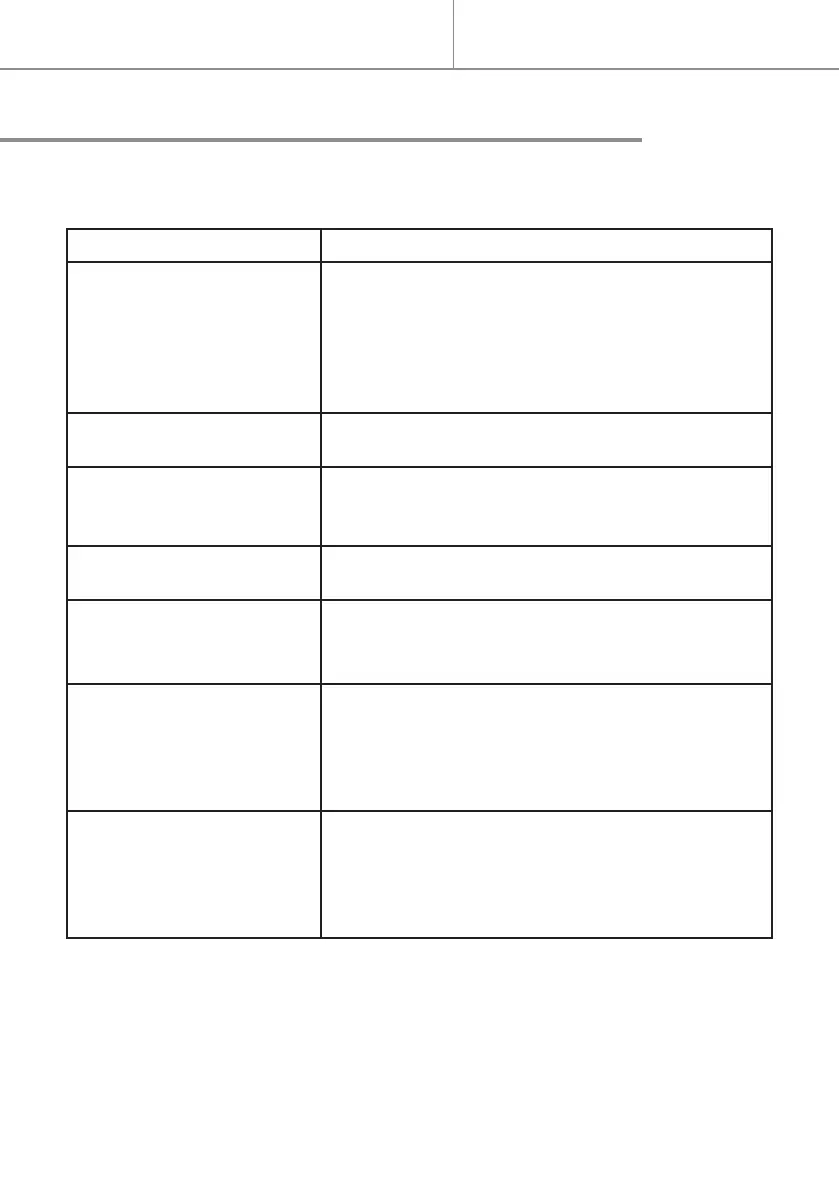
Problem Solutions
- The device does not heat. - Check that the electrical system’s circuit break-
ers are at I or ON.
- Select COMFORT mode.
- Increase the temperature setting.
- Switch o the appliance for a few minutes to re-
set the thermal circuit breaker.
- The appliance stays in
heat mode.
- Reduce the temperature setting.
- Check that there are no air currents nearby.
- The light switches o and
on again every minute
and a half.
- It is the normal operation of the thermostat that
allows an accurate room temperature setting.
- The light ashes rapidly
and continuously.
- Faulty temperature sensor (this fault prevents
the appliance from switching on).
- The light ashes every
2 seconds (or goes out
briey every 2 seconds).
The time is out of alignment.
- Set the time.
- Programmes P1, P2 and
P3 do not work.
Outside of the programmed time ranges, the ap-
pliance does not switch o but goes into Eco
mode.
- Reduce the temperature setting.
- Set the time.
- The appliance gives o a
smell.
This can happen the rst time the appliance is
used or if it has remained unused for a pro-
longed period of time. The smell should disap-
pear quickly.
- Clean the vents underneath the appliance.
IMPORTANT : If the problem persists, disconnect the power supply for 15
seconds then check its operation.


 To Next Page