SECURITY DOOR CONTROLS
www.sdcsecurity.com service@sdcsecurity.com
[t] 800.413.8783 805.494.0622 [f] 805.494.8861
801 Avenida Acaso, Camarillo CA 93012 • PO Box 3670, Camarillo CA 93011-3670
SECURITY DOOR CONTROLS
sdcsecurity.com service@sdcsecurity.com
© 2010 Security Door Controls Printed in the U.S.A. LIT-EZ Option Kit Upgrades 12.10
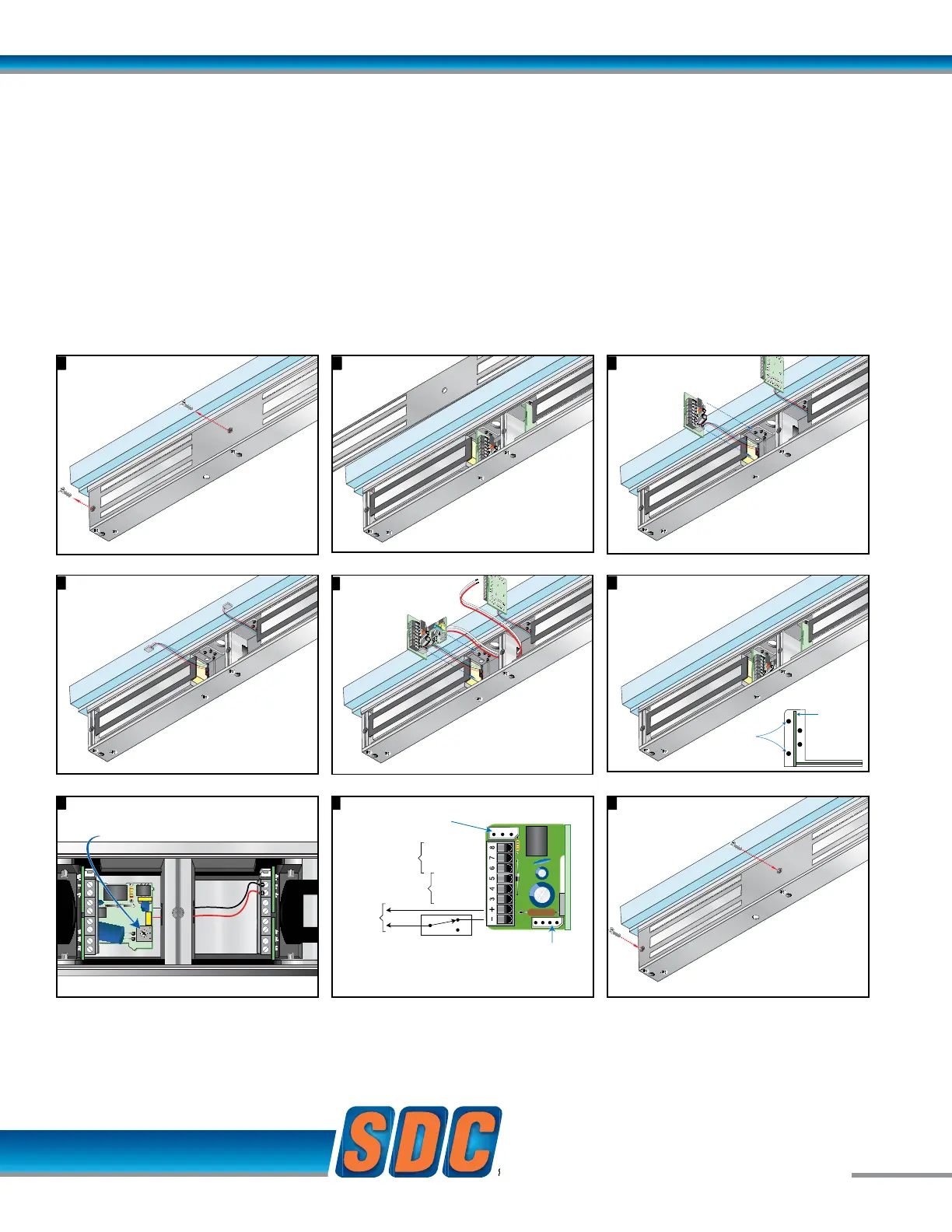
Remove cover plate screws
1
Attach magnetic core
wire connector to
timer module
Connect
output wires
of timermodule
to input terminals
1 and 2 of standards
input module.
5
Remove cover plate
2
6
Position timer modules
between posts
Adjustable 1 - 30 Seconds
Typical factory setting approximately 5 seconds
Turn clockwise to increase time
Cradle
Position Posts
PC Board
9 Attach cover plate
T - Timer input
module
EZ-T-10 TIMER INPUT MODULE
Modular Kit
Remove cover plate screws
Attach magnetic core
w
ire connector to
timer module
Connect
output wires
of timermodule
to input terminals
1 and 2 of standards
input module.
Remove cover plate
2
6
Carefully lift input
modules from case
3
7
Position timer modules
between posts
Adjustable 1 - 30 Seconds
Typical factory setting approximately 5 seconds
Turn clockwise to increase time
Cradle
Position Posts
PC Board
D2
Standard
input module
Remove cover plate
2
6
Carefully lift input
modules from case
3
7
Position timer modules
between posts
Adjustable 1 - 30 Seconds
Typical factory setting approximately 5 seconds
Turn clockwise to increase time
Cradle
Position Posts
PC Board
D2
Standard
input module
Disconnect magnetic
cord wires and remove
input module
4
T - Timer module wiring8
B Option
Connector
B Option
Magnetic Bond Sensor
D Option
Door Status Sensor
Magnetic Core
Connector
12 or 24 VDC
LOCKED - NO
COM
UNLOCKED - NC
CLOSED - NO
COM
OPEN - NC
Access and Egress Control
Momentary
N.C. Dry Contact
Contact actuation unlocks
door for 1 - 30 seconds
Remove cover plate screws
1
Attach magnetic core
wire connector to
timer module
Connect
output wires
of timermodule
to input terminals
1 and 2 of standards
input module.
5
Remove cover plate
2
6
Position timer modules
between posts
Adjustable 1 - 30 Seconds
Typical factory setting approximately 5 seconds
Turn clockwise to increase time
Cradle
Position Posts
PC Board
9 Attach cover plate
T - Timer input
module
Remove cover plate screws
1
Attach magnetic core
wire connector to
timer module
Connect
output wires
of timermodule
to input terminals
1 and 2 of standards
input module.
5
Remove cover plate
2
6
Position timer modules
between posts
Adjustable 1 - 30 Seconds
Typical factory setting approximately 5 seconds
Turn clockwise to increase time
Cradle
Position Posts
PC Board
9 Attach cover plate
T - Timer input
module
Carefully lift input
modules from case
3
7
Disconnect magnetic
cord wires and remove
input module
4
T - Timer module wiring8
Position timer modules
between posts
Adjustable 1 - 30 Seconds
Typical factory setting approximately 5 seconds
Turn clockwise to increase time
D2
B Option
Connector
B Option
Magnetic Bond Sensor
D Option
Door Status Sensor
Magnetic Core
Connector
12 or 24 VDC
LOCKED - NO
COM
UNLOCKED - NC
CLOSED - NO
COM
OPEN - NC
Access and Egress Control
Momentary
N.C. Dry Contact
Contact actuation unlocks
door for 1 - 30 seconds
Standard
input module
Disconnect magnetic
cord wires and remove
input module
4
T - Timer module wiring8
Position timer modules
between posts
Adjustable 1 - 30 Seconds
Typical factory setting approximately 5 seconds
Turn clockwise to increase time
B Option
Connector
B Option
Magnetic Bond Sensor
D Option
Door Status Sensor
Magnetic Core
Connector
12 or 24 VDC
LOCKED - NO
COM
UNLOCKED - NC
CLOSED - NO
COM
OPEN - NC
Access and Egress Control
Momentary
N.C. Dry Contact
Contact actuation unlocks
door for 1 - 30 seconds
Remove cover plate screws
1
Attach magnetic core
wire connector to
timer module
Connect
output wires
of timermodule
to input terminals
1 and 2 of standards
input module.
5
9 Attach cover plate
T - Timer input
module
Relock Delay Timer, Adjustable 1 to 30 Seconds. 1 only required for double EMLock®.
Application: The Timer Input Module delays relocking of access controlled doors to provide persons ample time needed
for entry or egress. Momentary interruption of power to the lock input activates the timer module.
Momentary, N.C. Dry Contact required. Contact actuation unlocks the door for 1 – 30 seconds.
Only 1 timer module is required for double Emlocks®.
1 only required



 To Next Page
 Loading...