5. Operation Controls and Functions
Number Name Function description
CH 1 CH 2 CH 3 CH 4 MODE RESO
SERVICE
DC 1 2V
INPUT
IN 3 IN 4IN 2IN 1
HDMI VGA AUDIO
OUTPUT
1
2
3
4
5 6
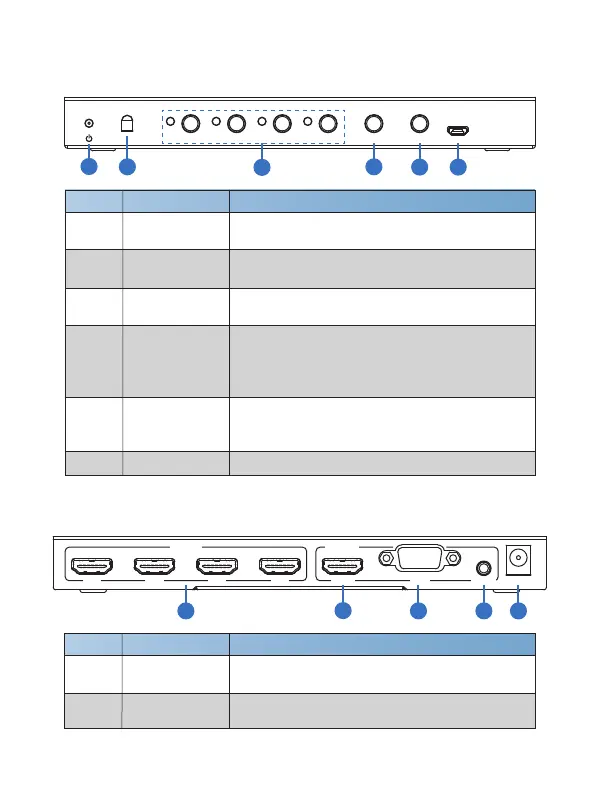
1 POWER LED
The LED will illuminate green when the unit is
working, red when the unit is in standby mode.
2 IR
IR receiver window. It accepts the remote control
signal of this device only.
3
CH1/CH2/CH3/
CH4 button
Selects input channel button (Please see “6. Display
Modes” detail description).
4 MODE button
Press this button to cyclical selection display mode
output (Please see “6. Display Modes” detail
description). Press this button up to 5s, the output
screen is full screen and equal proportion display.
5 RESO
Cycling select different output resolution.
Press this button up to 5s to opening or closing
window display frame.
6 SERVICE port Fireware update used. (Manufacture use only.)
5.1 Front Panel
5.2 Rear Panel
1
2
3 4 5
Number Name Function description
1 HDMI INPUT
Connect to HDMI source device such as DVD
player or PS4 with a HDMI cable.
2 HDMI OUTPUT
Connect to HDMI display device such as TV or
projector with a HDMI cable.
3/6
Website: www.seada.co.uk E-mail: sales@seada.co.uk



 To Next Page