
 Need help?
Do you have a question about the Seagate BlackArmor NAS 110 and is the answer not in the manual?
Overview of Seagate BlackArmor Backup as an integrated software suite for PC security and data destruction.
Highlights key benefits of Seagate BlackArmor Backup, including one-click protection and ease of use.
Details hardware requirements and operating systems supported by Seagate BlackArmor Backup.
Lists the essential hardware specifications needed to run Seagate BlackArmor Backup.
Specifies the operating systems tested and supported for Seagate BlackArmor Backup.
Lists the file systems compatible with Seagate BlackArmor Backup operations.
Explains the licensing terms and limitations for Seagate BlackArmor Backup.
Provides information on how to obtain free technical support for registered users.
Step-by-step guide for installing the Seagate BlackArmor Backup software.
Instructions on how to save the Seagate BlackArmor Backup setup file for later use.
Details on how to launch the Seagate BlackArmor Backup program.
Guide on how to uninstall Seagate BlackArmor Backup from the system.
Explains the distinction between file-level backups and sector-by-sector disk imaging.
Describes the different types of backup methods available for data protection.
Information on the dedicated secure partition for storing backup archives.
Introduces the Try&Decide feature for safe testing of software and system changes.
Overview of utilities for secure data destruction and system privacy.
Details on using the Zip archive format for backups and its limitations.
Explains the One-Click Protection feature for immediate system backup upon installation.
Describes the main program window and its interface elements for accessing functionality.
Guide on choosing which data (files, partitions, system state) to include in backups.
Detailed steps for creating a backup task, including selecting data and options.
Choosing specific disks, partitions, files, or application settings for backup.
Specifying the destination path and filename for the backup archive.
Setting up automatic backup tasks based on various time or event triggers.
Choosing between full, incremental, or differential backup policies.
Configuring filters to exclude specific files or folders from the backup process.
Configuring advanced backup settings like file-splitting and compression.
Defining rules for managing backup archives to save storage space.
Customizing backup tasks with specific options for enhanced control.
Securing backup archives using passwords and encryption for data confidentiality.
Adjusting backup priority, HDD writing, and network speed for optimal performance.
Configuring how the software handles errors, such as bad sectors during backup.
Setting up automatic creation of backup reserve copies in various formats.
Options for creating secondary copies of your backups for added data safety.
Guidance on selecting the appropriate method for restoring data.
Procedure for restoring individual files and folders from backup archives.
Steps for restoring entire disks, partitions, or specific files from disk images.
Selecting the specific backup archive to use for the restoration process.
Choosing whether to restore whole disks/partitions or selected files/folders.
Choosing the destination disk or partition where the backup data will be restored.
Configuring advanced settings for the restoration process, like priority and file handling.
Defining rules for handling existing files when restoring backup data.
Detailed instructions on how to activate and utilize the Try&Decide feature.
Practical examples illustrating the benefits and applications of the Try&Decide feature.
Guide on setting up automated backup or validation tasks.
Configuring a task to run a single time at a specified date and time.
Scheduling tasks to trigger based on system events like startup or user logon.
Configuring tasks to run on a daily basis, including frequency and specific days.
How to view, edit, delete, or rename existing scheduled tasks.
Step-by-step process for creating a secure partition for backups.
Instructions on how to adjust the size of the BlackArmor Backup Secure Zone.
Procedure for modifying or setting a password for the secure zone.
Guide on how to remove the BlackArmor Backup Secure Zone and reclaim space.
Checking the integrity and completeness of backup archives.
Setting up email or WinPopup notifications for backup and restore operations.
How to access and interpret logs of program operations and scheduled tasks.
Managing backup archives by combining or deleting older backups.
Procedure for safely deleting obsolete backup archives.
Finding specific files or archives using search criteria within backup data.
Enabling search engine integration for indexing and finding files within backup archives.
Accessing backup image contents as a virtual disk for file exploration.
Procedure for disconnecting a mounted virtual disk.
Overview of transferring operating system and data to a new, larger hard disk.
The process of cloning a disk, including selecting modes and parameters.
Choosing between automated or manual disk cloning methods.
Identifying the original disk from which data will be copied.
Choosing the target disk for receiving the cloned data.
Defining how partitions are transferred, including size distribution.
Detailed steps for manually resizing and relocating partitions during cloning.
Reviewing the cloning plan before execution and handling system reboots.
Identifying the newly added hard disk for configuration.
Steps for creating and configuring new partitions on a hard disk.
Permanently destroying selected files and folders using the File Shredder utility.
Securely erasing data from hard disks and partitions using various methods.
Guidance on creating personalized data destruction methods for specific security needs.
Removing traces of user activity and temporary files from the system.
Customizing the System Clean-up process by configuring component settings.
Selecting the method for data destruction for cleanup components.
Defining file names or patterns for the System Clean-up process.
Configuring cleanup of registry entries related to network computer searches.
Specifying which drives to clean up free space on during system cleanup.
Defining commands to remove from the Windows Run List during cleanup.
Filtering network places to manage stored network user credentials.
Performing cleanup on individual system components separately.
Explanation of hard disk partitioning concepts and processes.
Overview of common file systems used by operating systems.
Description of the FAT16 file system and its characteristics.
Details on the NTFS file system, its structure, and features.
Instructions for installing hard disk drives into a computer system.
General steps for physically installing an IDE hard disk drive.
Setting up hard disk drive configuration using jumpers (master/slave).
Introduction to BIOS and its role in computer initialization and hardware configuration.
How to access and use the BIOS setup utility for system configuration.
Configuring the boot order and advanced CMOS settings.
Troubleshooting common errors related to hard disk initialization.
Guide for installing a SATA hard drive, including connection and configuration steps.
Explanation of the physical principles behind guaranteed data wiping.
Description of the data destruction algorithms implemented in Seagate BlackArmor Backup.
 General
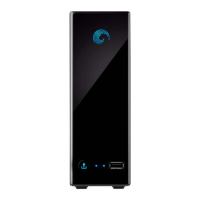
| Model | BlackArmor NAS 110 |
|---|---|
| Interface | Gigabit Ethernet |
| Drive Bays | 1 |
| Power Supply | External power adapter |
| Cooling | Fanless |
| Category | NAS |
| Operating System Compatibility | Windows, Mac |
| Capacity | 2 TB |
| Weight | 1.5 lbs |








 To Next Page
