20 Barracuda ATA IV Family Product Manual, Rev. B
2.2 Jumper settings
2.2.1 Master/slave configuration
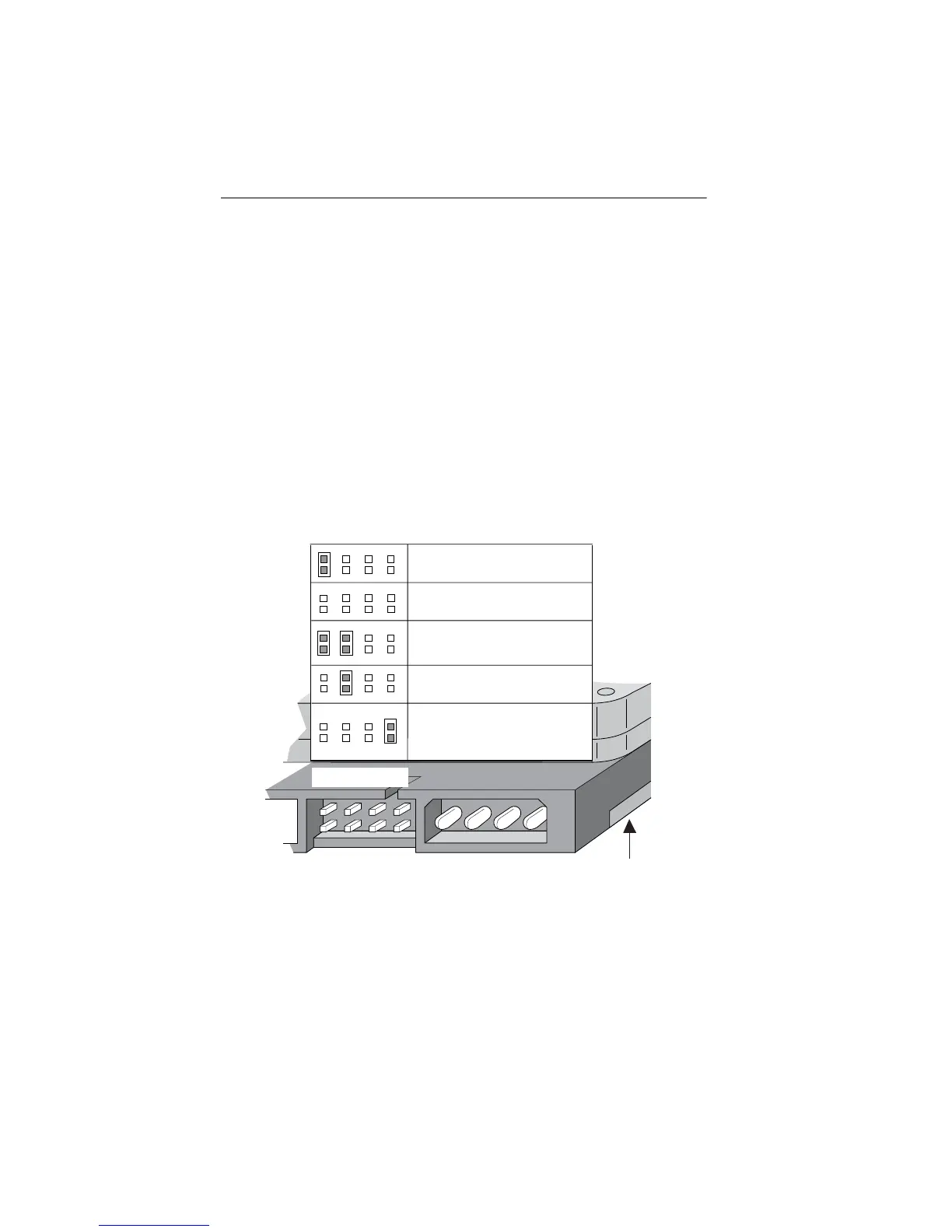
The options jumper block shown in Figure 2 is used to configure the drive
for operation. It is the 8-pin dual header between the interface connector
and the power connector. Use the following settings to configure the
drive as a master or a slave.
Master or single drive
. The drive is configured at the factory for a master
or single-drive operation with a jumper set on pins 7 and 8.
Drive as slave
. Remove all jumpers.
Drive as master with a non-ATA-compatible slave
.
Use this jumper setting
only
if the drive does not work as a master with
no jumpers installed.
Figure 2. Master/slave jumper settings
Options jumper block
Circuit Board
2
684
1753
Drive is slave
Master or single drive
Cable select
Master with non ATA-
compatible slave
Limit drive capacity
to 32 Gbytes





 To Next Page