SEAGATE LAPTOP ULTRATHIN HDD SATA PRODUCT MANUAL, REV. C 15
3.3 DRIVE MOUNTING
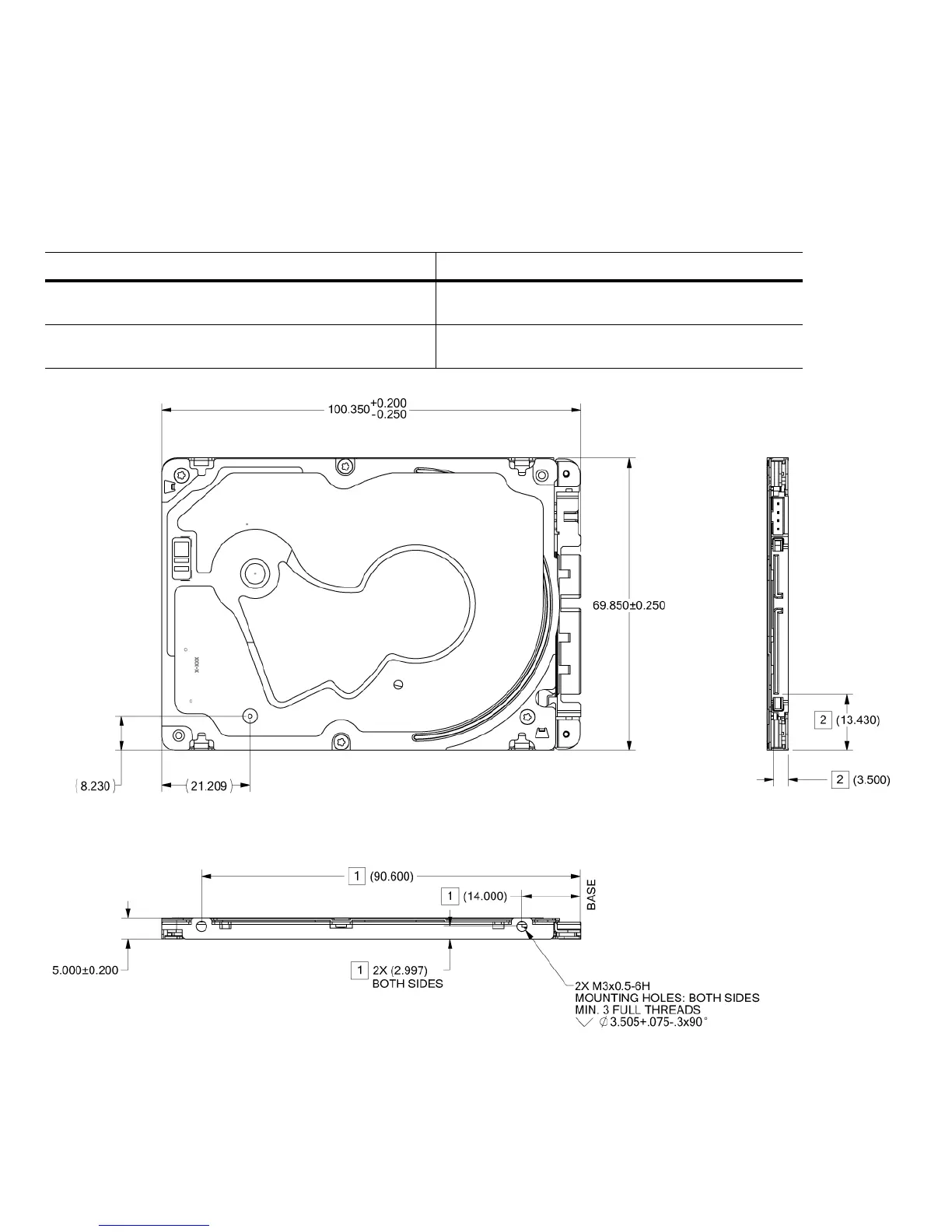
Mount the drive in any orientation using four screws in the side-mounting holes or four screws in the bottom-mounting holes. Refer to
Figure 3 for drive mounting dimensions. Follow these important mounting precautions when mounting the drive:
Allow a minimum clearance of 0.030 in (0.76 mm) around the entire perimeter of the drive for cooling.
Use only M3 x 0.5 mounting screws.
Do not overtighten the mounting screws. Maximum torque: 4.0 in-lb (0.4519 N-m).
Three (3) threads (0.080 in, 2.032 mm) minimum screw engagement recommended.
Avoid excessive drive distortion when mounting. Refer to the following specifications for stiffness/deflection information:
Figure 3 Mounting Dimensions (for standard models)
Top cover stiffness/deflection
Operating: no performance degradation, emitted noise,
mechanical damage, or hard errors
10 mm probe: 1.02kgf or
5 mm probe: 0.92kgf
Non-operating: no hard errors 20 mm probe: 2.0kgf at any point of top cover
20 mm probe: 15.0kgf at top cover edges only



 To Next Page