2XLANKRØ@MCØSGDHQØLD@MHMF
#HROK@XØRBQDDM #DRBQHOSHNM
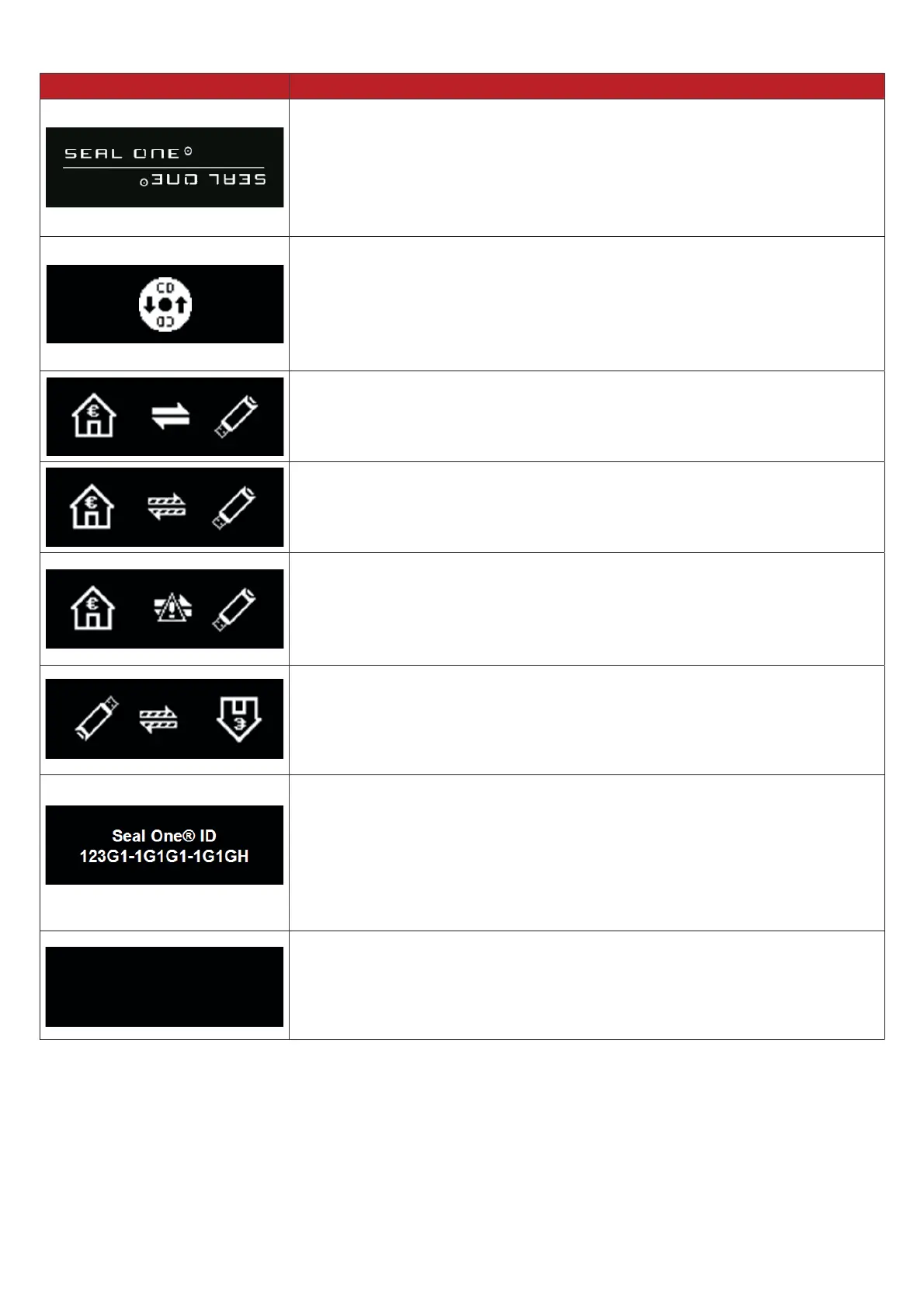
If the device logo remains permanently on the display during the start-
up process, the USB port of your PC / Laptop may be disturbed or
blocked. In this case, use the supplied USB cable or use another USB
port of your PC / laptop. If the Seal One device is used inside a compa-
ny, please contact your administrator. He is able to unlock the Seal One
device based on the USB Vendor/Product ID.
Seal One device is connected via USB but cannot communicate with the
3&ODSWRS$SRVVLEOHFDXVHLVWKDWWKH6HDO2QHDSSOLFDWLRQKDVQRW
been started. Start the Seal One application (Note: There is no physical
CD required to start the application, a virtual CD drive is provided auto-
matically). For details see chapter 3.1.1 / 3.2.1.
$OZD\VXVHWKHRULJLQDOFDEOHVXSSOLHGE\6HDO2QH
The connection between Seal One device and the internet is beeing
established.
Hint: The arrows are blinking.
Seal One device is connected to the internet and ready to use.
Hint: The animation of the arrows is moving.
There is no connection between the Seal One device and the internet.
Please check if the PC / laptop has an active connection to the internet.
0D\EHWKHLQWHUQHWFRQQHFWLRQLVEORFNHGE\DÛUHZDOO$OORZDOOLQFRPLQJ
and outgoing Seal One connections.
Hint: The warning sign is blinking.
You can change the display orientation.
Details can be found in chapter 3.1.3 / 3.2.3.
The Seal One ID is needed to enroll with an acceptance partner. It will
VKRZZKHQ\RXSUHVVDQGKROGWKHq2.qEXWWRQIRUDWOHDVW
VHFRQGV$VVRRQDV\RXU6HDO2QHGHYLFHLVVXFFHVVIXOO\UHJLVWHUHGLW
changes to the mode „ready to use“.
Note: In case you want to discontinue displaying the Seal One ID
without enrolling with a partner, push the button for at least 3 seconds
once more.
Seal One device sets itself into an energy saving mode after few minu-
WHVLQRUGHUWRLQFUHDVHLWVRSHUDWLQJOLIHWLPH$VVRRQDVDWUDQVDFWLRQ
arrives in this state, the energy saving mode is discontinued automati-
cally and the arriving transaction is displayed.
)RUIXUWKHUHQTXLULHVHJGLIÛFXOWLHVH[SHULHQFHGGXHWRVSHFLDOLQGLYLGXDO3&ODSWRSVHWWLQJVSOHDVH
refer to: www.seal-one.com/service


 To Next Page
 Loading...